The sounds of a digital musical composition filled the Music Technology Studio in the Taylor Music Center. As students absorbed the 90-second track, Chris Chandler encouraged them to listen carefully to what they heard. He wanted them to identify the attributes or characteristics of the student-created piece. Students dissect a composition in a music technology course, listening for sound, harmony, melody, rhythm and growth. Building on the strengths of the College’s liberal arts and engineering programs, Union now offers a minor in music technology. “Think about sound, harmony, melody, rhythm and growth,” said Chandler, assistant professor of music. “How do those various elements change in different sections of the piece? You can see where layers are added or taken away. What are some qualities that define those different sections?” An accomplished composer, Chandler introduced Music Technology 1: Transforming Sound, Making Music, to the Department of Music’s curriculum in 2019. That was followed by another course, Music Technology 2: Recording, Mixing and Synthesizing Sound. Those two courses are integral to a new program at Union. Building on the strengths of the College’s liberal arts and engineering programs, Union now offers a minor in music technology. Approved by a faculty vote last spring, the minor consists of six courses drawn from the departments of Music, Engineering, Computer Science and Visual Arts. Open to students from all majors, the program will engage students with analog and digital technologies, and fundamental concepts through creative expression and scientific inquiry Chris Chandler, assistant professor of music, teaching Music Technology 1: Transforming Sound, Making Music. Beginning this fall, Union now offers a minor in music technology. The minor consists of six courses drawn from the departments of Music, Engineering, Computer Science and Visual Arts. “I have had several engineering students in my music tech classes, and it’s been very rewarding to see their eyes light up when I talk about creative and artistic applications for concepts they have also encountered in their engineering courses,” said Chandler. He will oversee the new program, which was developed in consultation with Jennifer Milioto Matsue and Tim Olsen from the Department of Music, and Shane Cotter, Luke Dosiek and Cherrice Traver from the Department of Electrical, Computer and Biomedical Engineering. While music technology programs are not uncommon among larger colleges and universities, few liberal arts institutions, particularly those with engineering such as Union, offer the option. “One of the things that attracted me to Union was the strong engineering program and the potential for interdisciplinary collaborations,” said Chandler. “There is a significant amount of shared content, particularly between Music Tech, Electrical Engineering and Computer Science. The minor is a perfect fit for a place like Union. It meets the needs of both music-interested students in engineering and technology-interested students in music.” Students who choose to minor in music technology will be required to take three core courses. In addition to Music Technology 1 and Music Technology 2, this includes Introduction to Audio Electronics, which was developed by the Department of Electrical, Computer and Biomedical Engineering. Students will also select three electives from two categories, music and technology, which include courses from several departments on campus. “The flexibility of this minor allows students to make the most of Union’s liberal arts core and find connections across different fields of study intersecting with music and technology,” said Chandler. Chandler plans to develop additional courses that will count as electives. These include Introduction to Film Scoring, which will blend music technology and music theory with an emphasis on composing music for visual media, and Music Technology Workshop, centered on approaches to performing music with technology, such as synthesizers and hardware controllers. He also plans to develop Music Technology 3, a special topics course focused on modular synthesis and algorithmic approaches to digital music-making. Enrollment in Chandler’s Music Technology 1 class this term is capped at 16 students. Majors represented include economics, computer science, psychology, political science, biology and biomedical engineering. Abby Mitty ’23, an Interdepartmental major (ID) in psychology and Spanish from Boston, has been playing guitar and writing her own music for the past seven years. The music technology class has taught her how to use music production software. “I mostly write acoustic music, but I have learned how to use digital instruments, which has allowed me to add a number of different features to my own music,” said Mitty. Upon graduation, she plans to go into organizational psychology while continuing to pursue her passion for music. “I hope to take my music further and learn how to produce my own music,” said Mitty. “I haven’t done anything with my music yet, but this class has inspired me to keep working on it and share it eventually.” The introduction of a minor in music technology comes at a time when the Music Technology Studio is slated for a major renovation this winter. A gift from Kurt W. Hillig ’75 and his wife, Kathy J. Dien Hillig, will transform the layout of the space by upgrading the studio’s equipment, including new computers, workstations, audio interfaces and microphones. For more information on the music technology minor at Union, visit the website.
A former Birmingham Water Works employee released an audio recording of herself warning general manager Michael Johnson of potential billing issues in December. In the recording obtained by WBRC, the former employee, who wished to remain anonymous, warned Johnson that he would find the number of water meter readings the Water Works had an accurate reading on “startling.” Johnson replied, “Yeah, I know.” Earlier this year, thousands of customers reportedly didn’t receive bills for months at a time. Later, they received much larger or multiple bills all at once. The bills were also not based on accurate meter readings but estimations based on previous months. Birmingham Water Works blamed the issues on a lack of meter readers and insufficient staffing. The issues have drawn the attention of public figures on both sides of the aisle, including Birmingham Mayor Randall Woodfin, a Democrat, and State Sen. Jabo Waggoner (R-Vestavia Hills). Despite the uproar, the Birmingham Water Works Board (BWWB) may be raising rates again in 2023 by an average of 8.3% to fund a $128 million budget, part of which will be used to fund two new public relations (PR) positions. The BWWB charges its customers based on a tiered structure, meaning the rate increase could be as much as 19% for customers using larger amounts of water. The former employee was one of three employees in the Water Works billing department fired last December after they were accused of falsifying meter readings for 28 new homes in Hoover, though these accusations have been denied. The former employee said she was simply following orders when she asked a meter reader to re-read the meters in that neighborhood because the initial readings indicated that the homes had zero consumption, which she knew was likely not true. She said she was told by her superiors to “reverse” the meters, a process of estimating water usage by dividing other readings, and that the “vast majority” of the Water Work’s billing calculations are “guesswork.” The former employee also insisted that she and her teammates had requested the Water Works to put their process on paper for months, but this request was constantly denied. She said Johnson and the BWWB are getting “half information” from Water Works management. The audio was recorded by the former employee during her hearing to appeal her firing, but the Water Works did not know they were on tape. Johnson upheld the former employee’s firing, which the former employee said put the Water Works behind. To connect with the author of this story, or to comment, email [email protected] or find him on Twitter and Facebook. Don’t miss out! Subscribe to our newsletter and get our top stories every weekday morning.
From trap and techno to house and hip hop, electronic music production and beat-making software have changed a lot since the heyday of hardware samplers and analog synths. In today’s computer-powered era, the best beat-making software makes it easier than ever for producers and musicians to tap into their inspiration and push the bounds of their creativity regardless of budget or skill level. Whether you’re an experienced beat maker looking for a new go-to instrument that seamlessly integrates hardware and software, an existing musician looking to branch out into different genres, or a beginner looking to dive into the world of beat making, this definitive list of the best beat-making software is a great place to start. — Best Overall: Native Instruments Maschine — Best for Hip Hop and Rap: Ableton Live — Best for Beginners: Image Line FL Studio — Best for Windows: Bitwig — Best Free: Apple GarageBand There are plenty of great beat making and music production software options currently on the market, so we carefully narrowed down this list using a few key criteria. Versatility: At the end of the day, beat-making software is an artistic tool, and the most versatile artistic tools are always the most useful. We took care to pick software that provides users with large libraries of instruments, samples, and other sounds along with robust sound-editing tools to ensure the most creative freedom possible. Compatibility: System and hardware compatibility are notoriously difficult to maintain as computers age, and we did our best to include software that works on a range of systems at various versions. Please compare your system’s specs with the software requirements listed before making a decision. User-Friendliness:Every DAW and beat-making program has a learning curve, and we made sure to include products that will satisfy the immediate needs of advanced users and beginners alike. With a little bit of time and practice, anyone can master the software on this list. Price: Beat-making software comes at a wide spectrum of cost, and this list covers options that range from free to roughly $800. Many of the products on this list are available in a number of price tiers and versions, each including a different number of features. Why It Made The Cut: Maschine is a cutting-edge combination of hardware and software that puts an entire beat-making sound library at your fingertips. Specs: — System Compatibility: Windows, Mac — System Requirements: Mac: macOS 10.14 or later Windows: Windows 10 & 11 RAM: 16 GB minimum Processor: Intel, Apple Silicon — Plugin Format: VST, AU Pros: — Unique combination of cutting-edge beat-making hardware and software — Integrated 24-bit/96 kHz audio interface with line and headphone outputs — Huge sound library and intuitive controls for quick creative workflow Cons: — Software element isn’t a full-featured digital audio workstation — Library and sound expansion packs require additional purchase — Sampling workflow is a bit clunky Native Instruments Maschine offers musicians, producers, and beatmakers an entire integrated beat production system built from a combination of software and hardware, winning it our pick for the best beat-making software overall. Unlike the other picks on this list, Maschine is more of an all-in-one musical instrument than a strict piece of recording or beat-making software, with a workflow that's tailored for tapping into users’ creativity and expediting the actual beat-making process. The centerpiece of the Maschine system is an eye-catching spaceship of a hardware controller embellished with two high-res screens, 16 touch-sensitive pads, and a variety of buttons and knobs that give users full control of the included 8-gigabyte library of drums, synthesizers, and other cutting-edge sounds. An integrated 24-bit/96 kHz audio interface also allows for high-resolution recording of microphones, bass, and guitar as well as high-quality monitoring, making the system a great choice for users who are trying to streamline their setup. While Maschine is a great option for pure beat making, its software component isn’t as suitable for production of full songs as other feature-rich DAWs like Ableton Live. Maschine and the Native Instruments ecosystem are also relatively pricey to enter, thanks to their fee-based sound library and expansion pack upgrades that may be financially inaccessible to some users. Why It Made The Cut: Ableton Live is a full digital audio workstation complete with audio recording, mixing, and live performance capabilities packaged alongside a flexible suite of sound sculpting tools. Specs: — System Compatibility: Windows, Mac — System Requirements: Mac: macOS 10.13 to 12 Windows: Windows 10 RAM:8 GB minimum Processor: Intel, AMD, Apple Silicon — Plugin Format: Mac: 64-bit VST2, VST3, AU Windows: 64-bit VST2, VST3 Pros: — Best-in-class audio slicing and warping tools — Lightning-fast workflow for quick beat production — Newly introduced pro audio mixing tools including comping Cons: — User interface has a bland, outdated appearance — Full-suite edition is expensive — No free upgrades between editions Ableton Live has long been some of the best beat-making software for producing hip hop, rap, and electronic music, thanks to its fast creativity-focused workflow and intuitive live performance tools. It’s available in Lite, Standard, and Suite editions, each of which include a versatile library of roughly 1,500, 1,800, and 5,000 sounds respectively. Live 11, the latest version of the software, offers producers and beat makers expanded audio editing tools like take comping and a new effect-stacking system. This adds to the software’s existing one-of-a-kind pitch shifting and sample-slicing tools to encourage experimentation and further streamline the creative process. It’s also designed to work seamlessly with Ableton’s Push 2 Controller to allow even easier sample chopping and beat creation. Ableton Live Lite edition is relatively affordable, making it a good choice for beginning producers and other beat makers who want to get familiar with the software without spending a fortune. Users who choose to take the plunge on the full Suite edition will have to spend just under $800, making it one of the most expensive beat-making software options out there. Also, while the sound-shaping tools and huge library of sounds may justify this price tag, it’s unfortunate that Ableton doesn’t include free upgrades to new versions as a part of that cost. Why It Made The Cut: FL Studio’s streamlined sequencer and piano roll are some of the best in the industry for producing beats and electronic music thanks to their straightforward and user-friendly design. Specs: — System Compatibility: Windows, Mac — System Requirements Mac: macOS 10.13.6 or later Windows: Windows 8.1, 10, 11, or later RAM: 4 GB minimum Processor: Intel, AMD, Apple Silicon — Plugin Format: Mac: 64-bit VST & VST2, VST3, 64-bit AU, FL Studio proprietary Windows: 32-bit and 64-bit VST & VST2, VST3, FL Studio proprietary Pros: —Relatively affordable when stacked up against other beat making software —Unique step-based grid interface offers a simple, intuitive workflow —Free lifetime upgrades Cons: — Non-traditional design limits transfer of skills to other software — Larger, more involved sessions are difficult to keep organized — Audio recording and editing features are limited Since its introduction as a MIDI-based sequencer in 1998, FL Studio has persisted as some of the best beat-making software for beginners thanks to its uniquely colorful and creativity-inspiring interface that encourages experimentation and sequence-based composition. It’s available in a range of editions that cost between $100 and $500, making it some of the most affordable beat-making software on the market, with price tiers set apart by varying degrees of audio editing capability and plug-in availability. The same features that make FL Studio a strong choice for beginning producers may also appeal to experienced users, particularly its grid-based workflow that focuses on constructing songs beat-by-beat and section-by-section. A range of automation tools and some newly introduced audio editing features also make it a viable option for more traditional song production, though its audio features aren’t quite as fleshed-out as those found in classic DAWs like Ableton Live. Unlike many competing DAWs — some of which are more expensive — FL Studio continues to offer users free lifetime upgrades to its newest version whenever available. This makes it a no-brainer choice for beginning producers who want to work free of the compatibility and update worries that frequently bog down studios as time passes and software develops. It should be noted that larger song projects and session files can easily get out of hand and become disorganized within FL Studio’s interface, and the software’s unique workflow and design stand apart to such an extent that some of the skills aren’t transferable to other DAWs. If you’re just getting started you’ll have a bit more learning to do if and when you pivot to another beat making or recording program, but on the other hand, FL Studio will have you making beats quicker than any other piece of software on this list. Why It Made The Cut: Bitwig’s unique modular design and cross-platform compatibility put full control in the hands of its users, making it a fantastic option for collaborative, open-ended beat making and song production. Specs: — System Compatibility: Windows, Mac, Linux — System Requirements: Mac: macOS 10.14 or later Windows: Windows 7, 8, 10, 11 Linux: Ubuntu 20.04 or later RAM: 4 GB minimum Processor: Intel, Apple Silicon, AMD, dual-core x86 — Plugin Format: 32-bit and 64-bit VST 2.4, VST3; CLAP (beta) Pros: —Available for Windows, Mac, and Linux systems —Creativity-centric, modular workflow with an emphasis on sound manipulation —Priced affordably compared to other beat making software Cons: —Relatively small sound library compared to competitors —Multi-track audio recording features still behind the curve —Newer, smaller community offers slightly less support than others Despite being relatively new to the music production world, Bitwig has already established a loyal user base and a reputation for being some of the best beat-making software for Windows, Mac, and Linux systems. Its unique cross-platform design and fun, creativity-centric workflow make it one of the most flexible DAWs for electronic music production, particularly in cases where artists collaborate remotely or on different computers. In fact, since its introduction in 2009, Bitwig has been consistently developed with an emphasis on maximizing compatibility and being flexible for its users, which is an unusual breath of fresh air in the software world. Aside from running on a wide range of operating systems, it supports 32-bit plug-ins natively without the need for bridge software, and its developer is currently working on a new open-source plugin format called CLAP that aims to revolutionize plug-in organization, modulation, and CPU processing. Bitwig is hard to pass up if you’re looking to future-proof your workflow and enjoy a high level of creative flexibility while making beats, but it may be slightly harder to find tutorials and other community support due to it having a smaller user base than older DAWs like FL Studio and Ableton. Bitwig is also priced very fairly at around half the cost of Ableton Live Suite, but it includes a much smaller sound library than Ableton, requiring users to do more manual sound manipulation to achieve a variety of sounds. Its multi-track audio recording and editing workflow is also slightly clunky and unconventional despite being manageable, but if you’re mainly sticking to making beats, sampling, or chopping audio, this shouldn’t be much of an issue. Why It Made The Cut: GarageBand is still one of the best free programs for recording music and making beats thanks to its simple interface, speedy workflow, and well-curated library of samples and instruments. Specs: — System Compatibility: Mac — System Requirements RAM: 4 GB minimum Processor: Intel, Apple Silicon — Plugin Format: AU Pros: — Large library of software instruments includes drum sounds — Very simple and intuitive workflow —Available at no cost for Mac and iOS users Cons: — No Windows or Linux version; Apple-only product — Lacks the advanced functionality and flexibility of other DAWs —Audio sample rate is locked at 44.1 kHz If you’re looking to produce beats on a budget, Apple GarageBand is still one of the best free beat-making software options currently available thanks to its snappy, intuitive interface and huge library of high-quality sounds. While it’s not as capable at pulling off advanced audio editing or recording functions as more professional paid options, GarageBand still makes it incredibly easy to sketch and flesh out musical ideas with little effort, making it an ideal tool for developing beats, melodies, and arrangements. Though it’s not strictly a beat-making program, GarageBand hosts a bunch of unique tools and instruments that are particularly useful for making beats, including an automated Drummer that covers a variety of musical styles and an advanced additive synth called Alchemy that offers a range of sounds and sample manipulation functions. Unlike strict beat-making programs like Native Instruments Maschine, GarageBand also offers audio recording and editing features that make it useful for producing full songs as well. Despite being free, GarageBand is limited to Mac and iOS devices, which poses a built-in cost if you’re not currently an Apple user. Unfortunately, the beat-making capabilities and flexibility of most free Windows-compatible alternatives like Audacity and Magix Music Maker pale in comparison to that of GarageBand, which is why they didn’t make this list. If you do end up going with GarageBand for making beats, you’ll also have to bear in mind that its sample rate is locked to a CD-quality resolution of 44.1 kHz, which is completely usable but below pro industry standards. Beats, Songs, or Both: Though they’re definitely related to one another, beat making and songwriting are slightly different processes. Certain beat-making software, like Native Instruments Maschine, is more precisely tailored for nuts-and-bolts beat assembly through performance, sequencing, and sample manipulation. Other software, like Ableton Live, offers similar functionality along with audio comping, recording, and arranging functions that are better suited for the assembly of entire songs. While all of the software on this list can ultimately be used to make beats, the creative context in which you’ll be working is a major factor to consider when making a specific selection. Hardware: Beat-making software and beat-making hardware go hand in hand, and the best hardware controllers allow musicians to physically perform and edit their beats while streamlining their workflow. If you’re considering using a hardware controller to compose and record your beats, an ecosystem where hardware and software are developed simultaneously like Native Instruments Maschine or the Ableton LivePush 2 Controller will give you the best results available. All of the other software picks on this list are also designed to work with hardware controllers, but you’ll have to do a bit of research to ensure that your picks will play well together. FL Studio is arguably the easiest program to make beats with thanks to its unique and intuitive sequencer and piano roll that can be operated with just a few clicks. A large number of included demo projects also provides users a crash course on all the ins and outs of FL Studio’s great automation capabilities. Producers use a variety of digital audio workstations, or DAWs, to make beats. We’ve included all of the most widely-used DAWs on our list, including FL Studio, Ableton Live, Native Instruments Maschine, and Apple GarageBand. For our money, Apple GarageBand is some of the best free beat-making software currently available. Its abilities go far beyond simple beat making, and it grants users a diverse toolbox for music production and recording. Unfortunately, despite being free, you’ll need a Mac or an iOS device to use it. FL Studio currently costs roughly $100 for its entry-level tier and $500 for its all-in producer package, with two intermediate-priced tiers in between. To create beats, you’ll need a digital audio workstation, otherwise known as a DAW. Some DAWs specialize in beat making tools, while others offer a more generalized toolset for simple audio editing. If you’re just getting started, FL Studio or a free program like Apple GarageBand are your best bet for entering the world of beat making. While many professional rappers use software like Native Instruments Maschine, Ableton Live, and Apple Logic Pro to make beats, plenty of serious artists have also produced music using free software like Apple GarageBand. As in most creative pursuits, while more advanced or expensive software can offer a wider palette of sounds and tools to use, the actual software is less important than how you actually use it. Beginners can start making beats by checking out beginner-friendly software like Image Line FL Studio or Apple GarageBand as well as watching video tutorials by other artists. If you’re just starting out, choosing easy-to-use software will encourage experimentation and allow you to channel your creativity to great effect with little effort. As a strict beat-making system, Native Instruments Maschine takes the cake for best beat-making software overall thanks to its unique combination of hardware and software and incredible sonic flexibility. If you’re looking for a more traditional DAW that’s appropriate for beat making as well as full song production, Ableton Live is a fantastic choice, particularly for producing hip hop, rap, and other electronic music. Image Line FL Studio is a simple and easy-to-use beat-making program for beginners with a unique and intuitive sequencer, while Apple GarageBand is similarly easy to use for free at the cost of some flexibility and EDM-specific features. Finally, if you’re running a Windows or Linux machine or just want to stay on the cutting edge of electronic music production, Bitwig is a relatively affordable new option that aims to maximize creative flexibility and technical compatibility for its users far into the future. This post was created by a non-news editorial team at Recurrent Media, Futurism’s owner. Futurism may receive a portion of sales on products linked within this post.
Credit: Shutterstock Without a doubt the professional landscape has changed rapidly in the last two years. COVID made us adapt to a new reality in order to continue be productive even in our homes, and many of us developed skills we didn’t know we had. However, one skill will be the most sought after in the near future and that is Emotional intelligence. Emotional Intelligence (EQ) refers to the ability to perceive, control, and evaluate emotions. It basically is the ability to understand and manage not only your emotions, but also of the people that are around you as well. However, some researchers suggest that emotional intelligence can be learned and strengthened, while others claim it’s an inborn characteristic. Characteristics of Emotional Intelligence According to psychologist Daniel Goleman, who popularized and wrote extensively about the concept, there are five components of emotional intelligence: #1 Self-Awareness: This is the ability to recognize and understand your own emotions, is a critical emotional intelligence skill. Beyond just recognizing your emotions, however, is being aware of the effect of your actions, moods, and emotions on other people. #2 Self-Regulation: In addition to being aware of your own emotions and the impact you have on others, emotional intelligence requires you to be able to regulate and manage your emotions. This doesn’t mean putting emotions on lockdown and hiding your true feelings—it simply means waiting for the right time and place to express them. Self-regulation is all about expressing your emotions appropriately. #3 Social Skills: Being able to interact well with others is another important aspect of emotional intelligence. Having strong social skills allows people to build meaningful relationships with other people and develop a stronger understanding of themselves and others. How to improve social skills #4 Empathy: Empathy, or the ability to understand how others are feeling, is absolutely critical to emotional intelligence. But it involves more than just being able to recognize the emotional states of others. Being empathetic also allows you to understand the power dynamics that often influence social relationships, especially in workplace settings. This is important for guiding your interactions with different people you encounter each day. #5 Motivation: Intrinsic motivation is another important emotional intelligence skill. People who are emotionally intelligent are motivated by things beyond external rewards like fame, money, recognition, and acclaim. Instead, they have a passion to fulfill their own inner needs and goals. They seek internal rewards, experience flow from being totally in tune with an activity, and pursue peak experiences. EQ VS IQ While emotional intelligence mostly revolves around managing emotions, IQ is mostly based on logic and solving practical problems. Specifically, IQ usually refers to the intellectual ability, and some of the most common elements of IQ include the ability to: However, these two different types of intelligence do not mean that they contradict the other. One can be emotionally intelligent, while at the same time have a high IQ. In fact, the combination of EQ and IQ is very important to develop our character as a whole. Historically, scores on IQ tests have been linked to better academic performance, higher salaries, and better job performance. Newer studies have raised questions about those conclusions, though. On the other hand, Emotional intelligence has been linked to job success and more satisfying relationships. There is also evidence that emotional intelligence may help people handle stress better. A 2019 research review concluded that emotional intelligence can help people recover more quickly from acute stress. Both kinds of intelligence can dramatically affect the quality of life and our accomplishments. Understanding and developing both kinds of intelligence may be anyone’s best bet for increasing the odds of success in all areas of life. Emotional intelligence affects: #1 Performance at work: High emotional intelligence can help you navigate the social complexities of the workplace, lead and motivate others, and excel in your career. When it comes to sorting important job candidates, many companies now rate emotional intelligence as important as technical ability and employ EQ testing before hiring. #2 Physical health: The inability to manage your emotions can lead to serious health problems. Uncontrolled stress raises blood pressure, suppresses the immune system, increases the risk of heart attacks and strokes, contributes to infertility, and speeds up the aging process. #3 Mental health: Uncontrolled emotions and stress can also impact mental health, making people vulnerable to anxiety and depression. If you are unable to understand, get comfortable with, or manage your emotions, you’ll also struggle to form strong relationships. #4 Relationships: By understanding your emotions and how to control them, you are better able to express how you feel and understand how others are feeling. This allows you to communicate more effectively and create stronger relationships. #5 Social intelligence: Social intelligence enables you to recognize friend from foe, measure another person’s interest in you, reduce stress, balance your nervous system through social communication, and feel loved and happy. very good post! thanks Your email address will not be published. Required fields are marked *
What is the biggest obstacle for the social life onboard?
While streaming FL studio on Twitch, xQc realized that the stream was age-restricted. The streamer has been trying to get better at the software since he started to get the hang of it a couple of days ago, but viewers soon alerted him to the fact that they were getting an age-restriction prompt if they tried to join his stream. Many have seen a similar prompt pop up for streamers who play a lot of gambling games such as Slots on stream: Some in the chat even said they had seen the mature warning for other famous gambling streamers such as TrainwrecksTV. Gambling on stream has been a point of contention for a lot of people, and xQc, being one of the top streamers on the platform, is often criticized for his “gamba” streams. Felix “xQc” is one of the top streamers on Twitch and regularly pulls over 50-70k concurrent viewers to his content. As per the latest statistics, he is currently the most-watched variety streamer on the purple platform. For this reason, many have denounced his gambling streams. (Timestamp 15:53:01) Being a big streamer, Felix’s audience is bound to have a lot of young viewers, and the anti-gambling advocates feel that the streams may have adverse effects on young impressionable minds. As he stopped FL studio to figure out the problem, many in the chat pointed out that this is what happens to gambling streamers. He asked them: He then asks his viewers to take a screenshot of the popup and send it to him: Pokelawls, who was on a call with him on stream, confirmed this too: xQc was stunned when he saw the screenshots: Upon hearing that it is a common thing that happens to gambling streams, xQc was annoyed because he was not gambling at the time. His fellow streamers pointed it out too: xQc even checked other streams to see if the problem was only happening to him and found that only his channel was affected by the age restrictions. When someone in the chat pointed out that people don’t want kids to watch gambling streams, this is what he had to say: The streamer then came up with another theory, thinking there was some beta testing going on: However, the problem appeared to have been resolved in an hour or so. His chat was having fun as most joked about xQc losing his viewer count and teased him about how this would hurt his streaming career. Many also joked about how people could easily fool the prompt by lying about their birthdate: The subreddit r/LiveStreamFail also pitched in with their opinions. Many supported the mature warning as they considered Felix’s content to be for adults but remained skeptical of how much it would help moderate the streams. Some even thought that it was a pathetic attempt by Twitch to shift the blame onto streamers: Streamers like Rothstein, Trainwreckstv, and xQc earn huge amounts of money from gambling sponsors, and they are also famous for losing large wagers on stream. There have been critics who question the ethics of showing gambling on stream, but unless Twitch takes more drastic measures, gamba is here to stay. Read about your favorite creators only on TikTok Wiki & Youtube Wiki Poll :
Update your browser to view this website correctly. Update my browser now × Home›Business Blues guitar giant Joe Bonamassa will discuss creating his new Time Clocks immersive music album as part of MixNYC on August 6, 2022. By Mix Staff
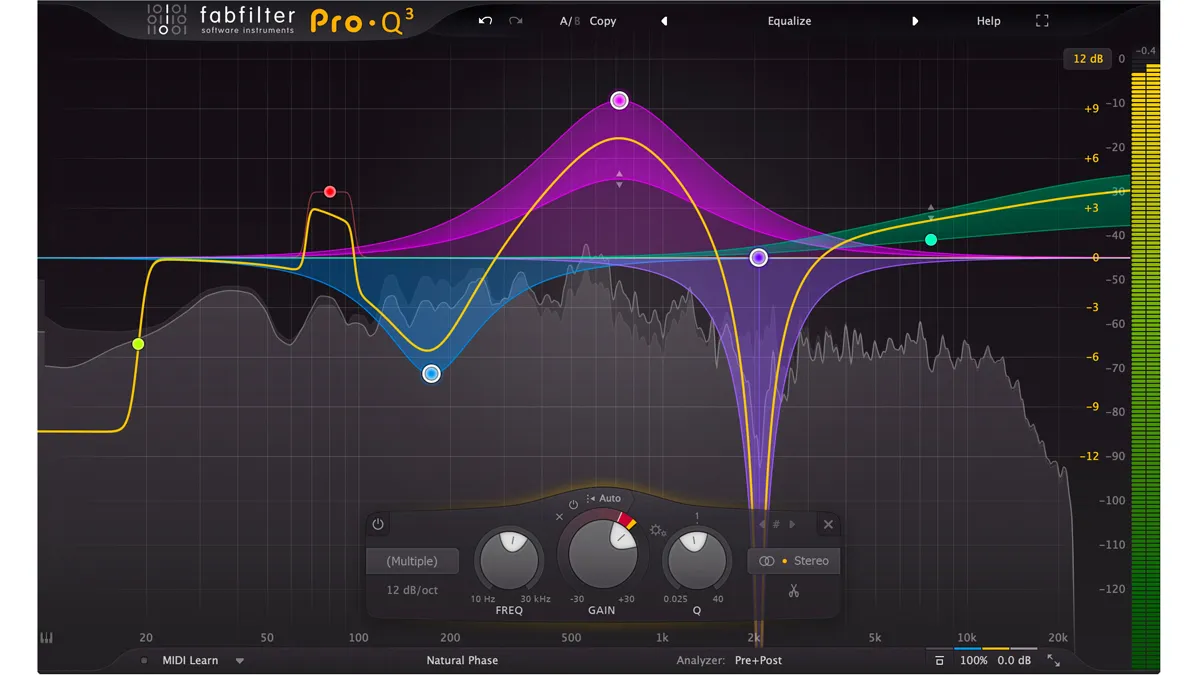
When you purchase through links on our site, we may earn an affiliate commission. Here’s how it works. The kings of transcendental synthwave have impeccable taste – here are some of the tools behind the magic We’ve got a huge interview coming up with The Midnight’s Tim McEwan and Tyler Lyle about their story, songwriting and new album Heroes. But before that, we asked producer (and live drummer) Tim to choose his favourite plugins behind the album. Denmark-born Tim’s background before forming the synthwave / pop-rock project with Tyler was in pop production and it shows in The Midnight’s consistently influential work that showcases a perfectionist approach to soundscaping as well as engaging songcraft. And we were keen to discover the plugins and go-to synths behind Tim’s work. Heroes is released on 9 September and you can preorder through The Midnight’s official UK (opens in new tab) and US (opens in new tab) stores. You can check out Tim’s production breakdown of Heroes’ track Change Your Heart Or Die above. FabFilter Pro-Q 3 “Let’s start with EQ. This is my workhorse – I think it’s most people’s workhorse, it’s incredible. It’s maybe 150 or 200 bucks and it’s absolutely worth it. It has a sort of dynamic EQ built in that you can activate, it’s just amazing.”Native Instruments VC76 and VC2A Universal Audio Teletronix LA-2A Classic Leveling Amplifer Boz Digital Plus 10db Compressor “I have different compressors. For a lot of vocals and guitar stuff and, and things that just needs a gentle controlling, I’ll use the Native Instruments’ VC76 and VC2A too. “The UA Teletronix is an emulation too – Tyler just got an original LA-2A. Then there’s the Boz Digital Plus 10db compressor, and they also have an EQ as well. “I use the Boz if I want a quick reaction – a quick attack. Bz tends to be great for it and I used it to control some of the drums but really whippy guitars, bass and even synths and vocals too. It can be pretty aggressive, which is great.” Universal Audio UAD Studio D Chorus Togu Audio Line TAL-Chorus-LX ValhallaDSP ÜberMod “I’m a chorus guy – I put chorus on everything and I don’t use it sparingly. I love the UAD Studio D Chorus. It’s very simple and you open it up and there’s about three or four settings. It just sounds amazing. “If I want to go for an alternative chorus I’ll go for the TAL Juno chorus emulation. I don’t know if it’s still free [it is and can be downloaded here (opens in new tab)]. It’s the emulation of the chorus that’s built into the Juno-106. “The ÜberMod is killer – it has little delays but when you initially open it there’s a chorus sound and it’s so clean. It’s great on guitars and synth. I love Valhalla’s plugins.”Softube Tape U-he Satin “I love tape saturation. Softube has a plugin called Tape – it’s very subtle, so it’s really to just add harmonic distortion. Gentle saturation that adds colours and adds a depth to the sound to make it more interesting. “U-he has a tape saturation called Satin which is beautiful as well. You can be a bit more aggressive with it and it’s very versatile. I use it on drums, to bass, synths and guitars. Sometimes even vocals to bring some presence.” UAD AMS Model RMX16 Digital Reverb Universal Audio UAD-2 Lexicon 224 Universal Audio UAD Lexicon 480L “I’m a big fan of UAD’s plugins and for reverbs the only thing that comes close is Valhallas plugins in terms of the quality, in my opinion. “I have the RMX16 and then I have the 224 and the [480L]. The 224 is from the ’70s and then 480L is the classic ’80s reverb and I used that mostly on this album on the vocals. It’s rich in presence and it’s digital without feeling brittle so I love that one. “The reverbs take quite a bit of DSP power from the card but it’s worth it. And back a few years ago when I was making Nocturnal and albums like that I just had the little UAD Apollo Twin and I had to bounce the reverb in order to use my DSP.” Dave Smith Instruments OB-6 Dave Smith Instruments Prophet 6 Juno 106 Oberheim Matrix 6 UDO Super 6 The Oberheim Matrix 6 is probably the most synthwavey synth I’ve ever heard. “There’s a lot of analogue synths on this album. It’s mostly analogue synths and it’s weird because in the last two years I’ve really got into them after never being remotely interested in them. Really because I had this impression they all sounded like the ’70s, and of course I know they all weren’t all made in the ’70s but I got the OB-6 and the Prophet 6 at the behest of Tyler in the fall of 2020 and it opened my eyes. “I love the OB-6. I tried to dial in an emulation of that sort of Tom Sawyer-style bass and that’s the sound you hear in the opening of Change Your Heart Or Die. That bass is present in a lot of songs where I tweaked it a little bit. “The Juno-106 is all over it and I have an Oberheim Matrix 6 which is a rack module without the keyboard but it sounds amazing. That is probably the most synthwavey synth I’ve ever heard. You can crank the resonance and it’s so aggressive and rips but it never sounds hard on the ear. “Then I have the UDO Super 6, of course [that can be heard of Heartbeat] so really there were a lot less soft synths, a lot less synth plugins. Usually I go for [U-He] Diva and things like that. Now I have the real thing it’s hard to go back. But I think they serve different purposes.” Don’t miss the latest deals, news, reviews, features and tutorials I’m the Guitars Editor for MusicRadar, handling news, reviews, features, tuition, advice for the strings side of the site and everything in between. Before MusicRadar I worked on guitar magazines for 15 years, including Editor of Total Guitar. I’ve currently set aside any pipe dreams of getting anywhere with my own songs and I am enjoying playing covers in function bands.
King Gizzard and the Lizard Wizard (KGLW, Gizz), the ultra-prolific sextet from Melbourne, Australia, have done it again… and again… and again… and again…. and again…. and again. Welcome to the Gizzverse. With the release of Changes, the band’s 23rd album, they have dropped six new albums in 12 months. While releasing so much material in a single year would be a daunting feat for the vast majority of modern artists, it only registers as a return to form for frontman Stu Mackenzie’s fervent musical fruitage. This album was originally intended to be the fifth release of 2017, but the band felt it was not yet ripe and gave us Gumboot Soup in its place.
October 28: Changes is a kaleidoscopic fever dream of tones and grooves
Changes year-long incubation has really paid off. Mackenzie has explained that the concept was fairly simple (each song is built around a pendulous key shift between two alternating scales with every chord-change), yet out of range for the band when initially conceived five years ago. Each song on the album was spawned by a different section of the opening track, “Change,” a 13-minute long blend of prog-rock and pop reminiscent of the ‘60’s and keyboards that sound like they were pulled straight from an R&B album. “Hate Dancin’” is a soft-spoken pop earworm, followed by the horn-punctuated, funk-adjacent “Astroturf.” “No Body” is a rock ballad using its inside voice that descends into the synth-laden, driving beat of “Gondii.” The smoky and mellow tones of “Exploding Suns” sound like it was meant for Sketches of Brunswick East, Gizzard’s 2017 collaboration with Mild High Club (which was this grateful fan’s on-ramp to Gizzverse). “Change” and “Short Change”incorporate all of these vibes in a kaleidoscopic fever dream of tones and grooves that bookend the entire album quite nicely.
A borderless style with no care for “what sells”
It’s challenging to articulate why I love this band so much. I think it boils down to the ethos of the band musically and professionally, the fan culture, and of course, the music. So much of what Stu, Ambrose, Joey, Cook, Lucas and Cavs have done is atypical for a modern band: The whirlwind releases creating a perpetual buzz, the borderless style weaving through genres like a downhill skier past guide rods on the slope, the range of complexity employed in their composition and the feeling that none of it was done at the behest of “the suits” at a record label pushing for more of “what sells”. This is, to me, the greatest marker of success: the ability to produce whatever you want and make a living from it. I love their no-rules approach to making music. In my view, this band embodies the spirit of creativity in a time of content monetization and algorithmic curation. Their discography includes so much variety, from surfy garage rock to synth-pop, thrash metal to soft acoustic jams, psych rock to hip-hop, spoken-word narrative spaghetti-western cowboy ballads to spoken-word sci-fi apocalypse ballads. I also love their DIY approach. Flightless Records was created by former second-drummer for King Gizzard and the Lizard Wizard, Eric Moore. The band made their own executive decisions regarding releases and ran their own operations regarding management, touring and merch. Moore resigned from the band in 2020 to focus on running Flightless Records. The band is now on its own label, KGLW records. While their earlier releases went the more traditional route, including booking a professional recording studio to make a record, Mackenzie has become completely comfortable using his laptop to record official releases from the band’s warehouse studio in Melbourne, Australia. The success of these later albums suggests there is little need for expensive microphones, cumbersome rack modules or 40-channel Neve mixing consoles to make great music that people love. You don’t have to be rich or cutting-edge to produce great art!
In an era of social media algorithms and posturing, it’s also notable the fan culture this band has created around itself. The fandom collectively is often referred to as “The Weirdo Swarm” by the band and the title is widely accepted by the fans. Similar to the way K-pop stans pour their fandom all over the internet, the Weirdo Swarm produces vast amounts of fan art, bootlegs, articles and memes to be shared and traded in forums, groups, and fan pages. Before I traveled down the lizard hole, I want to note that I didn’t really understand Deadheads who discussed their favorite songs in terms of which live performance was best. Now, I would point you toward “Work This Time” performed live at Ancienne Belgique in 2019 over the album version on Oddments (2014). Y’all, I get it now. Since joining the Weirdo Swarm, I’ve noticed so many similarities between other members and myself. (Yes, my significant other also tolerates my obsession with King Gizzard, but barely! I know your struggle.) Attending my first live show in Chicago last month, I saw myself in many of the other patrons. I did see at least ten people wearing the same yellow Mexico City 2018 t-shirt I was wearing, but I also saw hundreds feeling the same excitement I felt. Somehow, this does not make me feel typical or unoriginal. It only made me realize that I’m far from alone. In 2022, do not underestimate how important that moment was for me or can be for other music fans.
March: Made in Timeland
The band started off this year with the unfortunate cancellation of their Timeland festival, due to health concerns regarding the pandemic. This “ill-fated” three-day New Year’s Eve party was to coincide with the release of their 19th studio album, Made in Timeland, a series of vignettes originally created as intermission music for King Gizzard’s live shows, merged into two 15-minute tracks set to a ticking clock (or 60 beats-per-minute). Die-hard fans would find a way to listen to Made in Timeland well ahead of the rescheduled date in March.
January: Butterfly 3001
The second release of the year was Butterfly 3001, a collaborative remix of King Gizzard and the Lizard Wizard’s 2021 synth album Butterfly 3000. Butterfly 3001 features remixes and reimaginings by artists well-known to many audiences like the Flaming Lips, DJ Shadow and Peaches, as well as those one might call “emerging” or “alternative” such as Dam Funk, The Scientist or Geneva Jacuzzi. Both Made in Timeland and Butterfly 3000 explored a more synth-focused sound than the band had ever endeavored before (Though, endeavoring where they have not endeavored before is something of a staple with this group).
April: Satanic Slumber Party and Omnium Gatherum
The departure from the guitar-centric music was not long lived though. By early March, the band opened the musical faucet and released “The Dripping Tap,” an 18-minute ballad about the climate crisis featuring an orchestra of layered guitars, as well as Satanic Slumber Party, a collaboration EP with their fellow Australian rock/punk band Tropical F*ck Storm (TFS). Both tracks were developed from a session held at a cabin owned by TFS that came to be known as “Hat Jam”. “The Dripping Tap” was the first single from Omnium Gatherum, the band’s 20th studio album, which dropped on April 22, 2022. Omnium Gatherum features an array of genres both familiar and previously uncharted for Gizz, with multiple thrash metal tracks, hip-hop inspired rap tracks, and even some R&B tones. It’s the kind of blending and blurring of genres that can bring new fans to the band and fans of the band to new genres of music. By this time, King Gizzard and the Lizard Wizard had already begun intercontinental touring, with shows and festival spots in Europe, North America, South America and back home in Australia. Fans rejoiced in the new music they had already received and tour dates were selling out. While fans were still chewing on the cosmopolitan blend of Omnium Gatherum or desperately trying to score some tickets for the two-night show at Red Rocks in October (delayed since 2020), the band was preparing its coup de grâce.
October 7: Ice, Death, Planets, Lungs, Mushrooms, and Lava
On August 31, 2022, three new albums were announced via Twitter to be released within one month (October). The fan base erupted in theories and projections of what could be to come. These rumors would not be dispelled until the release of the first single, “Ice V,” from Ice, Death, Planets, Lungs, Mushrooms, and Lava (IDPLML), the band’s 21st studio album. IDPLML embraces the compositional turn for King Gizzard and the Lizard Wizard that started with “The Dripping Tap,” emphasizing long-form jams in the vein of jam bands like the Grateful Dead or Phish. Each track from the album was written by a different member of the band, each assigned a tempo and a mode of the major scale to compose in, and refined as a group. Mackenzie calls IDPLML the band’s most “collaborative album to date.” Each track from IDPLML carries the musical phenotypes of previously released material from King Gizzard, but it incorporates these snippets with a subtle wink rather than a neon sign. The approach is completely new for the group and the result feels paradoxically fresh and familiar.
October 12: Laminated Denim
While I was still processing the finer details of IDPLML, the perpetual motion machine that is King Gizzard and the Lizard Wizard dropped their 22nd album, Laminated Denim. Announced as a companion piece to Made in Timeland (you see the anagram in action, right?), Laminated Denim feels more composed than IDPLML, though it certainly jams. While also comprised of two 15-minute tracks (“The Land Before Timeland” and “Hypertension”) at 60 BPM, the tone and flow of Laminated Denim is more akin to their prog-rock and psych-rock releases than the eclectic musical safari of Made in Timeland. The guitars are back in central focus, with riffing reminiscent of Radiohead. The opening line of the album is a familiar sentiment: “It’s good to be back. Re-railed. Back on track.” Indeed, with Changes as the crowning jewel of yet another big year of releases, King Gizzard and the Lizard Wizard are hitting their stride once again. By the way, in case you missed it, the band also announced a U.S. Tour for 2023. Tickets go on sale Friday, Nov. 18 at noon central time.
Ayana Archie Claudia Grisales House Minority Leader Kevin McCarthy, R-Calif., speaks during his weekly press conference at the U.S. Capitol on Dec. 3, 2021. Samuel Corum/Getty Images hide caption House Minority Leader Kevin McCarthy, R-Calif., speaks during his weekly press conference at the U.S. Capitol on Dec. 3, 2021. U.S. House Minority Leader Kevin McCarthy had planned to get former President Donald Trump to resign after the Jan. 6 riot at the Capitol, The New York Timesrevealed in an audio recording Thursday. In the recorded conversation, McCarthy, a Republican, reportedly told a group of GOP leaders that he didn’t believe Trump would voluntarily step down, and contemplated rallying Congress to have him impeached a second time, saying that he believed the measure would pass both the House and Senate. “I’m seriously thinking of having that conversation with him tonight,” McCarthy said. “From what I know of him — I mean, you guys know him too — do you think he would ever back away?” McCarthy said he would alert the former president of his plans to begin an impeachment trial if he did not resign. “I think this will pass, and that would be my recommendation you should resign,” McCarthy said. “That would be my take, but I don’t think he would take it, but I don’t know.” McCarthy had previously denied having the conversation, saying that an earlier New York Times report was “totally false and wrong.” However the audio, which seems to corroborate the story, was later released by NYT journalists Jonathan Martin and Alexander Burns, authors of new book This Will Not Pass, an account of the 2020 election. My statement on the New York Times pic.twitter.com/PWi2WkoWzh In the recording, the then-No. 3 House RepublicanLiz Cheney can be heard asking McCarthy about whether a 25th Amendment succession plan could be triggered and about Trump’s possible resignation. A Cheney spokesman said Friday morning that the House select committee to investigate the Jan. 6 Capitol attack “has asked Kevin McCarthy to speak with us about these events but he has so far declined. Representative Cheney did not record or leak the tape and does not know how the reporters got it.” In January, the committee asked McCarthy to appear and share more about his interest to have Trump resign. However, McCarthy swiftly rejected the idea of testifying. Trump eventually faced an impeachment charge for inciting an insurrection a week after the riot. During that time, a majority of senators voted to convict Trump — 57 to 43, including seven Republicans. But two-thirds, or 67 votes, was needed to convict. It was the second time Trump was acquitted in an impeachment trial. In 2019, articles of impeachment were brought against Trump for the first time for abuse of power and obstruction of Congress, but he was also acquitted. The New York Times published another tape on Friday it says was recorded during a private House GOP meeting on Jan. 11, 2021, in which McCarthy said Trump acknowledged some responsibility for the attack. “I asked him personally today, does he hold responsibility for what happened?” Mr. McCarthy said, according to the Times. “Does he feel bad about what happened? He told me he does have some responsibility for what happened and he’d need to acknowledge that.” Earlier this year, McCarthy denied knowledge of those comments at a press conference. From January 13, 2022:
Q: "Did you tell House Republicans on their January 11 phone call that President Trump told you he agreed that he bore some responsibility for January 6th?"@GOPLeader Kevin McCarthy: "I'm not sure what call you're talking about." pic.twitter.com/rkZsy8QLYZ The question of Trump’s responsibility for the attack is central to the investigation by the House select committee. McCarthy and Trump had a shouting match during a phone call during the Jan. 6 attack, where McCarthy pleaded with Trump to take notice that the rioters were Trump supporters. However, Trump responded, “Well, Kevin, I guess these people are more upset about the election than you are.” Days later, McCarthy took to the House floor later to say Trump “bears responsibility” for his role in the attack. The rift appeared it would stay — until McCarthy flew to Trump’s Mar-a-Lagoresortin Florida within weeks of the attack and appeared in a photo with Trump, seemingly mending this feud between them. The recording puts McCarthy in a tough position with his party. In the wake of the news, he received mixed reviews from his rank and file. “@GOPLeader – you should have trusted my instincts, not your own,” Florida GOP Rep. Matt Gaetz tweeted Friday. However, Trump likely remains the ultimate judge on McCarthy’s ambitions. And with mended fences in their past already, it’s very possible McCarthy can survive a new controversy. Sponsor Message Become an NPR sponsor
Links on SoundGuys may earn us a commission. Learn more. Music is a highly personal experience, and if you want to fine-tune your songs to sound exactly the way you want, you’ll need to equalize your headphones. But with a deluge of apps of varying quality floating around, how do you decide which one to use? We scouted around to find out, and here are our picks for the best EQ apps. Poweramp Equalizer is the EQ portion split off from the famous media player app. If you ask around about the best equalizer app for Android, chances are someone will mention this one, and for good reason. Poweramp Equalizer takes all the EQ features of the media player app and puts them into a standalone package that can control all sorts of other applications and devices. You get a bevy of features you likely won’t find in other apps, including a customizable number of EQ bands (up to 32), bass, treble, and tone controls, and automatic detection of known media players. If that wasn’t enough you can even find and add other playback apps, but you might have to enable some extra permissions to do so. Poweramp will also tell you technical details about the content you’re playing, so audiophiles can rest assured they’re getting the numbers they want. The app has a lot of options, but it’s cluttered, and definitely comes with a learning curve. Detecting other media players may even require some command-line fiddling. However, once you become familiar with where everything is, you’ll surely enjoy all your tunes to the fullest. You can use the free trial for 30 days before you’re required to pay the $4.99 USD price. A quick search will bring up plenty of EQ apps claiming to be free, but lots of them don’t actually do much. Thankfully, Music Volume EQ is an exception. You get a five-band EQ and nine presets, along with volume and bass controls. The app also works with a good number of music players and devices. Its interface is pretty straightforward, though a bit skeuomorphic. You’ll likely get familiar with the controls in a short period of time, which is helpful if want to EQ and move on to other things. However, you don’t get nitty-gritty control over your content, and the data you get isn’t terribly detailed. Plus, there are ads. Still, this is a functional equalizer app for no money upfront, and that’s a pretty good deal. Wavelet only works on Android, but it works well on Android. This app comes with over 3,000 profiles for headphone models built-in, meaning you can select yours and get to fiddling with the settings right away. Unlike some Android-tailored EQ apps, this one doesn’t require you to root your device, which is another plus. You can also import text files to fine-tune your headphones instead of bothering with dials and sliders on a touchscreen. We even offer our own Wavelet-compatible EQ files at SoundGuys for some headset models to bring them closer in line with our house curve. (Note: SoundGuys is is not affiliated with Wavelet.) While you can get started with the trial version, audiophiles who really want to take control and access everything will find the $5.99 USD price tag a steal. Since Wavelet relies on Android’s system files, certain devices that lack a few essential libraries might mean the app won’t function properly, but they’re a minority and most phones should be fine. You can find Boom: Bass Booster & Equalizer apps for both Android and iOS (the one for Android is a media player with EQ functionality). Guides to equalizing on iOS usually rely on the built-in EQ options found in the Music app or using the equalizers found in headphone apps and streaming services, but Boost features its own. If you want to try out 3D surround sound, this app can do that, as well. You can choose between eight or 16 bands to adjust, which is good for both beginners and advanced users alike. The app works with popular streaming apps, too, including iTunes, Spotify, and TIDAL. Plus, you can equalize content played locally or from iCloud Music, Dropbox, and Google Drive. If you have media scattered all over the place, this feature could be incredibly useful. Truly in-depth equalizing on iOS isn’t (quite yet) as easy as it is on Android, but Boom makes it possible to EQ content from a variety of sources in one centralized place. Plus, you can use it on different devices and keep the experience mostly the same, which is handy if you switch operating systems a lot. The seven-day free trial should be enough time to figure out if paying for the various service tiers is right for you. The app has a few subscription tiers and even includes a lifetime, one-time payment option. These appear a bit confusing at first but see below for more details. All prices are in USD. If the other recommend apps above seem intimidatingly complex, fear not. Equalizer FX Pro nails the simple approach and costs just $1.99 USD. It’s more detailed than the EQ that comes with many headphone manufacturers’ apps without becoming too much to handle. You get some handy presets like a bass boost setting and options tailored to pop or rock, for example. But if you want to get a bit more hands-on, you can adjust the bands yourself. The interface uses familiar dials and sliders, and doesn’t overwhelm you with too many numbers or statistics. It’s not the most in-depth experience, but if you want to spare some brain energy for other things, or you only want to dip your toe into the wide world of equalizing, this app strikes a decent balance. SoundID doesn’t work quite like other EQ apps. Instead of fiddling with dials and sliders, you’ll listen to various sound samples and the app will craft an audio profile that suits your ears and preferences. The app is compatible with many different headsets, though of course not every make and model will work. The point of equalizing is to make music sound the way you want, after all. This process works kind of like an eye test: “do you prefer A or B?” After going through a few different rounds of this, it’ll create a profile for you. Creating an account lets you bring up this profile on other devices with the app installed, which is handy if you jump around technology a lot. If you crave viewing numbers and adjusting things yourself, SoundID might feel a bit too hands-off, but if you want to create an audio experience based on what you hear and not what you see, this app is definitely worth a try. Plus, it is available for both Android and iOS. You might not think you need an EQ app, because your device might already have an equalizer buried somewhere in its settings menu. If it offers everything you want, the built-in functions of your phone might work, but most vendor-shipped or default equalizers aren’t great. They usually have a limited number of bands you can adjust, little to no customization options, and very little in the way of advanced tinkering. If your headphones or speakers require anything other than the most basic adjustments, chances are the EQ functions shipped with your device won’t cut it. Before you download an alternative, however, it’s best to figure out what your priorities are and how to meet those needs. Many music apps from popular streaming services and quite a few models of headphones do indeed come with an equalizer somewhere in their app’s settings. These vary in quality and available features, but they can be a good introduction to just how dramatic a difference a little tinkering with default settings can make. For example, Spotify includes an equalizer, and even the relatively tight-knit ecosystem of Apple Music includes EQ presets. Headphones like Sony WH-1000XM5, Shure AONIC 50, and the Bose Noise Cancelling Headphones 700 have equalizers in their respective apps, as well. When it comes to equalizing your music, there are many things to consider and you could get lost for hours reading debates about what you need to adjust. But to simplify some big ideas, you want an equalizer that covers a broad range of frequencies. That’s because various instruments produce their sounds in different regions of the audible sound spectrum. For instance, cymbals live toward the high end of the spectrum, from about 8kHz on up, but most everything else lives below 10kHz. To tackle everything in that range, your EQ will have to let you adjust across the entire spectrum. You’ll also want to take into account how many divisions within that range your EQ allows you to adjust. If it only lets you tweak sections like “low,” “medium,” and “high,” you’ll merely be able to adjust in wide strokes and might create unintended consequences. On that note, another feature to keep an eye out for would be actual numbers indicating what you’re adjusting. For instance, many guides (including here on SoundGuys) may instruct you to adjust, say, 2kHz upwards to emphasize guitar strings. So, you’ll want an app that labels sliders accordingly. Then there’s the idea of the Q range. This means the combination of the center frequency and the bandwidth (bandwidth is also known as quality, hence Q). Center frequency refers to the part of the audible spectrum you’re aiming to adjust. Bass and treble knobs, for instance, have a broad Q range, meaning the adjustment isn’t detailed and alters a broad part of the audible spectrum. If you’re looking to adjust the sounds of particular voices or instruments, you’ll need a narrow Q range to specifically target your intended center frequency. This is all a bit hard to convey via text, which is why many EQ apps have graphs to show you what your adjustments look like. Ideally, you’re aiming for a peaked valley or mountain, instead of a long plateau, as seen in the example above. Opening up an EQ app and being confronted with an array of sliders, dials, buttons, and more might seem overwhelming—where do you even start!? Thankfully it doesn’t stay too intimidating once you get going. If your EQ app comes with presets, these can be a good place to begin just to see how much changing around settings can change the way your tunes sound. But you’ll likely want to move beyond these pretty quickly. A basic approach to use is to determine what your device or headset is doing that you don’t like, and then make certain frequencies louder or quieter in response. In general, it’s often better to drop offending frequencies down in volume than it is to make others loud to attempt to drown it out. For example, if your headphones make high frequencies way too piercing to your ears, you could either make the mids and lows louder or you could knock down the highs. The latter approach not only helps to solve your problem, but also avoids introducing distortion that might result from cranking up the other frequencies. Diving deeper, you can read up about the pitfalls of your particular model’s frequency response curve and adjust your EQ app’s settings. At SoundGuys, we offer Wavelet-compatible text files to help you do just that for many models of headphones. And for some headsets, we also provide an EQ curve you can recreate using your preferred program, in case it doesn’t accept text files. Last, but not least, you can trust your ears. Play around with various settings and find out what you like, then keep that in place. Music is a personal experience, and there’s no one definitive “one true way to enjoy music.” If you end up making your headphones sound worse, fear not, you can always undo the changes and try again. It might seem annoying or superfluous to equalize your headphones, especially after you’ve spent so much money on a pair, but there are good reasons to do it. Your headphones may come with a wonky default response curve—that could mean anything from way too much bass (quite common with consumer models) to annoyingly abrasive highs. Whatever the problem, equalizing the headset can mean the difference between good sound and great sound. At the same time, there might be nothing wrong with your favorite pair of cans, but you might enjoy listening to your tunes in a different way than the default sound profile. Personalizing your headphones to sound the way you want can be quite rewarding, and sometimes for very little work. Finally, you may want to have different EQ settings for various genres of music you listen to. Sometimes you might listen to primarily vocal songs, and other times it might be purely instrumental classical or intense heavy metal. Whatever you listen to, equalizing your headphones in a manner that suits the genres you enjoy can help each of them reach their full potential. To find the best EQ apps, we researched and read what people recommended on forums such as Reddit and looked at lists compiled by others that they determined to be the best equalizers. After selecting the apps most commonly recommended, we downloaded them to ensure they worked and truly made a difference to the sound coming through a pair of headphones. All the apps were downloaded from the respective app stores of Android and iOS and installed onto an unrooted device. For apps that required sound tests, such as Neutralizer, we followed the on-screen instructions and used the profile that was created by the app. For apps that allowed direct manipulation of sliders, we adjusted them to ensure they actually altered the way content sounded. Each writer at SoundGuys has accumulated years of experience reporting on the consumer audio market, and our staff adheres to a strict ethics policy. We don’t use sponsored content on the website at a time when doing so is the norm. SoundGuys’ survival depends almost exclusively on readers enjoying their purchases. We pride ourselves on transparently outlining objective facts, while accounting for the subjective experience to contextualize an audio product’s performance. When we do misspeak, we correct and own up to it. It depends. If you EQ your headphones using the manufacturer-provided app, those changes will likely stick with the headset. Using third-party apps, however, might mean the changes only hang around when the app is running. Check the documentation that comes with an app to see how the changes get saved to be sure. We haven’t found an app for iOS that can accept Wavelet-compatible text files. If you know of one, please let us know and we’d be happy to take a look at it! Not entirely. You can address some audio issues in a set of cans using an equalizer, but EQ apps can’t perform miracles. If the drivers in your set of cans are of poor quality or they lack isolation among many more serious issues, no amount of equalizing is likely to save them. No EQ app is compatible with every single model of headphones or media player. Thankfully, most common brands and players work with many EQ apps. If you’re concerned your favorite model won’t be supported, it’s best to read up about the EQ app you’re hoping to use before committing to a purchase.
“A lot’s happened, and also not a lot’s happened.” That’s how Iowa native Elizabeth Moen began our conversation when we recently spoke for the first time in at least a couple of years. On paper, she’s been very busy. She’s toured regularly, both in support of her own music and as a backing musician for both Squirrel Flower and Kevin Morby. She sang the National Anthem at a White Sox game, along with Julia Steiner of Ratboys. And her new album, Wherever You Aren’t, is finally making it’s release after being completed for about three years.
Wherever You Aren’t
Wherever You Aren’t, out Friday, is Moen’s fourth album. It was almost completely finished before the pandemic at Flat Black Studios in Lone Tree, Hyde Street Studios in San Francisco, California and FAME Studios in Muscle Shoals, Alabama. The album was funded via Kickstarter, which enabled Moen to do a lot of things she’d always wanted to do. It’s easy to hear on the record: the album is a big step forward for Moen, with an overall bigger sound than she’s had on previous albums. “The intention of doing a Kickstarter was to record in a way I’d never recorded before,” said Moen. “I wanted to be able to experience new studios, and play with all the various instrumentalists and singers I’d come across over the years, who’d played live with me. There are a lot of parts: there’s horns, pedal steel guitar, and layers of harmony. There’s so many little details I’d never tested out. It feels big, and also the songwriting is stronger too.” Indeed, the songs on Wherever You Aren’t are classic Elizabeth Moen. But her sound is emphasized by details that make the album have more depth than previous recordings, and by her witty but also profound lyrics. On this record, you’ll hear horns, some strings and pedal steel. “Synthetic Fabrics,” the second song on the album, opens with the line “Made plans for when I was 16/when I was about 8 or 9/making plans for my mid 30s/since I turned 25.” The line sets the tone for the album of someone who’s trying to navigate life the best they can and learning to “ride the waves.” Of course, Moen’s distinctive vocals and guitar playing take center stage here and sound as great as ever. Despite the added production values of Wherever You Aren’t, not to mention a strong set of songs, Moen had difficulty finding someone to release the album and ended up doing it herself. “I really wanted a team for the record,” said Moen. “I had this dream of a label, a booking agent, a manager. I kept just waiting and waiting. But then I was like, ‘Hold on!’ I have an amazing, super-supportive fan base, who have already donated to the record, who wanted to hear it. So I decided to just put it out myself! That’s what I’ve always done.” She has no regrets about the way it all turned out. “Once I just let go of those expectations or the record, on the business side of it, I got excited again! I listened to the record, and I was like ‘these songs still feel strong to me.’ That’s the sign of a record I’m proud of, where years later, they still feel good.” In addition to the CV listed above, Moen also made a big move since the last time I spoke with her. She’d been “couch surfing” for a couple of years, due to her touring schedule, but the pandemic left her without a place of her own. She found it was actually cheaper to move to Chicago than get a permanent place in Iowa City. “Chicago always felt like the next step,” said Moen. “I was like ‘all right, if I don’t do it now, I probably never will.’ I love Chicago, but I also still very much love Iowa – and feel very connected and attached to Iowa and my friends who live there.” One of those connections that Moen made while living in Iowa was with Ella Williams, a.k.a. Squirrel Flower. Moen and Williams became friends when they both performed at a show in Grinnell, where Williams went to college. Williams asked Moen to play her guitar on Squirrel Flower’s tour last fall. “I’d played guitar for people here and there in the studio, but that was my first hired lead guitar gig,” said Moen. “It really got me out of my shell and my comfort zone as a guitarist, and I’m forever grateful to Ella for trusting me.” The tours with Squirrel Flower and Kevin Morby were Moen’s first experiences as a “hired gun,” working with other musicians. Aside from how much fun she had, Moen found the experience inspiring and educational. “I’ve learned a lot from (Morby) about what it means to be a good bandleader,” said Moen. “He gives all of us moments to really shine, and you look back on the Instagram stories, and you see him pointing at the person taking the solo. It’s been really special, and it makes me appreciate my bandmates even more, as a bandleader.” While she firmly believes that it’s important to “not be a bully to yourself if you do nothing,” she’s also learned that these “waves” are part of a career in music, pandemic or not.
“Most musicians, and artists in general, would agree that it all just comes in waves,” said Moen. “You get a wave of nothing, and then everything is happening. And then you get a wave of nothing, and then everything is happening again.” After Moen got the message asking her to be a part of the Kevin Morby tour, she had dinner with her good friend and fellow Chicago musician Liam Kazar, a friend of Morby’s who introduced the two. “(Liam) gave me the best piece of advice, that I’ve been really taking to heart: ‘Those waves will always be there,” he said. “‘Even if your career goes as far as you want it to go, there’s still going to be these waves. The whole job is to ride the waves and not give up.’ Ever since then, I’ve really leaned into just riding the waves.” Moen has also started getting some well-deserved recognition for her guitar skills in recent years. Squirrel Flower was specifically drawn to her “reverby, ambient” slide guitar sound, which Moen had the opportunity to demonstrate in a video for the Fender guitar company. I told Moen that it seemed like she “demystified” slide guitar, and she agreed that’s important. “When Fender reached out, I was like ‘I’m a beginner! So if you want a beginner to talk about the beginning of slide guitar, let’s do it,’” said Moen. “I think with slide guitar, songwriting and really anything musical, demystifying it is a goal of mine. The more it’s demystified, the less intimidating it is for people to try and do it. I think sometimes, some people, unintentionally or intentionally, try to make it a cool kid’s club. Music shouldn’t be intimidating, it should be something that people feel very welcome to stepping in and trying.”
Moen has a couple of shows coming up in Iowa in support of the record: an album release show at Gabe’s in Iowa City on November 26th, and an appearance on IPR’s All Access Live! on Dec. 8, which will be broadcast live on IPR from the Raccoon Motel in Davenport. Moen will be accompanied by her old Iowa City friends and bandmates for both shows. She’s already hard at work planning tours for 2023 but is also making time to herself and plans to “enjoy being off the road.” “I want to keep growing as a person, and as a musician. Maybe I’ll pick up a new hobby. Who’s to say?” she asked. “As long as I’m doing what I’m doing and it still feels good, that’s really all I want to do.” Elizabeth Moen is IPR’s Artist of the Month for November. Her new album, Wherever You Aren’t, will be available Nov. 11 on Bandcamp and streaming services.
Play Now Football Pick’em Play Now College Football Pick’em Start or Sit (NFC Home Games) Daily Soccer Podcast A share of the points ultimately suited England and the United States quite nicely in their second group stage game of the World Cup, both sides playing out a 0-0 draw where the Americans were vastly more impressive than their opponents. Christian Pulisic and Weston McKennie both went closest in an impressive first half for the USMNT, whose pressing in a rejigged 4-4-2 system proved hugely effective at quelling the attacking thrust of an opponent who had scored six goals in their opener. England created few convincing chances, Mason Mount drawing a smart save from Matt Turner in the first half and Harry Kane flicking a free kick wide in added time. Ultimately the draw means England need only to avoid a four goal defeat against Wales to reach the last 16 with victory guaranteeing them top spot in Group B. The United States’ fate is in their hands too though they must beat Iran in the final group game to qualify. The state of the group might have been rather different if Iran’s clash with Wales had ended before the 97th minute. A game that looked to be headed for the tournament’s fifth 0-0 draw, bursting to life in the last 20 minutes with a red card to Wales keeper Wayne Hennessey. That was followed by late goals from Rouzbeh Cheshmi and Ramin Rezaeian that sent Iran from bottom in Group B to second place. After that, Senegal’s win against Qatar sent the hosts on their way towards elimination from the tournament. The Netherlands and Ecuador battled for top place in Group A. The two sides fought to a well-earned draw over the 90 minutes with Cody Gakpo aiding the Dutch with an early goal in the first half. Enner Valencia scored the equalizer for Ecuador and the goal was his third of the tournament. The two teams are now level in the group with four points each with one game remaining in the group stage. We will be back tomorrow, providing you with the most in-depth and up to the minute coverage of the World Cup so keep it right here — and while you’re at it, sign up for our new newsletter covering the beautiful game in all its glory, including daily updates about the World Cup, here. Friday, Nov. 25 Wales 0, Iran 2 Senegal 3, Qatar 1 Netherlands 1, Ecuador 1 England 0, United States 0 England have a late corner. Trippier’s delivery has been a little off so far but he has plenty to aim at here. Maguire meets it but couldn’t get a run on the ball, his header bouncing down into the ground. Turner claims it. Could that be that? In spite of changes from both managers this game seems to be petering out somewhat, understandable when a draw leaves both teams in control of their fate. If this holds a win would take the US through whilst England would feel rather confident that goal difference would keep them in top spot if they only drew with Wales. Let’s see if either side go for the jugular in the final six minutes plus added time. As was the case at the Euros, Grealish is proving to be a real X-factor off the bench for England. His every touch commits at least one American defender, often more, and suddenly a rearguard that had looked so solid is scrambling. There’s still the likes of Foden and Rashford to come. This could be where England win the game. Suddenly the sterile possession of a few minutes ago looks like a distant dream as the US work the ball around, earning set pieces whenever they want. If it were not for Maguire’s strength in the air Zimmerman would almost certainly have headed the US into the lead. Meanwhile there is no sign of a change from Southgate, who has four Manchester City players and a Champions League winning captain among his options on the bench. This has been the consistent criticism of the England manager, that he lets games drift for too long. Something has to give. This has settled back into the temp with which it began, England seeing lots of the ball but failing to find much movement between the lines. You could see frustration from Stones when he had the ball at his feet that no one was really showing to get it to feet. Maybe the Three Lions are tired, maybe shellshocked, but this is not going to plan. No changes from either side at half time. Bellingham lose out in midfield on halfway, leaving space for the Americans to drive into. Musah has space to pick a pass and finds Robinson but his cross is cut out by Rice. McKennie could have swung this game dramatically had he finished this chance. Oh my 😳
What a CHANCE for Weston McKennie pic.twitter.com/uRMhyV5MVw Berhalter may be quite pleased to hear the referee’s whistle because those last few minutes just saw England establish themselves a little more, ending in an excellent save by Turner off Mount a few moments after Shaw’s cutback had found Saka to clip wide. The chances were there for the US but it almost feels like Canada’s display against Belgium, where the North American side caught their big name European opponent dozing and failed to punish them. Where the US have really impressed off the ball, England seem a step late to their man every time. The front three in particular are all too easily bypassed, not entirely sure whether to get at these American full backs or place themselves in the right spot if possession is won back later in the move. This is really encouraging from Berhalter’s side, who are starting to build possession play and have England a bit unsure over who’s defending who. Musah in particular has the beating of this England midfield, picking the ball up on the half turn and driving forward. It feels like something is coming for the USMNT and it eventually does as a Pulisic shot cracks back off the bar. Good build up down the right ends with Wright putting a really nice cross into the area around the penalty spot. Trippier has lost McKennie but the Juventus midfielder blazes over. He absolutely should have scored there. Of the few touches the USMNT’s No.10 has got so far an awful lot of them have come in the position where he is creating for others, looking to slip team mates into space rather than attacking it himself. Anyone who has seen Pulisic’s best moments at Chelsea might be asking why he isn’t the player getting the passes. In the Premier League he has developed a useful niche as a penalty box shot sniffer, here he isn’t getting anywhere near those positions. The change to Haji Wright makes more sense now that it becomes clear that the US will spend a lot of time, particularly without the ball, in a 4-4-2 that is designed to slow English progression into midfield. It starts well in the opening 10 minutes, where Maguire and Stones really can’t do much more than work it from side to side. But Declan Rice is starting to make a more deliberate attempt to find pockets that offer his team mates that outlet and in truth England don’t really look that threatened by this press. Eventually they work the ball up the field down the right, cut back for Kane to strike low at goal. You suspect it’s goal bound but Zimmerman makes a good block. England take the knee before Mason Mount gets the ball rolling. John Stones and Harry Maguire roll the ball around the back, not seeming too perturbed by the US press. They go long but the ball rolls through to Matt Turner, who nervously hoofs the ball into the stands. For England it’s all quite straight forward, win and they are guaranteed to go through and are well placed to top the group with Iran needing a major goal difference swing to draw them back in. For the US a victory today means they need to only draw with Iran. A point would mean they have to beat Team Melli in the final round. If they lose they can still go through by beating Iran but would be reliant on England doing them a favor against Wales. On the basis of the Welsh display today they can be pretty confident of getting that helping hand. Yunus Musah will be lining up for the USA tonight but he could so easily have been in the setup of their opposition. Indeed Musah, born in New York but eligible for Italy and England, even played in the Three Lions youth setup as well alongside Jude Bellingham. At Arsenal his team mates included Bukayo Saka. Losing Musah to the USMNT is something of a sore point to England boss Gareth Southgate, who said before today’s game: “Firstly, they are very proactive on recruitment. They took one of ours which we were not very happy about but fair play. Yunus was in our Under-19s and then we went into lockdown. “He was a player at that stage I had not had a lot of contact with and the decision was made before I had the chance to get to know him well.” There’s just one change across both sides today as Gregg Berhalter brings Haji Wright in for Josh Sargent to lead the American line. It’s no wonder that England are going for what has worked so far. England XI: Pickford; Trippier, Stones, Maguire, Shaw; Rice, Bellingham, Mount; Saka, Kane, Sterling USA XI: Turner; Dest, Zimmerman, Ream, Robinson; Adams, Musah, McKennie; Weah, Wright, Pulisic Dread it. Run from it. England vs. USA still arrives. How are your nerves folks? Split points in this one between the two teams. Both with four points in Group A and level on goal differential. The final matchday of group play will be massive. Late game scenes here as Enner Valencia goes down on the pitch. He gets a bit of treatment before being carried off the field. Appears to be some discomfort in his right leg. There will be six minutes of stoppage time. Ecuador taking their time on when to press a bit as the game approaches the 70th minute. Netherlands content to play a more methodical game at the moment. Middle third is quite clogged as both teams are vying for possession. 60′ Ecuador combining in the final third, the ball gets recycled around and lands to Plata. His shot targets the upper left corner of the goal, but the shot is off the post! The Netherlands have had no answers to start this half despite subbing on Memphis Depay into the game. 49′ It’s Valencia with the equalizer for Ecuador! Estupiñán gets on the ball and runs into the box. His initial shot is stopped, but Valencia is there on a central run to make sure the ball gets into the back of the net. What a goal for Valencia. Just minutes into the second half and his third of the tournament! 1-1 in the second half. ENNER EQUALIZES FOR ECUADOR 🇪🇨 pic.twitter.com/ocAAOWqsBZ Gakpo provides the opening goal in the 6th minute of the game to give Netherlands a narrow lead at the half. Ecuador played themselves back into the game and had a good chance to off a corner kick to equalize, but the goal is disallowed after being ruled offside. 45+3′ Ecuador breakthrough off a corner kick with a deflected shot by Estupinan that sneaks in near post. The goal is disallowed though after an offside call. A delightful moment quickly deflated as the two sides head into the locker rooms for half-time. 45+2′ Ecuador with a dangerous free kick and they target Valencia. A long lofty ball and the forward gets contact on it, but its deflected out for a corner. 33′ Enner Valencia with some time and space in the final third. He decided to take the chance from distance and it nearly pays off with ball drifting just wide of the near post. The Dutch retain possession and are quick to get into the opposite direction. Some physical play leads to a corner kick opportunity but it is defended away by Ecuador. The game is seeing some more pushing and shoving as it ticks past the half hour mark now. Ecuador building off a counterattack, Enner Valencia gets nearly end line inside the box before sending a ball through. The team earned two consecutive corners but are unable to capitalize on the time in dangerous spaces. Ecuador taking more chances and looking to intercept passes to go direct more centrally. They are spending time in the Netherlands half and have begun to string some more combinations in the final third, keeping the Netherlands defense honest as the game approaches 25 minutes.