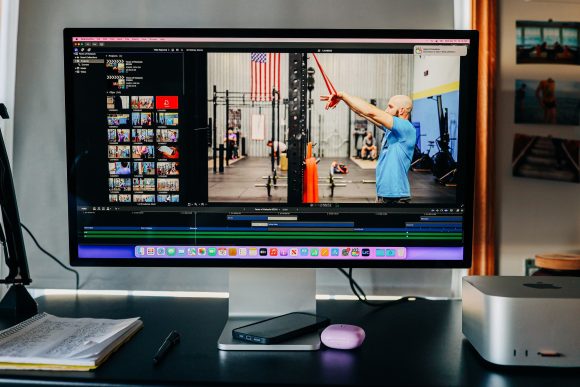
Create professional looking videos for YouTube with these powerful editing programs.
You’re going to want to play to your strengths while leaving yourself room to grow when you choose video editing software for Youtube videos. While there are several very well-known and well-regarded options out there, they each offer their own specific advantages and challenges. Just about any video editing software can spit out a video that meets Youtube’s technical requirements, but successful content creation goes beyond the technical and relies on factors like ease of use, speed, and compatibility with other programs. The best video editing software for YouTube will meet your specific needs without requiring a degree to learn and emptying your budget that you need for other essentials like audio gear and gaff tape.
So you’ve decided to start a YouTube Channel. Although you can absolutely shoot on your phone and upload directly to YouTube, taking the time to run your footage through an editing program before you export it will give your videos an extra level of professionalism.
Before purchasing an editing program for making YouTube videos you should consider your skill level and what kind of skill level you aspire to. Video editing programs typically break into three categories: entry-level, consumer and professional.
If you aspire to edit video full-time or make a decent chunk of income from your YouTube channel, investing in a pro-level editing program is probably the best choice for you. They do, however, typically involve much steeper learning curves.
Some software will work best if you’re using it as part of a larger suite. For instance, Adobe’s Premiere Pro integrates tightly with other Creative Cloud software, including Photoshop and its motion graphics software, After Effects.
Once you have a large library of edits, switching to another software can be a challenge, so make sure you feel confident in your choice before diving into it.
More advanced users typically rely on desktop-specific versions of software to make their high-production value content. Desktops typically offer more robust features, more customizable interfaces, and far superior media management.
Mobile and tablet apps, however, can make up for their limited features with speed and ease of use. If you’re just starting out, apps can provide a much smoother on-ramp to editing for those who want to start putting out content right away without going through any tutorials.
Adobe
Check Price
Why it made the cut: Adobe Premiere Pro is the editing program favored by most professional editors in the industry, making it our top choice for editing YouTube videos. It integrates with the rest of the Adobe Creative Cloud suite of programs making it easy to add things like customized motion graphics into your videos before exporting for YouTube.
Specs
Pros
Cons
Premiere Pro is the program that’s used by the majority of professionals and top YouTubers, which is why it has earned our top spot on this list. Although the advanced features might seem like overkill for someone who is brand new to video editing, you’ll want room to grow as you progress as a creator and this program can provide that.
Premiere Pro features intuitive timeline editing, customizable presets, built-in effects and easy color adjustments that simplify the process of editing a video for YouTube. Once you have the hang of it, the predictable nature of the software will allow you to concentrate on your content.
If you want to take your video editing skills to the next level, or hope to one day be hired to create videos outside of your YouTube channel, this is the program to invest in. It requires a subscription, but paying the monthly fee means that you get access to regularly updated features and gives you the option to work collaboratively with other editors on your YouTube videos.
If you have a fancy camera that shoots 4K or 8K footage, Premiere also offers some of the best compatibility and tools for those high-res edits.
Apple
Check Price
Why it made the cut: Final Cut Pro is optimized for MacOS systems and offers an incredibly approachable interface that’s packed with powerful tools—newbie editors will have no problem learning the ins-and-outs of this piece of software.
Specs
Pros
Cons
Final Cut Pro offers pro-level editing tools for YouTube video editors inside an extremely user-friendly package. This a great place to start for new video editors. If you’ve cut your chops using a free program like iMovie and are looking for something that will give you a little more creative freedom, Final Cut Pro is a great place to turn. The interface offers a familiar feel that subtly introduces more advanced features for those who want it. It’s used by plenty of popular YouTubers and if you are operating on a MacOS the program is certainly much faster and less prone to crashing than Adobe’s editing programs—meaning you can get your content editing together and published online that much quicker.
Cyberlink
Check Price
Why It Made The Cut: This budget-friendly non-linear editing program gives YouTube creators access to tons of stock content, offers super fast rendering and can support 4K video.
Specs
Pros
Cons
Cyberlink PowerDirector 360 offers a robust set of video editing tools inside an easy-to-use interface. That makes this program a great tool for YouTubers looking for something in the middle area between iMovie and Premiere Pro. PowerDirector offers extremely fast rendering and access to tons of presets and effects that make it easy to piece together an engaging video edit without having tons of prior experience.
The program also offers editors a huge catalog of royalty-free music, and access to stock footage from Getty Images and Shutterstock—a real win for YouTubers who film most of their creative content from the comfort of their home studio. Licensing footage and music can be a pricey hassle without a resource like this.
Adobe
Check Price
Why it made the cut: Adobe Premiere Elements is a stripped down version of Adobe Premiere Pro, making it a great starting point for new YouTube editors looking for an inexpensive program with less bells and whistles.
Specs
Pros
Cons
As the name implies, Adobe Premiere Elements is a stripped down version of Adobe’s pro level editing software. The nonlinear editing program gives new editors the basic editing tools, with a simpler interface for a more intuitive learning experience.
Premiere Elements can also be purchased as a one-of program rather than through Adobe’s subscription based pricing model—making it a more budget friendly choice for the YouTube content creator who is just getting started. Premiere Elements includes features like video-creation wizard, step-by-step tutorials and guided edits. This is a great starting point for making professional quality looking YouTube videos without breaking the bank. This is also a great option for people looking to upgrade from a simple video editing phone app without traversing a steep learning curve.
Apple
Check Price
Why it made the cut: An extremely basic, bare bones editor, iMovie will let you quickly cut together clips and export videos for YouTube at no cost.
Specs
Pros
Cons
If you are brand new to editing videos for YouTube and are looking for something that is free, easy to use and you happen to be a MacOS user, look no further than iMovie. While this program lacks some of the sophisticated editing tools found in the other programs in this guide, it’s a great choice if your end product is simple enough that it doesn’t require a lot of heavy lifting. It only supports two video tracks per project, so if your YouTube content relies on cutting between your face talking to camera and footage of you demonstrating whatever it is you are talking about —this can actually be quite the useful starting place.
You probably have at least some basic video editing software
Most top YouTubers are likely using Adobe Premiere Pro or Final Cut Pro to edit their videos. Some switch back and forth between the two. If you are subscribed to channels that focus on video editing or photo editing, it’s not uncommon to find an episode where the YouTube host will talk about their preferred editing program and share tips and tricks with their viewers of how they do what they do.
If you’re only trying to edit together two video clips: one of your face talking to camera and one of you demonstrating whatever it is you are talking about, which lets face it, is a pretty common setup for popular YouTube videos—iMovie is just fine. If you are trying to integrate more than two clips, want to make more complex edits or introduce advanced transitions a paid video editor will probably be a more suitable program. But, if you are just starting out and unsure how much time or money you might want to invest in you’re YouTube videos, iMovie is a great starting point.
iMovie is a great place to start video editing before deciding if you want to spend the money for more robust software. Shoot some video footage on your smartphone, download it to your computer, open iMovie and start cutting clips together.
Making your first YouTube video really only requires a YouTube account and a camera (you can absolutely use your phone to film it though). Having a way to stabilize your camera while filming and a microphone for capturing quality audio will help your video stand out on YouTUbe.
The number one top for making videos look professional on YouTube actually has very little to do with your eyes. Having a video that has good quality sound is the best way to keep people engaged in your YouTube videos. In addition to getting a nice mic to record audio for your YouTube videos, you should consider getting a tripod so you can stabilize the camera that you are shooting footage with. A set of continuous LED lights can be a nice addition, but if you are staring on a budget filming near a nice window covered in a soft white curtain can serve as an impromptu softbox—you will just need to make sure you are filming your content during the daytime to achieve a flattering look.
When selecting the products that appear in this buying guide we considered the different styles of YouTube creators and what types of editing programs might best serve them. Although top YouTubers are typically using programs like Premiere Pro or Final Cut Pro, there are a number of people who upload videos to YouTube that aren’t using industry standard editing programs and so it was important to include those more budget-friendly options as well.
The products that appear in this buying guide were selected through a mixture of hands-on-experience, editorial reviews and user feedback.
Selecting the best video editing software for YouTube videos is dependent on your budget and ultimately your long term goals as a video editor. If you are hoping to make your YouTube channel a source of income and sponsorship, it makes sense to invest in a piece of pro-level software from the start. If you are more interested in creating YouTube videos for sharing with family and friends a lower-cost or free editing program will probably serve you well.
Jeanette D. Moses is a New York City–based filmmaker and photographer known for her intimate depictions of New York’s creative communities. She’s been a contributor to PopPhoto since 2014, specializing in interviews, gear reviews, and all things analog.
RELATED
Moody colors and a double exposure feature cater to those with a fondness for old-school vibes.
READ NOW
RELATED
Check out this perfect guide for hunters new to the world of game cameras.
RELATED
Improve your workspace setup with these larger desk options, ideal for dual monitors.
Want more photography techniques, camera reviews, and inspiration?
Sign up for Popular Photography’s newsletter and join the club.
We are a participant in the Amazon Services LLC Associates Program, an affiliate advertising program designed to provide a means for us to earn fees by linking to Amazon.com and affiliated sites.
Registration on or use of this site constitutes acceptance of our Terms of Service.
© 2022 Recurrent. All rights reserved.