After a more than two year hiatus, the Peloton studios are once again open to the public. Following the soft reopening phase that began in June, Peloton Studios New York (PSNY) and Peloton Studios London (PSL) officially celebrated their grand reopening on August 19, 2022. When Peloton first shared the news, they also relaunched the studio booking site, which had been dormant since the initial studio closure. If you have questions about how to book an in-person class, you’re not alone! This article provides an in-depth overview of how to book and take an in-person class at PSNY and PSL. First, we’ll cover a lot of frequently asked questions about how to book classes; then we’ll take you through a step-by-step tutorial of the actual booking process.
There is a special website to book in-person classes, which you can find at studio.onepeloton.com. There you will find the list of classes. See the bottom of this article for an in-depth walkthrough, guide, and screenshots of the booking process and what to expect.
Classes at PSNY cost $35 and classes at PSL cost £25. You technically buy a credit, which you will then use to reserve your spot in the class. You can buy credits at https://studio.onepeloton.com/shop. One interesting note is that you can essentially gift class credits to friends and family by purchasing the credits and then transferring them to another member. Similarly, if you purchased credits that you will no longer be able to use, you can transfer them to another member. You can visit your account page to view your credits and any classes you have scheduled, or previously taken at the studio.
Yes, each class is the same cost no matter the class length or modality.
The Peloton Studios are currently open to members on Fridays through Sundays. Mondays through Thursdays are reserved for coach-to-camera instruction.
Peloton is currently releasing classes for bookings 6 weeks in advance at both Peloton Studios New York & London.
Peloton is releasing new in-person classes for booking on Mondays around 12:00pm ET (this is of course subject to change, but has been stated as the policy). Each Monday, they’ll release the next weekend’s worth of classes – which will be six weeks away. Thus, the schedule will be released on a rolling six week basis.
Members who visited Peloton’s original 23rd Street Studio will recall that the schedule was released two weeks out, and you could book exactly one week in advance. However, now that Peloton is wanting their studios to be a destination experience, they are opening up the schedule much further in advance so that members can make travel arrangements.
With the studio only recently having reopened, demand is high to take in-person classes. This means that classes are selling out within minutes or hours of them becoming available (which again, is typically around 12:00pm ET on Mondays). We expect over the coming months it to become easier to book a spot once more people have had a chance to visit the studios.
No, you cannot pick your own Bike/Tread/mat location when booking. The assignment is random – your confirmation email may note a spot auto-assigning to you, but this does not really matter. When at the studio, it is essentially first-come first-served as you enter the room. However, Peloton may move you at their discretion (potentially based on height or other factors). This applies in particular to the yoga and strength studios, which are smaller and present more of an opportunity for taller people potentially blocking the cameras.
At the original 23rd Street Studio, one of the steps was using a map to select a specific Bike or Tread. Peloton has done away with this since their reopening.
Although there isn’t a published map of the Peloton Studios cycling studio (or other studios), there are still limits for each class. The capacities for Peloton Studios New York (PSNY) are below:
The capacities for Peloton Studios London (PSL) are below:
(At time of publishing PSL does not have yoga classes, and strength classes are recorded without members).
No. You’ll know the modality, length, and instructor – but no other additional information will be available upon booking. You will be able to check the upcoming schedule approximately two weeks in advance to learn additional information.
If you cancel more than 12 hours in advance, your credit will be returned to your account (but you will not receive a refund). That credit must be used in 60 days.
We have heard that in mid-August Peloton implemented a limit of two classes (per person, per day) in order to allow more members the opportunity to check out the new studios. So for example, if you’re visiting NYC for the weekend you can take a maximum of six classes throughout the weekend: two on Friday, two on Saturday, and two on Sunday. We imagine this limit might be reexamined in the future.
In theory, yes. However, it is important to note that the doors to the class open 30 minutes prior to the class start time, and “close” 15 minutes prior to the start time. So if you aren’t there 15 minutes before, Peloton might give your spot to someone on the waitlist. You should avoid booking back-to-back classes too close together, as you want to allow time following the class to get your picture taken with the instructor.
According to the FAQ page members may book up to five spots in a class. You can do this by booking once, then going back and booking the same class again as many times as the number of spots you’re looking to book. However, we’ve received reports that Peloton plans to change this and only allow one spot in a class per member – so this means that if you want to go with friends they would need to book their own spot. We’ll keep an eye on this.
For group bookings – perhaps such as an unofficial home-rider invasion from a particular leaderboard tag – you can reach out to [email protected] (PSNY) or [email protected] (PSL). You can expect to hear back from Peloton within 1-2 business days regarding pricing and availability. You can also contact the concierge for visitor information at [email protected] (PSNY) or [email protected] (PSL).
Sort of. To actually book a class, you do need a Peloton account, which you can sign up for for free as part of the booking process. However, you don’t need to be an active member to do so.
Bookings at the studio are open to all members regardless of whether they are All-Access (those who own a Peloton device such as the Bike or Tread) or App-only. Note that you do still need a Peloton account, which you can sign up for for free as a part of the booking process. The cost of an in-person class is the same regardless of your membership type as well.
At the 23rd Street studio members could buy packs of class credits at a slight discount. As of right now, they are not allowing you to do this at Peloton Studios New York (PSNY) and Peloton Studios London (PSL).
You should see a “find a class” button in the top right corner of the studio booking site – clicking this will allow you to toggle between the NYC and London studios. There is also a “location” field in the left-hand side bar of the page that allows you to select either NYC or London.
The 23rd Street studio offered a monthly pass (that cost approximately $400) for unlimited studio rides. Since Peloton wants a visit to Peloton Studios New York (PSNY) or Peloton Studios London (PSL) to be a member experience with the opportunity to meet instructors and other members, they aren’t treating the studios like a local gym – so they are currently no longer offering an unlimited pass option for locals.
If you don’t have a credit, the booking process will let you buy one credit as you check out. Just keep in mind to have your credit card handy, as you can’t save your credit card info to your profile; you have to enter it as you buy that credit. Note that credits are only good for 60 days, so if you’re not exactly sure when you’ll visit, it is probably safer to wait until you’re ready to book before purchasing the credit.
Peloton will periodically add the “Waitlist” button next to classes that had been previously full, and even more rarely, but the “Book” button back so you can directly book and skip the waitlist. This might occur if there were cancellations, or they had been holding spots for something and no longer need them. There is no set time or date these get released back – you just have to get lucky and check the studio website at the right time to see that.
A waitlist spot means that you don’t have a guaranteed spot in the class, but there is a chance Peloton will email you if someone cancels. There is no guarantee you will get into the class.
If you’re not moved from the waitlist into the class you will not receive your money back, but your credit will be returned to you. You can then book another class before your credit expires in 60 days.
There is no solid answer – it simply depends on when people who were able to book a spot in the class cancel. It could be a few days or weeks in advance of the class; it could be the morning of; or it could be 15 minutes before the class begins (in the instance of a no-show, for example).
This entirely depends on your personal situation and whether you’re willing to gamble on a potentially “wasted” trip if you go to the studios but ultimately don’t get off the waitlist. If you’re local or already in town and don’t have anything else to do, it is potentially worth a shot. However, we would not advise planning an entire trip around a visit if you’re only on the waitlist, because there is no guarantee you’ll get into the class.
If you’re interested in taking a class in-person at the Peloton studios, head to https://studio.onepeloton.com/. You’ll be brought to a welcome screen where you have two options: you can click the “book your spot” button to jump straight to the schedule, or you can hit the down carrot button at the bottom of the screen to learn more about the studio space and explore instructors.
Upon clicking the “book your spot” button, you will be brought to the main schedule page. The first thing to look for is whether you’re viewing the New York studio or the London studio, as you can only view the schedule for one at a time.
Below the location box there is a list of fitness disciplines that you can filter by: cardio, cycling, running, running, strength, walking, and yoga. You can select certain boxes so that you only view classes of that modality. For example, if you’re dead-set on taking a cycling class at Peloton studios, you should select the “cycling” box so that you only see upcoming rides.
You can also filter by instructors. Note that there is only basic information listed for each of the classes: the modality, length of the class, and the instructor. If the date is within the next two weeks you can head to the Peloton class schedule to get additional information, such as whether the class is music-focused vs. fitness-focused, or centers around a particular theme. Peloton has been adding more details to the studio booking site once the class is within two weeks; but the classes have been completely booked by the time those updates are made.
When viewing the list of upcoming classes you will be able to see on the right-hand side whether the class is available to book, waitlisted, or full. Completely full classes will not have a clickable button. You can only sign up for a class if you see a “book” button, or if there is a waitlist option available.
After clicking the “book” button for the class you’d like to take, you’ll be brought to a screen that contains only that class information: the modality, date, time, instructor, and duration. There is also a disclaimer provided by Peloton: “As we’re a LIVE production studio, spots are assigned by us. You may be placed on spot and then be asked to move for production purposes.”
This is a major change from how Peloton previously operated their studio booking, as members used to be able to select their specific spot each class. It appears that moving forward Peloton will assign that spot for you.
When the studio booking site first relaunched members booking a cycling class were asked to input their shoe size or indicate if they were bringing their own, but that section has since been removed from the site.
If you don’t have any credits, you will need to purchase those in order to book the class. Classes at PSNY cost $35 and classes at PSL cost £25. You can buy them as a step of the booking process, or buy them ahead of time. Note if you buy a credit ahead of time, they are only good for 60 days, so be sure you will be able to find a class at the time you can visit before doing so.
Upon booking the class you’ll be brought to a confirmation screen that says: “You’re booked!” From there you can return to the schedule, view your classes, and review the studio rules. You’ll also receive any email containing the booking confirmation.
If you need to cancel the class you’ve booked, you can do so by navigating to the my classes page and clicking the “cancel” button next to that particular class. You may also reach out by phone, email, or chat. You must cancel at least 12 hours before the class starts in order for your class credit to be returned to your account. Otherwise it will be considered a “late cancellation” and you will lose the credit.
If you’re on the waitlist for a class but can no longer attend, you should also remove yourself from the waitlist at least 12 hours ahead of the class start time.
You can visit your account page to view your credits and any classes you have scheduled, or previously taken at the studio.
The day has finally arrived and you’re ready to head to the studio! You’ll want to make sure you’re completely prepared for the experience. In the coming days we’ll have a separate guide covering everything to know for the actual visit.
For additional information & questions not covered about booking Peloton classes, in either New York or London, you can always visit the Peloton Studios FAQ site.
Want to be sure to never miss any Peloton news? Sign up for our newsletter and get all the latest Peloton updates & Peloton rumors sent directly to your inbox.
Get our newsletter and stay up-to-date with all the Peloton news you need to know!
Hi – thanks for this information. Do you know if there’s a parking garage close to PSNY? Thanks!
Thank you for the info! I am waitlisted for a ride in London in a few weeks. Do you know the likelihood of getting off the waitlist? How many people are generally waitlisted for a class?
Your email address will not be published.
Pelo Buddy is in no way affiliated with Peloton Cycle or Peloton Interactive. Peloton is a registered trademark of Peloton Interactive, Inc. Some links on the site are affiliate links. As an Amazon Associate I earn from qualifying purchases.
FAQs & Guide on How To Book & Sign up for In-Person Classes at … – Pelo Buddy
From majoring in music production at OHIO, to working with top … – Ohio University
At two years old, Matt Dugan watched his parents dance around the living room as Carlos Santana’s “Smooth” blared from the speakers. His earliest memory is still one of his favorite stories to tell, though he’s added some great memories during his time working in Los Angeles recording studios with top artists in the music industry.
Dugan graduated in 2020 with a major in music production and recording industry from the School of Media Arts and Studies (MDIA) in the Scripps College of Communication. Leading up to college, Dugan promoted himself as the all-around music guy. He produced and mixed songs for friends and local rap and R&B artists, continuing his passion for the genre that sparked in middle school. Dr. Dre and Mac Miller were the earlier artists Dugan drew inspiration from, as well as producer Jake One.
As a MDIA student, Dugan was eager to get into other studios and inspired by Professor Josh Antonuccio’s courses. He applied for the MDIA Masterclass Series and was accepted into the competitive program, which took him to Austin, Texas and New York City.
Dugan spent a week in Austin with four Scripps peers, elevating his production skills in an Austin studio run by Jim Eno, most notably known from the band Spoon. In New York City, students worked with Michael Brauer, a mix engineer who received Grammy Awards for his work on John Mayer’s album “Continuum” and two Coldplay albums.
During both trips, Dugan recorded, produced and mixed, gaining hands-on experience with advanced audio gear and well-known engineers and artists in the music industry.
Dugan joined Brick City Records, the student-run record label and MDIA capstone experience his senior year. As a lead engineer, he worked closely with artists in studio sessions. He said the internship he landed in the OHIO-in-LA program the summer before his senior year also helped him apply for the master class programs and excel in the capstone.
OHIO-in-LA is a mixture of networking and industry experience, requiring students to get an internship while on the ground in Los Angeles. Dugan interned at Clear Lake Recording Studios, setting up and tearing down sessions, making trips for artists’ needs and being available anytime for the chaos that comes with working in the music industry.
Dugan kept in touch with everyone at Clear Lake and after graduation, he heard that the studio was in desperate need of engineers due to the pandemic. He started out as a runner there and in his extra time interned at LoveRenaissance (LVRN), an Atlanta-based studio that has worked with artists like 6LACK and Summer Walker.
He also kept in contact with engineer Denis Kosiak, whom he met at Clear Lake and who asked Dugan to help with personal projects. Kosiak has worked with artists like Justin Bieber, Khalid, Alicia Keys, Billie Eilish, David Guetta, and Benny Blanco, just to name a few.
Although being in the same studio as some of the greatest artists of our time, like Lil Wayne, Smino and Khalid was a thrill, Dugan really wanted to work with these artists and help them make their musical visions come to life. But the music industry can be hard to penetrate, and for a time, Dugan doubted whether music was the right career path for him.
“It’s very inconsistent, and I’ve been offered really awesome jobs elsewhere that fell through,” Dugan said. “So it’s been a crazy up and down battle trying to break in.”
All this changed in one day during a single session. Dugan was told the band For King and Country would be coming in for promotional photoshoots in a studio next door to where he would be tracking vocals the same day. He didn’t have any details on who he would be working with and was surprised to see Jordin Sparks walk in to record her vocals on For King and Country’s latest single “Love Me Like I Am.”
Dugan finally got to work one-on-one with an artist he has looked up to since he was a kid.
“Once we started recording, it was like a fever dream,” Dugan added. “I didn’t’ really think about how far I’ve come but looking back it definitely puts everything into perspective.”
As fate would have it, Sparks invited Dugan to a session at her home studio, where they were able to talk about the uncertainty of the music industry, artist to artist.
“At the end of the day, we didn’t get into [music] to be a cog in the machine,” said Dugan, referring to his shared perspective with Sparks. “We want to get paid to have fun and be creative. We don’t want it to feel like work.”
Sparks also writes out every song she has ever worked on and asks anyone involved in its creation to sign the paper. Dugan is one of those signatures on “Love Me Like I Am.”
“It makes you feel a part of it,” Dugan said. “That was the validation of ‘I did it.’”
© 2023 Ohio University. All rights reserved.
What is the shape of the universe? – Livescience.com
When you purchase through links on our site, we may earn an affiliate commission. Here’s how it works.
The universe may be vast, but researchers have multiple points of evidence that reveal its shape.
Physicists think the universe is flat. Several lines of evidence point to this flat universe: light left over from the Big Bang, the rate of expansion of the universe at different locations, and the way the universe “looks” from different angles, experts told Live Science.
David Spergel (opens in new tab), a theoretical astrophysicist and emeritus professor of astrophysical sciences at Princeton University, has probed the shape of the universe for decades. In a 2003 study published in The Astrophysical Journal (opens in new tab), Spergel measured irregularities in the cosmic microwave background (CMB), light left over from the Big Bang, that were observed by NASA’s Wilkinson Microwave Anisotropy Probe (WMAP) and later by the European Space Agency’s Planck spacecraft.
The amounts of positive and negative energy in a flat universe are exactly the same, and therefore cancel each other out. If the universe had a curvature, one would be higher than the other. “A flat universe corresponds to a universe with zero energy,” Spergel told Live Science.
Related: How many atoms are in the observable universe?
In this case, the WMAP measurements of CMB fluctuations suggested the universe was both infinite and flat. Spergel also compared these measurements with those made by the European Space Agency’s Planck spacecraft, which further constrained the possible shapes the universe could take.
“We can measure the curvature with some uncertainty, so we can say that the curvature is zero with some uncertainty,” Spergel said. “While we can lower the uncertainty, we only at best constrain the geometry.”
Another reason Spergel is positive the universe is flat is its rapid expansion, which is captured by the Hubble constant. Because the universe went from coming into existence as a compact ball of matter to expanding outward at remarkable speeds, all that stretching rendered it flat, or at least as close to flat as possible.
Evidence for the flatness of the universe also shows up in what’s known as the critical density. At the critical density, a hypothetical universe would be flat and would eventually stop expanding, but only after an infinite time, according to the Swinburne University of Technology (opens in new tab) in Australia. If a hypothetical universe were denser than this, it would be curved like a sphere and eventually collapse in on itself due to its gravity — a proposed phenomenon known as the “Big Crunch.”
—What’s the coldest place in the universe?
—What is the smallest particle in the universe? (What about the largest?)
—How do we know the age of the universe?
But all measurements of our real universe suggest it is just below the critical density, meaning the universe is both flat and will expand indefinitely.
Yet another line of evidence suggests the universe is flat: It is isotropic, meaning it looks the same from every angle. Anton Chudaykin (opens in new tab), a physicist at the Institute for Nuclear Research in Russia, and colleagues looked at the data on oscillations in regular, or “baryonic,” matter, as well as models of how atomic nuclei heavier than hydrogen were created soon after the Big Bang, to estimate the curvature of the universe.
“In different geometries, matter and light evolve differently, which allows us to extract the three-dimensional shape of the universe from observation data,” Chudaykin told Live Science.
The research, published in the journal Physical Review D (opens in new tab), found that to within a 0.2% margin of accuracy, the universe was flat.”The data we gathered indicate that the spatial curvature is consistent with zero,” the researchers wrote in the study. “It implies that our universe within statistical uncertainty is infinite.”
Elizabeth Rayne is a contributing writer for Live Science. Her work has appeared in SYFY WIRE, Forbidden Futures, Grunge and Den of Geek. She holds a bachelor of arts in English literature from Fairfield University in Connecticut and a master’s degree in English writing from Fordham University, and most enjoys writing about space, along with biology, chemistry, physics, archaeology and paleontology.
Live Science is part of Future US Inc, an international media group and leading digital publisher. Visit our corporate site (opens in new tab).
© Future US, Inc. Full 7th Floor, 130 West 42nd Street, New York, NY 10036.
Amazon Echo Studio review: This premium smart speaker isn't a … – Android Police
Amazon’s flagship Echo has more speakers than you can shake a stick at
Smart speakers can make a great addition to many homes, especially those with other smart devices like various, vibrant smart lights and plugs. While there are plenty of inexpensive, minimalist speakers that add lots of smarts to your home, they usually lack in the sound department. If you want a smart speaker that prioritizes sound quality, you’ve got to shell out more cash, so while the Amazon Echo Studio may seem like a big ask at $200, it’s in a different class than your average smart speaker.
So, while it may not be ideal for anyone who just wants things like reminders or the weather, anyone looking for a smart speaker that prioritizes sound quality as highly as voice assistant features will be drawn to the Echo Studio. The main focus may be music, but that doesn’t mean smart-home features are lacking. With inclusions like a Zigbee hub and Dolby Atmos, it’s clear the Echo Studio is designed to be the hub of your smart home just as much as it is your preferred method of streaming your music. The biggest weakness is Amazon’s Alexa, but it’s more of a minor annoyance than an Achilles heel.
The Echo Studio may not be a bang-for-the-buck device, like Amazon’s cheaper Echo offerings, but it’s clearly the one Amazon thinks of as its flagship. Between Dolby Atmos, a Zigbee hub, and the sheer number of speakers packed in here, the Echo Studio doesn’t have to be cheap to be worth the money.
There’s no way around this, the Echo Studio is big. If you’re coming from something more reasonably sized, like an Echo Dot or even a full-sized Echo, you’ll struggle to fit the Echo Studio into the same spaces you could comfortably tuck other smart speakers. There’s an excellent reason for that, though, and it’s because the Echo Studio is crammed to the gills with speakers. With a 5.25” woofer, a 1” front-firing tweeter, and 2” left, right, and top firing speakers, the studio has a lot of hardware to justify its size, as well as the heft that comes with it.
The exterior design is fairly minimal, with just 4 buttons. Left to right are the mute toggle, volume down, up, and the assistant wake button. That last one is handy if someone changed the wake word to Ziggy when you weren’t paying attention (yes, that’s actually an option), and your Quantum Leap knowledge is severely lacking. It’s easy to tell when the mic is disabled since both the light ring around the top of the Echo Studio and the button itself will be red.
Probably the most prominent physical features are the front and back woofer cutouts near the bottom. The other speaker grills are noticeable if you look closely, but are otherwise obscured by the fabric cover. Speaking of that fabric, your only color options for it are gray, and Billie Eilish. That’s not me being snarky and out of touch about a neon green or platinum blonde colorway, the only other option is literally a picture of Billie Eilish—see below. That difference will run you an extra $30, but there’s no other differences to speak of; it even has the same black plastic trim pieces.
If, for some reason, this appeals to you, Amazon will sell you one.
Around the back, just below the woofer cutout, you’ll find the only inputs. Left to right is a USB Micro B port that’s just for Amazon to use, the figure eight power inlet, and a combo optical/3.5mm jack. That’s a bit of a curveball, as far as audio inputs are concerned, but when your target demographic is stuffy audiophiles, supporting optical audio isn’t a terrible move. Don’t expect it to come with any of those input cables, though. The only things the Echo Studio comes packed with are a six-foot power cable, and the tote bag it’s packed in to make it easy to pull out of the box.
One of the big promises of the Echo Studio is room-filling sound, and that relies on understanding the acoustic properties of your room. Much like a professional setting up a surround system, the Echo Studio gets a profile of your room by producing a test sound and analyzing the reverberations. The Echo Studio has an array of seven mics for voice controls that pull double duty when you calibrate for a new room. This is also how it pulls off Dolby Atmos support, allowing it to project sound to make it seem like it’s coming from other locations. There aren’t a lot of Atmos tracks on Prime Music, but there’s enough to get a decent enough feel for it, and I was honestly surprised by how convincing it can be at times. Even sitting right in front of it at my desk, some tracks sounded like there was music coming from my left and right, and oddly enough some vocal parts sounded like they were coming from closer than the speaker.
On the whole, the Echo Studio has enjoyable sound quality, though it isn’t quite as good at lower volumes. While it’s impressive at higher volumes, with zero distortion or rattle from the woofer, it can sound very hollow at lower levels. I don’t believe this will be an issue if it’s in a living room, or anywhere else where it’ll have other noise to compete with, but in a quiet room where you’re likely to listen at low volumes, expect it to sound like a cheaper speaker. This is only an issue when it’s below about 20% volume, but it’s a very drastic change when you cross that threshold.
I already mentioned how impressed I was with the lack of distortion at higher volume levels, but I’m impressed just how loud it can be. I’ve seen the phrase “room-filling sound” thrown around a lot, but it’s very fitting in this case. While the Echo Studio is definitely large for a smart speaker, something this size should not be able to cover a room in sound as well as this does. If you absolutely have to squeeze more sound into a room, you can either add the Echo Sub into the mix, get a second Echo Studio to make it a stereo pair, or both.
The Echo Studio is marketed as a music-centric smart speaker, and the only way you’ll be able to take advantage of that is to play high-def and lossless tracks. The Studio supports plenty HD sources; in addition to Amazon’s own HD Music service, you get Deezer, Apple Music, and Tidal. It supports Spotify, too, but we’re still waiting for the launch of Spotify Hifi. While I’d like to see more services available, like Qobuz for example, the only big service that’s missing is YouTube Music. There are a few other options to choose from, but even with all the prominent (non-Google) players and a few extras thrown in for good measure, the selection still feels a bit limited. Unlike Google’s speakers, you can’t just “cast” whatever’s on your phone to the Echo Studio.
One of the weakest aspects of the Echo Studio is Alexa. Between Google Assistant, Siri, and Alexa, Amazon’s voice assistant has been the weakest in my experience, but at least it’s still better than Bixby. The third-party skills marketplace gives it a bit of a leg up since it lets other developers give your Echo the ability to do things like call you an Uber or order you a pizza, but that doesn’t change Alexa itself. My main complaint is how specific and non-conversational your commands need to be. Commands as simple as “Turn off the lights” will prompt Alexa to ask you if you mean one specific light, meanwhile the Google Assistant knows I want to turn all the lights off. There are plenty of commands that will get you what you want in any given scenario, but it’s just not as intuitive as Assistant or Siri.
While Alexa itself is a bit wonky at times, setting up the Echo Studio through the Alexa App was a breeze. My phone connected to the Echo Studio right through the app, and then it only took a few seconds for it to hop over to my wifi. Setting up other smart devices is just as easy since the Echo Show doubles as a Zigbee hub. I happened to have an extra Zigbee-enabled Hue bulb in my closet, so I decided to add it through the Alexa app instead of the Philips Hue app. Unlike setting a new bulb up through my Hue hub, it immediately found it and let me add it to a room profile, cutting the process down from minutes to just seconds.
Maybe. It’s obviously not for everyone at $200, but it’s full of features that everyone wants in a smart speaker. If you want a good intersection of sound quality and price, this is a pretty appealing option, especially since it can easily be expanded piecemeal into a much more serious system by adding a second Echo Studio and an Echo Sub. If you care about having the absolute best audio, there are better options, though they cost significantly more.
Amazon has other Echo devices that work as a Zigbee hub, though all of them are a far cry from the Studio in terms of sound quality. If you aren’t a fan of Alexa, you might be better off checking out our other favorite smart speakers for one that has Google’s Assistant instead. But if you've been waiting for a Google Home Max 2, it might be time to switch to Alexa.
If you're caught up on Google's spat with Sonos, you'll be aware that even if you bought a stereo pair of Nest Audios, you can no longer cast to them as a group from the Google Home app. Amazon still has this functionality built in, so if you expand your smart speaker collection, you'll still easily manage simultaneous playback across however many Echos you want. As far as sound goes, while the Nest Audio is a fine device, the audio from the Echo Studio is in another class. While you can get a stereo pair of Nest Audio speakers for the same price, the Dolby Atmos built into the Studio helps to level the playing field, especially considering how limited the stereo functionality of the Nest speaker line is, thanks to the aforementioned legal trouble with Sonos.
The Sonos One has a very similar list of audio optimization features, and stereo pairing ease, but as far as speakers are concerned it only has a tweeter and woofer packed into its much smaller frame. In addition to this more compact size, it also clocks in at about half the weight, but that's not really a selling point for a device that you aren't supposed to move around after setup. Features the Sonos One has over the Echo Studio are an ethernet port, access to the Google Assistant, and touch controls that include track skipping. I wouldn't say that those are enough to justify a larger price tag, especially considering the massive difference in the size, number, and variety of speakers the Echo Studio has.
Connor is a writer living in Dallas, Texas, where he can usually be found taking photos, working out, or camping. He writes reviews, features, and guides for Android devices, power stations, earbuds, and audiophile devices like DACs and DAPs. Connor's first Android was a Samsung Intercept all the way back in 2010, and his favorite phone of all time is the Pixel 2 XL, which he insists on keeping up to date with third-party ROMs like LineageOS. At 6'5", Connor is quite literally a massive nerd, and he's so obsessed with coffee that he brought his espresso machine camping with him as part of a power station review. Connor often values cool factor over practicality, which is probably why he built an all-in-one VR gaming PC into a 2003 eMac case. Connor can be reached at c.nolan at androidpolice .com
Federal Reserve Board – Federal Reserve Board invites public … – Federal Reserve
The Federal Reserve, the central bank of the United States, provides the nation with a safe, flexible, and stable monetary and financial system.
Federal Open Market Committee
Monetary Policy Principles and Practice
Policy Implementation
Reports
Review of Monetary Policy Strategy, Tools, and Communications
Institution Supervision
Reports
Reporting Forms
Supervision & Regulation Letters
Banking Applications & Legal Developments
Regulatory Resources
Banking & Data Structure
Financial Stability Assessments
Financial Stability Coordination & Actions
Reports
Regulations & Statutes
Payment Policies
Reserve Bank Payment Services & Data
Financial Market Utilities & Infrastructures
Research, Committees, and Forums
Working Papers and Notes
Data, Models and Tools
Bank Assets and Liabilities
Bank Structure Data
Business Finance
Dealer Financing Terms
Exchange Rates and International Data
Financial Accounts
Household Finance
Industrial Activity
Interest Rates
Micro Data Reference Manual (MDRM)
Money Stock and Reserve Balances
Other
Regulations
Supervision & Enforcement
Community Development
Research & Analysis
Consumer Resources
November 04, 2022
For release at 1:30 p.m. EDT
The Federal Reserve Board on Friday invited public comment on a proposal to publish a periodic list of depository institutions that have access to Federal Reserve accounts—often referred to as “master accounts”—and payment services. The proposal would result in a transparent and accessible source of this information for the public.
In August, the Board adopted final guidelines that establish a transparent, risk-based, and consistent set of factors for Reserve Banks to use in reviewing requests to access these accounts and payment services.
“Today’s proposal will enhance transparency to the public by periodically publishing a comprehensive list of financial institutions that have access to Federal Reserve accounts and payment services,” said Vice Chair Lael Brainard. “I look forward to getting feedback on this proposal for enhanced transparency.”
The proposal issued today would build on the transparency of the guidelines by requiring Reserve Banks to periodically disclose which depository institutions have access to their accounts and payment services.
Comments will be accepted for 60 days after publication in the Federal Register.
For media inquiries, please email [email protected] or call 202-452-2955.
Federal Register notice: Guidelines for Evaluating Account and Services Requests
Board of Governors of the Federal Reserve System
20th Street and Constitution Avenue N.W., Washington, DC 20551
Best tablets for music production 2023 – MusicRadar
When you purchase through links on our site, we may earn an affiliate commission. Here’s how it works.
Make touch-screen music on the move, with devices from Apple, Microsoft and Samsung compared and contrasted
If you want to make music on the move, then buying one of the best tablets for music production could be the way to go. There are many options, at just as many price points, so there should be something for you no matter what your budget. Most music production tablets for can run the best music applications out there, including complete sequencers to arrange music, synths and other instruments like guitar and piano emulations. They are also powerful enough to handle software from some of the biggest names in the music production business, including Korg, Steinberg, Arturia, IK Multimedia, Moog and Fabfilter.
Tablets utilise touch-screen interfaces, so you can drag, drop and create sounds with the touch and swipe of a finger. They also offer much more screen real estate compared to your phone, and so make the whole music creation experience that much more fun and intuitive.
However, entering the tablet world for music production can be a slightly daunting experience, so we have created this buyer’s guide with all the advice you need, plus reviews of the latest and best tablets for music production.
There are two main tablet types – Android and iOS – that run music production apps. A third type runs the full version of Windows. These devices are not always included in tablet round-ups as they are essentially laptops with touch screens – known often as 2-in-1 devices. However, as they deliver all the PC music making software power you need, and all within a touch-screen environment, we have included them in our round-up here.
Below, we discuss all three operating systems and which you should choose for music making. We have also listed our top music production tablet picks across all categories, alongside advice on using a tablet versus a laptop and desktop computer.
As we explain in the buying advice section below, you should choose a tablet on portability versus power – the music making functionality you can expect compared to the weight and size of the tablet. However there’s also the operating system the tablet uses to consider. This can be a divisive subject with many die-hard advocates lauding each system, so we’ll divide our advice up accordingly.
The Windows systems – aka touch screens that effectively double as PC laptops – have been dominated by Microsoft’s Surface Pro, which is certainly an expensive option if you just want to use a tablet. The latest Surface Pro 8 looks set to maintain that trend, with lovely design tweaks and new functionality. If you have the budget then you can spend a lot on the top end version of this, or you could opt for the cheaper tablet-only option (minus the keyboard) and upgrade later.
For iOS devices, Apple’s iPad Pros really shook things up in the world of mobile music making when they were released a year ago. As ever, things change fast in the world of iPad releases, but we’re still going to recommend the larger 12.9 Pro as our iPad of choice for music producers. It is not only (joint equally) the most powerful iPad you can buy, but also boasts the sharpest screen.
However rather than the equally powerful iPad Pro 11-inch getting second place, the new iPad Air is stealing its thunder. This has all the M1 power within a super compact design, so is probably the best iPad for musicians in terms of portability versus power. It has a lovely, compact design with an M1 chip to deliver the music muscle you need.
That leaves Android devices, and they simply don’t come much better than the Samsung Galaxy Tab S8 Ultra. Its massive 14-inch screen will wow you and is perfect for touch music making, if not portability. If you are an Android fan and have deep pockets to empty of cash and fill with one of the bigger tablets in our tests, then look no further. 
And it’s the M1 chip that makes this and the new iPad Air our top choices for music making. The M1 chip has been causing a stir within Apple’s computers, including the new Mac Studio, aforementioned MacBook Pro, iMac and Mac Mini, with even a base-model 8GB of RAM proving to be very decent for music making.
With the iPad Pro you get this 8GB as standard and it doubles to 16GB if you choose the 1TB or 2TB options. However, all this power doesn’t come cheap. Go for the top-dollar 2TB option and you’re looking at a couple of thousand all in, the same price as a fully-loaded 1TB 16GB iMac, also with an M1 chip.
You want a beautiful, static 24-inch screen or a beautiful, mobile 13-inch touchscreen? Apple doesn’t make it easy to choose between desktop and iPad, no, but if you are in the market for a tablet for music making, there’s nothing slicker and more powerful out there than the 12.9-inch Pro.
The Air has the same Apple M1 chipset as the Pro, so it’s just as powerful – the 8-core CPU promises a speed boost of up to 60 percent in comparison to the previous model. In fact there was little that we could throw at the Air that challenged it. This makes it vastly superior to the previous model and it’s rare to see such a step change between versions.
iPad Air’s two key differences over the Pro are that it doesn’t have as much storage space and its screen is smaller (and uses a slightly different technology, though this is not that noticeable in use). However, that smaller screen also makes it a more portable option for mobile music making – and remember that is what we’re here for – so you could easily argue that the iPad Air strikes the perfect balance between power and portability.
The Samsung Galaxy Tab S8 Ultra has the biggest screen of any tablet in our buyer’s guide, at a massive 14.6-inches. This makes it a dream to make music on – you really feel like you can touch those notes. However, you really should consider the point of buying a tablet for music production in the first place, and that is that you probably want to make music anywhere and everywhere, so such a large screen – not to mention its weight – could be less practical to take out and about. One nice touch, though, is that you get an S Pen stylus included – while with most iPads you have to buy an Apple Pencil separately.
What the Samsung Galaxy Tab S8 Ultra also delivers is power, thanks in no small part to the top-end Snapdragon 8 Gen 1 chipset. We also have to mention the great speakers – you’ll want to listen back to your music, and these really do deliver a great sound considering the compact size.
In some ways, the Samsung Galaxy Tab S8 can be seen as an even bigger iPad Pro – it’s just that it runs the Android OS. Whether that suits you is, of course, a personal choice, but we’ve put it beneath the iPad Pro and Air simply because Apple’s OS is that bit slicker and does offer more apps for music producers. But for Android fans who want the best available option and aren’t on a budget, this is the tablet to buy.
With the eighth incarnation, we get some much needed improvements and a completely modernised design. The biggest feature for musicians is the inclusion of Thunderbolt 4 which should keep it relatively future proof in terms of adding music production peripherals. This comes at the expense of USB-A though, so check your connectivity needs before buying
Even with its design changes – like thin bezels and rounded edges – Surface Pro 8 is still very much recognisable as part of Microsoft’s famous line of tablets. Yet it also acts and feels like a new generation, with some of the fastest hardware that’s ever been seen in a Windows tablet. This all makes it the best Surface Pro we’ve ever seen, despite losing some legacy ports.
Of course, all of these additions and enhancements come at a price – a lot more than its predecessor, the Surface Pro 7, and you can expect to pay well over £2k if you really up the specs. Yet Surface Pro 8 really is the update we’ve been waiting for and a truly powerful Windows tablet for musicians.
Comparing the two performance-wise is, according to some, like comparing chalk and cheese. The M1 definitely wins out in the power stakes, but this iPad Mini will still be powered up long after a Pro’s battery life dwindles away. Either way the A15 will outperform the chips in the rest of the non-Pro iPad range, so the new Mini is the most powerful non-M1 iPad available. We can certainly recommend it for music making on that score alone.
It will also suit pockets, both financially and physically, more than the Pro – and you’ll be tempted, as we were, to upgrade to the new 256GB version for a reasonable extra $150/£150. The USB-C connectivity will also help add music peripherals, so this is a fantastic music producer’s entry into the iPad family.
That said, you can easily add another grand to the asking price by spec’ing up the 11-inch iMac Pro to the 2TB option (which also doubles the RAM to 16GB). You’ll end up with the most powerful compact iPad there is, albeit for more than you’d pay for a basic 13-inch MacBook Pro.
So as we’ve hinted at in the buying advice below, it’s all about the screen size. If you don’t need it, go for the Mini, the newer Air or this smaller iPad Pro. You will get all the power you need for music making, without showing off about it with 12.9 inches.
As you might have guessed from the name, the Lenovo Yoga Tab 13 has a 13-inch screen, so just a tiny bit bigger than the largest Apple iPad Pro. It’s a display that’s big and bold and one that makes using music apps (and others) a breeze. But like all the larger screen tablets here, you’ll have to decide whether bigger is better when it comes to mobile music making.
Lenovo Yoga Tab 13 has one or two standout features including a built-in kickstand for propping it up without needing a case. You can also use it as a second screen for a computer or laptop, but perhaps its standout feature for musicians is its large speaker which delivers a great sound.
Power is decent, although you might want to upgrade to the larger storage option. Because of those extra features, the Yoga Tab 13 isn’t the cheapest tablet, but is much more affordable than many of the other devices here. It is therefore a good proposition if you’re after a solid Android device with some useful extras.
Nevertheless there are good points. It comes with 64GB capacity as a base level – the 32GB on the previous generation had been looking too weedy for too long – which should be enough for most musicians to own a decent suite of apps. The 10.2-inch screen is neither the biggest nor smallest either. And the price? Well next to the Pro this is obviously a steal, but in the world of Apple and music making, you want the biggest and best, and even though this is a third of the price of the Pro, we know which we’re saving for.
ThinkPad X1 Yoga comes loaded with connectivity for additional music peripherals. You get two USB Type-A ports in addition to the two Thunderbolt 4 USB Type-Cs, as well as an HDMI 2.0. The display is outstanding, a 16:10 touch screen – great for software that is optimised for touch. You might want to up the memory to 16GB and storage to 512GB from the standard spec (which is half this), but then you are adding to an already high price tag.
We’ll make no bones about this being more laptop than tablet, but if you want the touch screen portability of tablet music making on top of a Windows OS, they don’t come much more powerful. Just be prepared to lay out some cash.
If you have decided that the tablet experience is the one you want, the main things to consider are how much you want to spend, and what operating system you want – with Apple’s iPadOS, Android and Windows being the main options. Then choose according to what matters to you – the screen size, weight, or power for example.
For music production, the screen size is perhaps the most crucial consideration and of course you should choose this according to what you are happy working with – and can afford. Obviously most of us would choose the bigger options, but remember to balance out portability here, as the whole point of choosing a tablet over a desktop machine is the ease of music production away from home. Bigger screens usually also mean more weight – all things to ruminate over when you are making music on the go.
Why you can trust MusicRadar Our expert reviewers spend hours testing and comparing products and services so you can choose the best for you. Find out more about how we test.
This is the big choice you will have to make when it comes to buying a tablet for music making. While we can’t make this one for you, it may be that your existing music production set-up – if you already have one – or indeed the phone you use have already made the decision for you. If you have a Mac for music making then the iOS route is obvious; use a PC then Windows might be your choice. And Android phone users might consider Android tablets, for familiarity if nothing else.
Taking each of the three on its merits, Windows tablets give you the full desktop PC experience in a mobile, laptop-like environment – in fact the 2-in-1 tablet options are essentially laptops with touch screens. These are considered more ‘pro’ than Android devices but usually cost considerably more, not to mention weighing as much as a laptop. Windows tablets certainly run a gamut of music production software titles – all of the big ones – but the applications aren’t always optimised for the touch experience.
Android, like iOS, is all about touch and mobility. These are optimised for use on the move, and there are many great music making applications – from fun to full-on and professional – that will give you all the tools you need for mobile music production. While we’re talking Android, Amazon’s slates use a version of this OS and are great for entertainment, but not so powerful for work or creativity, which is why we’ve not included any in this roundup.
Apple’s iPads give you the best of the Apple desktop experience in a mobile, touch environment, and have probably the greatest line-up of more professional music making applications out there. That said, you are paying more for them – the iPad range is the most expensive – and it doesn’t yet run the daddy of DAW packages, Logic. Yet. We say ‘yet’ because with many iPads in the range utilising M1 chips, there are rumours that Logic on an iPad could be around the corner which, in many producer’s eyes, would make the iPad the number one choice for music making, end of.
If you’re hoping to get serious work done on a tablet then an iPad Pro, such as the iPad Pro 12.9 (2021), would be a good option. This has a big screen, lots of power, and supports a keyboard add on. For an Android alternative, consider the Samsung Galaxy Tab S8 Plus, which has similar selling points. And for PC users, the Microsoft Surface Pro is essentially a laptop PC.
Find out more about how we test music gear and services at MusicRadar.
Don’t miss the latest deals, news, reviews, features and tutorials
Andy has been writing about music production and technology for 30 years having started out on Music Technology magazine back in 1992. He has edited Future Music, Keyboard Review, MusicTech magazines and currently runs Computer Music which he helped launch back in 1998. He owns way too many synthesizers.
MusicRadar is part of Future plc, an international media group and leading digital publisher. Visit our corporate site (opens in new tab).
© Future Publishing Limited Quay House, The Ambury, Bath BA1 1UA. All rights reserved. England and Wales company registration number 2008885.
Best pitch correction plugins and apps 2023: software to improve or … – MusicRadar
When you purchase through links on our site, we may earn an affiliate commission. Here’s how it works.
Get your vocals in tune or nail that incredibly popular Auto-Tune® sound with 13 free and paid-for plugins from Antares, iZotope, Waves and more – includes PC, Mac and mobile options
If singing is at the heart of your music production, then you’ve probably considered using the best pitch correction plugins and apps to either tweak your vocals so they are in tune, or to produce the synthetic vocal effect made famous by Cher on the track ‘Believe’ back in 1998.
Tuning vocals is now easy with software and many tuning apps are also capable of that Auto-Tune effect which is still incredibly popular across many music genres. In this round-up we have the best pitch correction plugins and apps, all capable of both naturally tuning your vocals to perfection or for creating that distinctive synthetic vocal sound.
The Auto-Tune effect was originally produced on the aptly-named Auto-Tune plugin by Antares. With well over two decades of popularity, it’s not surprising that the effect can now be produced by a host of other plugins and apps from many other developers. Where the original Auto-Tune is still right up there in terms of features and slick workflow, the growing list of similar plugins can massively range in price and feature set; some are dedicated to just that effect while with others it is just one of many audio processing features.
In this best vocal tuning plugins and apps buyer’s guide we’ll be looking at plugins for both types of automatic tuning scenarios: those which excel at natural, invisible vocal tuning, and those that can produce the more robotic effect.
Some DAWs come with these kinds of plugins built-in. Logic has Flex Pitch, for example, which delivers great results. Steinberg’s Cubase also has its own plugin, VariAudio, which can easily handle all your tuning needs. However, in our buyer’s guide we are only including third-party plugins that are available for every DAW or those which can run as mobile tuning apps.
If you want that Auto-Tune effect then the original is still, in many ways, the best, with Antares Auto-Tune (opens in new tab) still doing its thing in an even more slick environment some 24 years after Cher made it famous. The Pro version gets you all the bells and whistles and ‘live’ tuning for onstage, and instant tuning on vocal recordings.
Brainworx bx_crispytuner (opens in new tab) and Waves Tune Real Time (opens in new tab) are the best of the rest when it comes to Auto-Tune pretenders, the latter often on sale for silly money.
For another cheap route to robotic vocals – and some other neat effects along the way – Soundtoys Little AlterBoy (opens in new tab) impresses us with its simplistic but beautiful approach to not only Auto-Tune style effects, but brilliant male to female and female to male formant editing and more.
For more refined pitch editing, Celemony’s Melodyne (opens in new tab) will always be the black magic plugin that impresses with its abilities. But it does cost, so if you are after its basic functionality and a whole lot more, we have to throw iZotope’s Nectar 3 Plus (opens in new tab) in as a great option, which gives you module upon module of vocal editing options, the miraculous Vocal Assistant feature and even a version of Melodyne!
For mobile voice manipulation, one of the best to audition – and it’s free to start with – is Voloco (opens in new tab). It offers a lot of mobile fun and is cross platform so is available for desktop music production too.
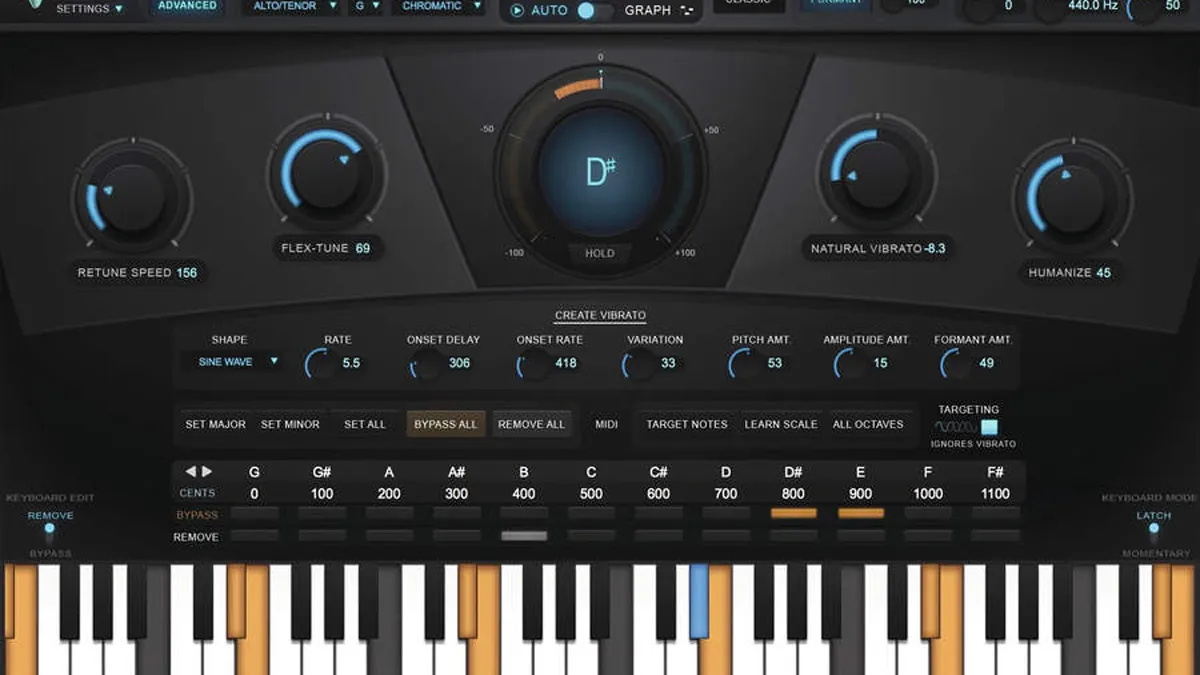
It’s operated in either of two modes: Auto and Graph, the first enabling real-time automatic re-pitching, the latter for detailed manual editing. You also get two views: Basic and Advanced. With Basic, choose a voice type, select the target key and scale, set specific pitches for removal (or leave unchanged). You can also use the Auto-Key plugin to detect the key and scale of the audio in your track, and transmit the results to all running instances of Auto-Tune.
Advanced view has a few extras like Create Vibrato, ideal for adding a bit of wobble via an LFO, plus options to set minor and major modes, edit across multiple octaves, and MIDI input editing features.
Auto-Tune Pro is the most powerful, usable incarnation of this standard yet, and easily maintains the software’s position as one of the best retuning solutions available, and may well prove to be the ultimate pitch-manipulating toolbox.
Read the full Antares Auto-Tune review
bx_crispytuner works best with bx_crispyscale (included free of charge), the latter allowing you to determine and apply a scale to the former, although crispyscale is by no means essential. Using the two in tandem, however, will allow you to apply a scale to multiple instances of crispytuner, which is great for large vocal sessions.
bx_crispytuner is very similar to Auto-Tune in that it has similar timing controls to make your tuning more natural or more synthetic. They even retail for the same price, although crispytuner is perhaps the slicker looking plugin of the two. And in terms of creating that synthetic vocal effect, it almost outdoes Auto-Tune. Subtle it isn’t, but that might be just what you are aiming for.
In order to perform this live tuning, the plugin operates with ultra low latency, so that even though the audio needs to go through your DAW and computer’s routing, it can still be monitored in real time. This means you as the singer, or your monitoring engineer, can hear what is happening as it happens and can make adjustments accordingly.
While some of the UI features are shared with Waves Tune, which is its non real-time sister plugin, the interface is somewhat more modern and slicker. It features a live tuning meter which shows the pitch as the vocal passes through, and as with Waves Tune, there are controls for Speed, Transition Tolerance and vocal Range. The central keyboard also indicates the notes of the audio passing into the plugin and here you can set the range of ‘allowed’ notes.
The Speed dial can, as with so many plugins of this ilk, be set to fast (zero) for the robotic Cher effect should you wish. Used in conjunction with the Transition dial, both can easily be used to create that effect, only this time you are doing it on live vocals. Waves Tune Real Time is therefore probably the first choice of the Waves Tune plugin range for that more unnatural effect, whereas the standard Tune will get you more natural results with ease.
You get three main modes from left to right: the main controls for Pitch and Formant, three Mode options (Transpose, Quantize and Robot) and then a Drive and Mix area. The Pitch control alters the incoming audio by semitones but the beauty of AlterBoy is that you don’t get the kind of high-pitch chipmunk effects you get with some pitch shifters – it’s a far more natural shift (unless you want to make it more extreme).
The Formant option can, again very naturally, sweep a male vocal into a female, or vice versa. It’s pretty incredible to hear it in operation because one of AlterBoy’s main attractions is the fact that it does it with no nonsense, one dial with all the science bits hidden away. It just gets on with it, with brilliant results.
The central Modes are where things get even more interesting. After a simple Transpose option, you get Quantize, where notes are forced to the nearest semi-tone for that Auto-Tune like effect. It works well and incredibly simply, although you’ll probably get more finesse and tweakability out of the real-deal Auto-Tune.
However, for no nonsense results, this is great. Finally here you also get Robot Mode, where the pitch is frozen to one note, no matter what the original input is singing. This pitch, and indeed the formant, can still be changed with the left hand dials.
Add in saturation via a Drive option and AlterBoy is a wonderful, diverse vocal tuning plugin that does the job and does it very well. Great for beginners and superb value.
Recent additions include a Melodic algorithm that allows editing of noise-based sibilants to be carried out separately from pitch-based parts. Vocal pitch editing is also now incredibly natural due to features like a Levelling Macro that balances quiet and loud elements, and even the tiniest of pitch deviations can be tweaked.
Melodyne 5 Studio offers the full panoply of multitrack polyphonic editing options, but, if you mainly work with monophonic material, the more affordable Melodyne 5 Assistant still delivers many of the essential features. Whatever version, Melodyne is powerful and remains an exceptional tool for manipulating vocals and other audio in functional and creative ways.
Read the full Melodyne 5.1 review
One of Nectar 3’s many highlights is a machine-learning driven system for automatically setting the plugin up based on analysis of the input signal. Called Vocal Assistant, it creates a custom preset to make your vocal sound objectively ‘better’ and more mix-ready.
Select Assist mode, point the algorithm in the right direction by choosing Vintage, Modern or Dialogue as the source ‘Vibes’, and Light, Moderate or Aggressive as the processing ‘Intensity’. The input signal is analysed for a few seconds, during which the modules are set up in the background to correct for dynamic fluctuations, resonant peaks, sibilance, and even adjust pitch correction and reverb mix.
In Unmask mode, Vocal Assistant clears space for the vocal by applying equalisation to any other track that’s fighting with it for space. The results are invariably well- judged and thoroughly effective, giving the vocals a perceived lift that’s almost always beneficial. This feature has also been enhanced for Nectar 3 Plus, the latest incarnation of Nectar.
With many other great features and modules plus a souped up EQ, Nectar 3 sounds incredible and flows beautifully, and we can’t recommend it highly enough to any vocal-wrangling producer. However, if you are just after simple tuning or that robotic vocal tuning effect, it may deliver much more than you need and there are cheaper alternatives out there.
Read the full iZotope Nectar 3 review
You can go from simple noise removal through harmonisers and alien effects to some of the most famous vocal tuning styles. Here you get everything from Daft Punk to T-Pain, although artists are not named directly (Bon Hiver, Duft Pank and P-Tain anyone?). Once done you can then apply some decent effects – compression, reverb and EQ – to the results for extra polish.
On top of this you get a free beat library, rudimentary multi-track recorder and the ability to import your own beats and export any creations you produce as WAV or AAC files, or share your efforts with other users.
Voloco is a huge amount of fun and also yields impressive results. It’s free but various subscriptions – up to $50 (£35 approx) a year – unlock extra import, multitrack and effect features, although what you get for free is still impressive.
APT (Automatic Performance Transfer) lies at the heart of what makes Revoice Pro so special. Having done your tuning work on the selected tracks, you simply call up the APT dialogue and select one of the presets (you can also make your own), tell it which is the guide and apply it to any track you wish to edit. This is great for backing vocals, for example, where you can add tracks and align not just the pitch and timing but also the dynamic.
Compared to the simpler plugins here, both VocAlign and Revoice Pro are perhaps aimed at the more professional user; pro producers and mixers will save countless hours in the studio with both tools. They do cost that bit more than other plugins here, so if you are just after simple tuning and the Auto-Tune effect, you will find simpler and less expensive alternatives in this guide.
The software has three core processors – Match Timing, Match Pitch and Formant Shift – each accompanied by a parameter control to determine how loose or tight the matching processing is. It has great visual feedback with the three zoomable views – waveform, pitch and signal energy – allowing you to see timing and pitch both before and after processing. The display can be used to add manual Guide/Dub sync points or establish protected areas that won’t be processed – handy for more creative applications.
You can use VocAlign Ultra without delving too deeply into the advanced features. In that respect, we managed to tighten all manner of doubled and layered vocals. The results are very impressive and in many cases pleasantly transparent. It’s also very easy to adjust the amount of timing and pitch correction, and loosening things a bit is often the key to getting the most natural results.
VocAlign Ultra is a great vocal and audio processor. It’s a bit pricey but if you do a lot of editing and aligning it will improve your productivity considerably.
Read the full Synchro Arts VocAlign Ultra review
You insert the plugin on an audio channel just like any other effect, play your audio and it will map it across a piano keyboard after scanning it. (This is as opposed to the real-time processing of Waves Tune Real Time – see above.) An orange line shows the original recording and you can then drag and drop the constituent parts onto the correct notes. Once done, a green line shows the corrected notes.
Controls allow you to select vocal type, root of the scale and scale type. There are also a couple of speed controls that determine how quickly the plugin takes effect so you can go natural or robotic, your choice.
There’s also an LT version of Waves Tune that greys out some of the features of the main plugin. It retails for less (often around £30/$37), but since the full version is usually on sale (at the time of writing just $36/£29), we’d recommend shelling out the extra on it. It does the job of tuning without any fuss and very accurately, and focusses well on natural vocal tuning – although you can get more extreme effects should you wish.
There are two knobs, Pitch and Formant, controlling the central tone of the human vocal and the resonant frequencies that shape the timbre of the vocal. A Flatten button allows you to force the input to snap to a predetermined note, a speedy tool for building up augmented choruses and harmonies.
Experiment with the modulation and automation options, and vast creative scope presents itself. Automation can be a superb way of introducing vocal effects (such as sudden pitch drops) that activate based on the volume of the input signal, so the intensity of your performance can be the triggering factor.
The aim of the game with Vocal Bender is really getting that professional-sounding vocal manipulation at speed and with no processing lag. It is certainly one of the slickest vocal plugins we’ve experimented with – best in class for quick-fire, modern pitch manipulation.
Read the full Waves Vocal Bender review
One of its big draws is that you can play the instrument with your voice, or if that is shaky, play within set pitch parameters with tuning set up for you with its Auto Pitch Tracking.
There are an incredible number of presets to get you going – over 250 covering harmonies, tuning effects, formant shifting, alien vocoder voices and more rhythmic effects. These all utilise Voice Synth’s more pro-end effects like a 24-band EQ, auto-gain compressor, 8-octave pitch shifter, arpeggiator and analogue modelling vocoders.
You certainly get a huge variation in sound and, even though it’s a decade old, Voice Synth still has a lot to say – or you can say it too with its integrated sampler. That all said, the iOS version scores much better than the full desktop Mac version on their respective App Stores, so this is a good mobile but less attractive desktop proposition.
You get 500 beats included with the app which will play in time with your vocals – yes it sorts both your timing and pitch out – and in this respect it delivers the goods fast. It’s a bit geared towards that one-trick synthetic style, with hip-hop and R&B being its focus, but it is free so well worth a download.
There is a Pro version, but at just $3.99/£3.59 it’s not much of an outlay for extra multitrack recording features, more effects and, of course, less ads.
When it comes to buying a plugin specifically for vocals (check out our guide to the best vocal plugins for more insight), you need to decide what your needs are from the many issues vocalists have. It might well be that a simple EQ is all you require, just to bolster certain frequencies to give your vocal more body, or remove mid and high frequencies to reduce overall harshness.
Some of our buying choices, particularly the mobile entries, also focus on other more out-there effects. Some of the other vocal processes you will come across in these include formant shifting, where you might turn a male voice into a female (or vice versa); harmonising or doubling, where a single voice is doubled or more to produce a group of voices singing together; and vocoding, where a standard voice becomes a more robotic voice not dissimilar to the extreme pitch and time settings in automatic tuning software.
However, aside from these more extreme vocal effects, it’s more likely that you will have tuning issues with your singing and that’s where this buyer’s guide really comes into its own. Vocal tuning is, of course, an essential application. Even if you are – or are recording – the world’s best vocalist, you or they will always have an off day, and it might not be possible to do a vocal retake. Vocal tuning applications to help tweak the vocal into tune post-recording are therefore incredibly popular, and this process can be very straightforward and transparent. You, your vocalist and audience need never know such processing has taken place.
Or you might want the opposite! You might want everyone to know just how much processing you’ve done by utilising the famous and much more obvious automatic tuning effect. The effect, made famous by Cher in the late ’90s and the producer T-Pain the 2000s, is essentially derived from the mother of all tuning plugins, Antares’ aptly named Auto-Tune. This software was originally intended simply to help vocalists or producers get voice recordings in tune.
The almost robotic-like vocal effect is produced when that (or a similar) plugin is used in a more extreme setting. Here its tuning effect – produced in Auto-Tune’s case by way of the Return Speed parameter – is at its quickest setting. It therefore retunes any incoming vocal signal at the fastest speed resulting in an inhuman effects where you can hear the jolt as it knocks the vocals in tune. You suspect that Auto-Tune was never really intended to be used at this setting on purpose but, as with many music production principles, if used at an extreme setting, happy accidents occur!
So when buying your pitch correction plugin, you simply need to decide whether you want to go natural or robotic, or would prefer a plugin that is capable of both. In our best pitch correction plugins buyer’s guide we have plugins capable of both, and some like iZotope’s Nectar that are capable of much more.
Finally, of course, decide on your desktop or mobile needs. Most of our recommendations run as third party plugins within standard Mac and PC DAWs, although we have also included app options for the mobile Android and iOS platforms. Only one, Voloco, sits in both mobile and desktop camps so could be used to transfer your mobile vocal experiments to desktop with ease.
Don’t miss the latest deals, news, reviews, features and tutorials
Andy has been writing about music production and technology for 30 years having started out on Music Technology magazine back in 1992. He has edited Future Music, Keyboard Review, MusicTech magazines and currently runs Computer Music which he helped launch back in 1998. He owns way too many synthesizers.
MusicRadar is part of Future plc, an international media group and leading digital publisher. Visit our corporate site (opens in new tab).
© Future Publishing Limited Quay House, The Ambury, Bath BA1 1UA. All rights reserved. England and Wales company registration number 2008885.
Stock Market Today: Dow, S&P Live Updates for Dec. 7 – Bloomberg
Bloomberg Surveillance: Early Edition with Francine Lacqua live from London, bringing insight on global markets and the top business stories of the day.
Overnight on Wall Street is morning in Europe. Bloomberg Daybreak Europe, anchored live from London, tracks breaking news in Europe and around the world. Markets never sleep, and neither does Bloomberg News. Monitor your investments 24 hours a day, around the clock from around the globe.
Radio personality and budding entrepreneur Angela Yee describes her youth in the New York City hip hop scene, her first radio job at Shade 45 and how she played a central role in bringing together some of the biggest names in music. In this episode, hear how Yee introduced Jay Electronica to Jay Z, why she decided to book Eminem for one of his first shows, and how she’s expanded her empire to include real estate and a new coffee venture.
China Goes All Out to Rescue Its Ailing Property Sector
Watch UK Supermarkets, Homebuilders as European Earnings Season Kicks Off
German Factory Orders Plummet as Manufacturers Under Siege
UK House Prices May Decline by 8% This Year, Halifax Says
India Central Banker Sees Inflation, Debt as Risks in Region
China May Ease ‘Three Red Lines’ Property Rules in Big Shift
British Airways Shows First New Uniform Since 2004, by Ozwald Boateng
Tesla Now Over 40% Cheaper in China Than US as Prices Cut Again
Twitter Security Headaches Mount With User Data Leak Claim
Samsung Hit by Historic Profit Fall, Spurring Capex Cut Hope
Turkey Closes in on Russia-backed Assad Deal in Blow for US
Ukraine Latest: Putin’s Cease-Fire Nears as Russian Costs Mount
The Bad News May Soon Be Over for UK Small Caps
More Americans Tap Credit Cards for Everyday Expenses
Prince Harry’s Memoir, Spare: All the Key Points and Revelations So Far
Harry Claims William Was ‘Tormented’ Over King’s Relationship With Camilla
Churchill’s Mystery-Wrapped Riddle, Updated
Meta Will Decide How Painful Its Irish Gut Punch Is
AI Is Cool But Can It Tailor a $50,000 Suit?
The World’s Love Affair With Japanese Cars Is Souring
It Takes 6,000 Gallons of Water to Cool the World’s Fastest Supercomputer
The Many Forces Fueling Tesla’s $860 Billion Tumble
Dads of Congress Turn Capitol Into Day-Care Center During Vote Marathon
Nurses at Several NYC Hospitals Prepare to Strike Next Week
Key China Coal Importer Buys Australian Cargoes as Curbs Ease
Winter Heat Wave Offers Reprieve from the Energy Crunch — For Now
Valparaiso’s Decline Leaves Unesco World Heritage Site Graffitied, Crumbling
How Formerly Incarcerated People Won Legal Protection in Atlanta
Relentless Rents Leave Few Choices for Americans Relying on Assistance
Digital Currency Group Closes Wealth Division Amid Trouble
Crypto’s Alpha Male Culture, Explained (Podcast)
What’s to Become of Miami’s “Crypto Hub” Status? (Podcast)
Rita Nazareth
Subscriber Benefit
Subscribe
Sign In
The stock market came under pressure once again, with Treasuries signaling growing concern about a recession next year amid an aggressively tight Federal Reserve policy.
In a session marked by unnerving swings in both directions, the S&P 500 suffered a fifth straight loss. Oil erased its 2022 gains on easing demand for fuels. Economic jitters were palpable among bond traders, with a key segment of the US curve reaching a four-decade extreme. Treasury 30-year yields sank to the lowest since September.
Master of Addiction Science Launches – University of Southern California
Fall 2023 Priority Deadline: Full-Time & Advanced Standing – January 23
Summer 2023 Deadline: Part-Time/Flex – February 15
Over 20 million people in the United States were diagnosed with Substance Use Disorder (SUD) in 2019, yet only 10% of these people received treatment. In 2021, an estimated 107,000 people died of drug overdoses, while every year 95,000 people are estimated to die from alcohol-related causes, making it the third-leading preventable cause of death in the U.S.
The USC Institute for Addiction Science (IAS) aims to revolutionize the way substance use is discussed, treated and prevented through a new Master of Addiction Science (MAS), the first degree of its kind to be offered at a major university, melding pharmaceutical, medicine and social work together. The new program, which recently opened enrollment for fall 2023, is a cross-disciplinary curriculum partnership between the USC Alfred E. Mann School of Pharmacy and Pharmaceutical Sciences, USC Suzanne Dworak-Peck School of Social Work, and Keck School of Medicine of USC Department of Population and Public Health Sciences.
“We’re expecting that the students who graduate from our program will be able to elevate the field, and really apply transformative change to the nature of addiction treatment in this country,” said Jennifer Lewis, associate teaching professor at the Suzanne Dworak-Peck School of Social Work and one of the collaborators in the development of the curriculum for the MAS degree. “We all need to recognize the complexity of addiction. None of us has the key to solving this tremendous social problem alone. The key is working together to make an impact.”
Treatment for addiction, like the majority of the health care system, is largely based on a siloed structure of specialists who each treat their own aspect of a patient’s addiction using only the tools within their discipline. The Master of Addiction Science seeks to create a new integrated system of care model that blends science-based disciplines together, providing practitioners with an ability to co-deliver treatment and prevention for greater impact and increased patient satisfaction, while also working closely with researchers to explore emerging scientific developments.
Students in the MAS program can choose courses spanning across 18 schools at USC, and an option to pursue clinical or research tracks. The MAS fits within USC’s priority to leverage cross-campus collaboration for both faculty and students, drawing on the strengths and perspectives of multiple disciplines to create solutions to challenging societal issues. MAS curriculum is focused on examining a wide variety of addictions — from opioids and alcohol to vaping and gambling — with myriad approaches to prevention and treatment. Students will develop the skills to translate research theory into clinical practice that is unique to an individual patient and their history, making it a true “bench to bedside” program.
“We are bridging the gap between science and practice. We’re able to bring together people who are out in the field as well as people who are in the lab and really build a conversation that makes for a better application of scientific evidence and real-world experience,” said Terry Church, assistant professor of regulatory and quality sciences at the USC Mann School of Pharmacy and one of the lead MAS curriculum architects. “For me, it’s a great place to be a scientist because it allows me to build creatively from the ideas of others. It makes for a broad view and I think that’s truly how we’re going to solve some of these larger problems in the world.”
The causes of addiction and substance use disorders are multifaceted, often interdependent and not fully understood by current scientific research. Some people may have a strong genetic predisposition to addiction, while others appear to be influenced by their environment, and still others may have developed damaging habits and behaviors over time. To address the many forms in which addiction can present, the MAS program takes a cell to society approach that spans from cellular biology to social and physical environmental factors to behavioral norms and government policies. Taken together, this allows for a more comprehensive look at addiction from many angles.
“Addiction isn’t just about neurobiology or psychology or public health or any one component, layer, or discipline,” said Jessica Barrington-Trimis, associate professor of population and public health sciences at Keck and the third member of the MAS curriculum development team. “In order to fully understand the impact of addiction and how to positively work toward reducing the epidemic of addiction, students need to understand addiction science from multiple perspectives and fields of study, from the underlying biological processes relevant to addiction to the overall impact on society.”
This cutting-edge, transdisciplinary approach to addiction science also increases the potential career paths for graduates of the MAS program, including clinical positions interacting directly with those seeking treatment, administration positions in recovery-related fields, research appointments across disciplines, and high-level policy development opportunities.
As social determinants of health (SDOH) are increasingly recognized for their influence on a variety of mental and physical health conditions, social work is a core component of health care teams providing expertise on treating individual and societal risk factors. Environment and lived experiences are both predictors associated with addiction, including the socioeconomic disparities frequently experienced by people of color and other marginalized groups. Studies show that SDOH can actually alter DNA and other core elements of physical health and development. The expertise of social workers in SDOH makes this discipline an important element in addiction prevention and treatment.
“Social work has traditionally looked at biopsychosocial or systems-dynamic approaches to problems that are more comprehensive and target multiple levels of abstraction,” said John Clapp, associate director of the Institute for Addiction Science and the Lenore Stein-Wood and William S. Wood Professor of School Behavioral Health at USC Social Work. “Historically, sociologists would have focused only on community and policy, public health would focus on macro policy and economics, and psychologists focus on the biological and behavioral parts. Social workers design interventions that meet the complexity of the problem across disciplines and from the micro to the macro.”
Social workers also bring a spectrum of services to the client relationship, doing everything from helping clients meet their essential needs such as housing and food to addressing mental health and addiction cravings using the latest evidence-based interventions. This broad skillset is particularly useful with the treatment and prevention of addiction, where the problem can be impacted by chronic environmental factors that generate further negative outcomes for an individual’s life, making an integrated, comprehensive approach essential.
“I wish there were more disciplines like social work, which is already transdisciplinary,” Church said. “For me, including social work in this degree program was very important. Their work is dedicated to really helping people get better across different aspects of their lives.”
To reference the work of our faculty online, we ask that you directly quote their work where possible and attribute it to “FACULTY NAME, a professor in the USC Suzanne Dworak-Peck School of Social Work” (LINK: https://dworakpeck.usc.edu)
© 2023 University of Southern California Suzanne Dworak-Peck School of Social Work
How to Enable “Stereo Mix” in Windows and Record Audio from Your PC – How-To Geek
Join 425,000 subscribers and get a daily digest of news, geek trivia, and our feature articles.
By submitting your email, you agree to the Terms of Use and Privacy Policy.
Nick Lewis is a staff writer for How-To Geek. He has been using computers for 20 years — tinkering with everything from the UI to the Windows registry to device firmware. Before How-To Geek, he used Python and C++ as a freelance programmer. In college, Nick made extensive use of Fortran while pursuing a physics degree. Read more…
Read more…![]()
Ever need to record something on your computer exactly as it comes out of your speakers? Enabling “Stereo Mix” will let you do exactly that, and here’s how to do it. This will work on Windows 11, Windows 10, Windows 8, and Windows 7.
Nowadays, most sound cards have the ability to record whatever is being output. The only hang-up is accessing that recording channel. Depending on your PC, the recording channel may be named “Stereo Mix,” while on other devices it will be called “What U Hear” or something very similar.
You can’t control your system’s sound devices very effectively through the sound options in the Settings app — for this, we need the old Sound settings window found in the Control Panel.
If you’re using Windows 10 or an older version of Windows, all you need to do is right-click the audio icon on your Taskbar and click “Sounds.”
The “Sounds” option isn’t available in Windows 11. Right-click the audio icon on the taskbar, then click “Sound Settings” instead.
Scroll down until you see “More Sound Settings” and click it — that button opens the legacy Sound settings window.
In the pane, right-click on a blank area, and make sure both “View Disabled Devices” and “View Disconnected Devices” options are checked. You should see a “Stereo Mix” or “What U Hear” option appear.
Right-click on “Stereo Mix” or “What U Hear,” then click “Enable” to be able to use it.
The short answer: The audio drivers for your sound card don’t support them, or your sound card itself does not support it. There usually isn’t much you can do about that, unless you happen to find a different version of the drivers that have those features, or you write your own drivers.
Stereo Mix has been going by the wayside for years and isn’t present on many newer PCs. What U Hear is more common, but it isn’t universal either — so how do you record your system audio if neither are available to you?
You need to use a third-party program. Audacity makes it easy to record the audio coming from your PC, but Open Broadcast Software (OBS) will work too.
RELATED: How to Record the Sound Coming From Your PC (Even Without Stereo Mix)
With “Stereo Mix” enabled, you can open up your favorite recording program and select that instead of your microphone before you record. If you don’t see the option, or your program doesn’t give you the ability to change the recording device, you can disable or unplug your microphone and make “Stereo Mix” or “What U Hear” the default recording device.
This works well for when you want to capture audio for a screen-sharing session or record audio from streaming sources — such as live web-casts — that don’t necessarily allow you to download content immediately.
Open up your recording application of choice (like Audacity), look around for the option to select your input device, then select “Stereo Mix” or “What U Hear” as the input. It’ll probably be selected automatically if you set Stereo Mix or What U Hear as the default device.
If you don’t have Stereo Mix, What U Hear, or something equivalent, you’ll need to use other methods to record your PC’s audio.
RELATED: How to Record the Sound Coming From Your PC (Even Without Stereo Mix)
Facebook
Instagram
Twitter
LinkedIn
RSS Feed
The Best Free Tech Newsletter Anywhere
By submitting your email, you agree to the Terms of Use and Privacy Policy.
2022 college cross country championships: Schedules, times, updates – NCAA.com
🤸♀️ Gymnastics 101: How to sound like an expert
🤩 Top freshmen in men's hoops
🏀 Providence hands UConn another L
👀 Must-see indoor T&F rivalries
Enter your information to receive emails about offers, promotions from NCAA.com and our partners
Northern Arizona and NC State won the men’s and women’s DI cross country championships, respectively. Here’s what you may have missed.
Individual
Stanford’s Charles Hicks was the first to cross the finish line in 28:43.6. Hicks took the lead over the last 2K and never looked back. Hicks set a course record with his time and became the first Cardinal runner to ever win the individual title.
Click or tap here for the complete results from the race.
Hear what Charles Hicks said after becoming the 2022 Men’s Cross Country Individual National Champion!
📺 ESPNU#NCAAXC pic.twitter.com/hBaoIPjYGQ
Team
Northern Arizona won the DI men’s cross county team title, finishing with 83 points. The Lumberjacks won a tiebreaker over Oklahoma State 3-2.
It’s the first time in DI men’s cross country history that a tiebreaker determined the national champion. The only other tie came in 1942, before a tiebreaker was established.
Northern Arizona has now three-peated, winning three titles from 2020-2022. It the second three-peat for the Lumberjacks, who three-peated from 2016-2018. Northern Arizona has won six titles in the last seven years. The only other school to achieve the feat was UTEP from 1975-1981.
Click or tap here for the complete results from the race.
Individual
NC State’s Katelyn Tuohy was the first to cross the finish line in 19:27.7. Tuohy used a final kick to surpass Florida’s Parker Valby over the final 1K and secure the win.
Click or tap here for the complete results from the race.
Team
NC State won the 2022 DI women’s cross country team title, finishing with 114 points. The win gives the Wolfpack back-to-back titles, becoming the first back-to-back DI women’s champion since 2009-2010.
NC State also is the first program since Colorado in 2018 to win both the individual and team title.
Click or tap here for the complete results from the race.
Colorado School of Mines and Adams State won the men’s and women’s DII cross country championships, respectively. Here’s what you may have missed.
Team
Colorado School of Mines won the men’s DII cross country title. The Orediggers finished with 43 points, 133 points more than Wingate in second place. It’s the first championship for the Orediggers since 2019.
Individual
Colorado School of Mines’ Dillon Powell won the men’s DII individual cross country championship in 29:28.0. Grand Valley State’s Tanner Chada finished second for the second straight year.
Click or tap here for the complete results from the race
Team
Adams State won the women’s DII cross country title. The Grizzlies finished with 75 points, 51 points more than Grand Valley State in second place.
Adams State has won three straight championships, marking the fifth time the feat has been achieved in DII women’s cross country history. Adams State has won five of the last seven championships and 22 titles total, the most in DII women’s cross country.
Individual
Adams State’s Stephanie Cotter won the women’s DII individual cross country championship in 19:45.2. Cotter becomes the ninth women to win the DII championship twice, previously winning in 2019. Winona State’s Lindsay Cunningham finished second.
Click or tap here for the complete results from the race
MIT and Johns Hopkins won the men’s and women’s DIII cross country championships, respectively. Here’s what you may have missed.
Johns Hopkins won the women’s DIII cross country title. The Blue Jays finished with 144 points, three less than second place. With the win, Johns Hopkins has back-to-back titles
Click or tap here for the complete results from the race.
Individually, Loras’ Kassie Parker finished first in 21:06.5. Parker won by 43.1 seconds for her second-consecutive cross country individual title.
MIT won the men’s DIII cross country title. The Engineers finished with 82 points, three less than second place. With the win, Johns Hopkins has won back-to-back titles
Click or tap here for the complete results from the race.
Individually, John Carroll’s Alex Phillip won in 24:37.6. Phillip repeats as national champion.
Adams State won the women’s DII cross country title. The Grizzlies finished with 75 points, 51 points more than Grand Valley State in second place.
Adams State has won three straight championships, marking the fifth time the feat has been achieved in DII women’s cross country history. Adams State has won five of the last seven championships and 22 titles total, the most in DII women’s cross country.
Adams State’s Stephanie Cotter won the women’s DII individual cross country championship in 19:45.2. Cotter becomes the ninth women to win the DII championship twice, previously winning in 2019. Winona State’s Lindsay Cunningham finished second.
Click or tap here for the complete results from the race
Adams State’s Stephanie Cotter leads the pack at the 2 Mile marker. The Grizzlies also lead the team race at this point in the race.
The DII women’s cross country championship is underway. Watch the race at the link below.
WATCH THE DII WOMEN’S CROSS COUNTRY CHAMPIONSHIP
Colorado School of Mines won the men’s DII cross country title. The Orediggers finished with 43 points, 133 points more than Wingate in second place. It’s the first championship for the Orediggers since 2019.
Colorado School of Mines’ Dillon Powell won the men’s DII individual cross country championship in 29:28.0. Grand Valley State’s Tanner Chada finished second for the second straight year.
Click or tap here for the complete results from the race
Colorado School of Mines’ Dillon Powell leads the pack at the 4 Mile marker. The Orediggers also lead the team race at this point in the race.
The DII men’s cross country championship is underway. Watch the race at the link below.
WATCH THE DII MEN’S CROSS COUNTRY CHAMPIONSHIP
The 2022 Division II men’s and women’s cross country championship races are today, Friday, Dec. 2. Seattle Pacific University will host the championships at Chambers Creek Regional Park in University Place, Wash.
The men’s race will begin at 1 p.m. ET, followed by the women’s race at 2:15 p.m. ET. Both races will be airing live on NCAA.com. We’ll also be providing live coverage here on NCAA.com.
Men’s race
Women’s race
👀: Click or tap here for the every DII XC team and individual qualifier
The NCAA Division II Men’s and Women’s Cross Country Committee has announced the participants for the 2022 NCAA Division II Men’s and Women’s Cross Country Championships.
Thirty-four teams were selected to participate in each championship. The top three, seven-person teams automatically qualified from each of the eight regions, for a total of 24 teams. Ten additional teams were selected at-large. A minimum of 24 additional individuals were selected to participate in each championship through an automatic qualifier and at-large selection process.
👀: Click or tap here for the every DII XC team and individual qualifier
The championships will be held Dec. 2 at Chambers Creek Regional Park in University Place, WA. Seattle Pacific University will serve as the host. The men’s race will begin at 1:00 p.m. Eastern, followed by the women’s race at 2:15 p.m. Eastern.
A live webstream of the championships will occur on www.NCAA.com from 1:00 p.m. Eastern until the conclusion of the awards ceremony. You’ll be able to find live results from the championships by clicking or tapping here.
The 2022 DII men’s and women’s cross country selections will be released today at 5 p.m. ET.
34 teams per gender will be selected for the championships. 24 on each side will automatically qualify (three per region, from regional championships) while the remaining 10 for each of the men’s and women’s championships will be picked at large.
When: Monday, November 21 at 5 p.m. ET
Where: NCAA.com
The championship race will be at Chambers Bay in University Place, Washington on Friday, Dec. 2. It will be streamed live on NCAA.com beginning at 1 p.m. ET for the men’s race and 2:15 p.m. ET for the women’s race.
MIT won the men’s DIII cross country title. The Engineers finished with 82 points., three less than second place. With the win, Johns Hopkins has won back-to-back titles
Click or tap here for the complete results from the race.
Individually, John Carroll’s Alex Phillip won in 24:37.6. Phillip repeats as national champion.
The DIII men’s cross country championship is underway. Watch the race at the link below.
WATCH THE DIII MEN’S CROSS COUNTRY CHAMPIONSHIP
Northern Arizona won the DI men’s cross county team title, finishing with 83 points. The Lumberjacks won a tiebreaker over Oklahoma State 3-2.
It’s the first time in DI men’s cross country history that a tiebreaker determined the national champion. The only other tie came in 1942, before a tiebreaker was established.
Northern Arizona has now three-peated, winning three titles from 2020-2022. It the second three-peat for the Lumberjacks, who three-peated from 2016-2018. Northern Arizona has won six titles in the last seven years. The only other school to achieve the feat was UTEP from 1975-1981.
Click or tap here for the complete results from the race.
Novation makes two classic synth plugins free – DJ Mag
Download the ’90s-originating Bass Station and the V-Station plugins now
Novation has made its Bass Station and V-Station classic synth plugins available for free.
Bass Station refashions the 1993 dual-oscillator hardware synth of the same name for your DAW, also comprising two digital oscillators and an analogue filter. The plugin is loaded with 100 presets, which includes those featured on the original synth.
The V-Station is an 8-voice polyphonic synth that recreates the K-Station hardware synth first released in 2002. It also uses three oscillators delivering multiple waveforms, ring modulation and FM, as well as providing effects like reverb, chorus, phaser, delay and distortion, an arpeggiator, and 200 factory presets.
Novation formed in the UK in 1992 and put themselves on the map with their second piece of hardware, the Bass Station synthesiser, in 1993. The synth was noted for bearing a sonic resemblance to the iconic Roland TB-303 and used by electronic music artists including Laurent Garnier, Massive Attack, Underworld, Orbital, Underworld, and more.
Both plugins can be downloaded from the Novation site.
Last month, Novation launched its first 88-key MIDI keyboard controller, the Launchkey 88 MIDI keyboard, which comes furnished with a semi-weighted keybed — the UK “best keybed to date” — 16 velocity-sensitive pads, eight scale types, an integrated arpeggiator with strum mode, and other features. It also integrates with Ableton Live, Logic Pro, Cubase, and other DAWs.
Thrust Publishing Ltd, Unit 3, 30-40 Underwood Street, London, N1 7JQ, United Kingdom. Tel: +44(0)7940488008
Governor Newsom Unveils New Plan to Transform Kids' Mental … – Office of Governor Gavin Newsom
Published:
In significant overhaul of state’s mental health system, Governor’s plan increases access to mental health services for all Californians ages 0-25
Master Plan for Kids’ Mental Health invests $4.7 billion to reimagine mental health and substance use services, adds 40,000 new mental health workers
FRESNO – With kids across California headed back to school, Governor Gavin Newsom today unveiled California’s Master Plan for Kids’ Mental Health to ensure all California kids, parents and communities have increased access to mental health and substance use services.
Nationally, kids are reporting symptoms of depression and anxiety at record rates and are considering or attempting suicide at historic levels. Here in California, about one-third of 7th and 9th graders and half of 11th graders experienced chronic sadness in the 2020-2021 school year and it’s estimated that 1 in 10 kids between the ages of 12 and 17 suffered from at least one major depressive episode in the last year. Suicide rates for California youth ages 10 to 18 increased by 20% from 2019 to 2020.
California is taking urgent action to address this crisis. For kids and families needing help now, some elements of the Governor’s plan are already available to all California kids, including the Children’s Mental Health Resources Hub, which offers kids and parents a central hub for a variety of resources, including several support hotlines, CalHOPE and informational guides on suicide and depression warning signs.
The Governor unveiled the plan at McLane High School in Fresno, which provides social emotional support services for students with a dedicated social emotional support staff made up of psychologists, social workers, and welfare specialists. Over the past decade, the Fresno Unified School District has increased mental health staffing from around 50 to more than 200 professionals. The Master Plan for Kids’ Mental Health provides funding to schools across the state to offer the same kind of resources McLane and Fresno Unified does.
“Mental and behavioral health is one of the greatest challenges of our time. As other states take away resources to support kids’ mental health, California is doubling down with the most significant overhaul of our mental health system in state history,” Governor Newsom said. “We’re investing billions of dollars to ensure every California child has better access to comprehensive mental health and substance use services. The Master Plan for Kids’ Mental Health is premised on a very simple belief: every single kid deserves to have their mental health supported. That’s the California Way – putting our kids first.”

Governor Newsom unveils new plan to transform kids’ mental health at McLane High School in Fresno
The Governor also signed AB 2508 by Assemblymember Sharon Quirk-Silva (D-Fullerton) to better define the role of school counselors that recognizes the importance of access to mental health.
Over the last three years, California has launched an historic overhaul of the state’s mental health system – investing $4.7 billion to boost coverage options and public awareness so all children and youth are routinely screened, supported, and served. The funding creates new virtual platforms and establishes a new pipeline for the mental health workforce, adding 40,000 new mental health workers in the state.
Other investments include:
“As a parent, there’s nothing worse than seeing your child in pain and feeling powerless to help. And that’s the case for far too many families around the country with children struggling with serious issues such as depression and anxiety without access to the care they need,” said First Partner Jennifer Siebel Newsom. “In California, we take the mental health and wellbeing of our children seriously, and we’re tackling this problem head-on with significant investments in the infrastructure of the state’s mental health system. And for those looking for support today, California’s mental health resource hub for youth is connecting parents, caregivers, educators, and children with the resources and support kids need to improve their mental health and build healthy wellness habits and practices that will help them thrive.”
“I truly believe every student would benefit from a connection with a mental health counselor and I am hopeful we will continue to see a positive change from investments in social emotional support for our students and I know Governor Gavin Newsom can provide students with the much needed resources to successfully navigate life,” said Aliyah Barajas, a senior at McLane High School.
Governor Newsom unveils new plan to transform kids’ mental health at McLane High School in Fresno
The Master Plan for Kids’ Mental Health outlines action across three key pillars:
The plan announced today will make it easier than ever before for kids to access critical mental health and substance use services – in their schools, in their homes and in their communities. Read the full Master Plan for Kids’ Mental Health here.
If you or a friend or loved one is having suicidal thoughts, call the National Suicide Prevention Lifeline: call or text 988 or chat at 988lifeline.org/.
# # #
Copyright 2023 State of California
Wholegrain Digital Systems Bringing Top Engineers to Talk About … – Mix
Update your browser to view this website correctly. Update my browser now
×
Home Events
Tom Marks, CAS (Re-Recording Mixer); Jason LaRocca (Scoring Mixer); Alfredo Pasquel (Music Editor, Mixer); and Thor Legvold (Sonovo Mastering) will appear at Wholegrain Digital Systems’ ‘Using Dynamic Parametric EQ to Tame Large-Scale Mixing Projects’ panel.
By Mix Staff
Following up on his success at the Mix Immersive Music event at Power Station/Berklee NYC in August, Duane Wise, founder of Wholegrain Digital Systems and creator of the DynPEQ family of plug-ins, brings his roadshow to Mix Presents Sound for Film & Television, to be held Saturday, September 24, at Host Partner Sony Pictures Studios.
As part of the program, Wholegrain will host an expert panel of top mixing, scoring, mastering and re-recording engineers, discussing the use of EQ in taming large-scale mixing projects.
“Duane is a great guy with a great product, one that has caught on with some of the top ears in professional audio, including a bunch of scoring engineers,” said Tom Kenny, co-editor of Mix. “He represents that boutique side of our manufacturing community, which is really the lifeblood of technological development. A small shop with a big product. We’re excited that he gets a chance to address the sound for film and television audience.”
The Wholegrain Digital Systems panel will take place at 12:30 p.m. in the Burt Lancaster Theater. The topic of discussion and panelists are:
Using Dynamic Parametric EQ to Tame Large-Scale Mixing Projects
The panel session concerns using dynamic parametric equalization, manifest in the DynPEQ family of plug-ins, to allow the mixing engineer to produce better results faster. In addition to its application to acoustic correction, DynPEQ can be used akin to an arbiter in large-scale mixes, modulating groups when the overall mix gets dense and competitive. What’s more, the analog peak limiter in Quartet DynPEQ allows for extra headroom while avoiding distortion.
Moderator: Tony Cariddi
Panelists: Thor Legvold (Sonovo Mastering); Jason LaRocca (Scoring Mixer); Tom Marks, CAS (Re-Recording Mixer); Alfredo Pasquel (Music Editor, Mixer)
For more program information, and to register, visit the Mix Presents Sound for Film & TV website.
For sponsorship information, contact Mix Publisher Janis Crowley.
Mix Staff
alfredo pasquel ⋅ Jason LaRocca ⋅ Mix ⋅ Mix sound for film ⋅ thor legvold ⋅ Tom Marks ⋅ Wholegrain Digital Systems
© 2023 MIX is part of Future plc, an international media group and leading digital publisher. Visit our corporate site.
High demand for studio, one-bedroom rentals causing spike in … – QNS
A StreetEasy report, released on Wednesday, Nov. 16, reveals that Queens renters are prioritizing finding their own place — even if it means paying higher rents.
Renter demand for studio and one-bedroom apartments in Queens is now up more than 150% since January 2021, when renter demand in Queens hit the bottom, StreetEasy economist Kenny Lee told QNS.
Lee suggests that the increased demand for studio and one-bedrooms might be due to the rising number of New Yorkers who are working from home.
“Many are looking to move further [from Manhattan] in search for better prices,” Lee said. “Queens has experienced a decline in availability of studio and one-bedrooms as a result of the migration.”
With New Yorkers working from home, there are no ties to a particular neighborhood. As a result, StreetEasy’s data suggests that many are migrating to Queens, causing a decline in availability for studios and one-bedrooms and an increase in prices.
“Overall renter demand in Queens has really surged through the pandemic,” Lee added. “Renters in the city are trying to be as flexible as possible in search for affordability.”
Demand for two-or-more-bedroom housing has softened after the peak of the pandemic.
“It’s really surprising to us,” Lee said. “When rents rise quickly, renters are more likely to pair up, but that has not been happening in the city at all.”
In October, studio and one-bedroom listings received 100% more inquiries on average than in January 2021, and 1.5 times more inquiries than listings with two or more bedrooms. The demand for listings with two or more bedrooms has cooled since this summer, though is still up 62% from January 2021.
Post an Event
View All Events…
Subscribe
Keep up with all the latest from your borough.
New Year's Eve Celebration Coming to Universal Studios Florida – WDW News Today
A New Year’s Eve celebration will happen at Universal Studios Florida this year. December 31 will have a celebration similar to the July 4 celebration earlier this year. Accordingly, the theme park hours for December 31 have been extended until 1:00 a.m. at Universal Studios Florida.
Though Universal Orlando has not made a formal announcement of a New Year’s Eve celebration yet, they did divulge details in a comment on social media. This celebration will happen from 6:15 p.m. until 1:00 a.m. in the Music Plaza of Universal Studios Florida.
Like the July 4th event, a high energy band will perform. Special character interactions will be available. Being a New Year’s Eve event, the night will climax with a special countdown and brief pyrotechnics display at midnight. Guest should be aware, based on Universal Orlando’s location within the city of Orlando, that only a limited fireworks display will happen.
Universal Orlando used to hold a special paid New Year’s Eve event in the CityWalk area. Since the theme parks shut down for several months in 2020, that event has not returned. Things have slowly been returning to normal regarding special events at Universal Orlando. Also in the past, the park has had a special New Year’s Eve lagoon show, but it’s been several years and based on the 4th of July activities, we don’t expect it to return.
This New Year’s Eve event will be included with the price of regular admission to Universal Studios Florida.
Speaking of special entertainment included with the price of regular admission, the Universal Orlando holiday festivities will still be happening on December 31. The holiday celebration runs through January 1, 2023. Guests could attend the New Year’s Eve event and still enjoy the Christmas activities.
During the holiday celebration at Universal Orlando, guests can see a holiday parade, tour the Tribute Store, see all the Grinchmas activities, and even enjoy the nighttime holiday light show on Hogwarts Castle with standard theme park admission to both theme parks. We have created a complete guide to the Universal Orlando holidays if you are interested in more information about those activities.
Will you be kicking off the New Year at Universal Studios Florida? If so, please let us know what you are most excited to experience in the comment below.
For more Universal Studios news from around the world, follow Universal Parks News Today on Twitter, Facebook, and Instagram. For Disney Parks news, visit WDWNT.
Previous
This site uses Akismet to reduce spam. Learn how your comment data is processed.
All times are Eastern (ET)
These Washington music production programs can help take your … – Dance Music Northwest
Subscribe
Uniting Souls Music delivers ‘Half Light Sway’ remix EP to close out 2022
Seven Lions sets date for release of long-awaited debut album ‘Beyond The Veil’
Kai Wachi releases heavy yet heartfelt EP ‘Skins’
Scumz begins Titans tour at Stage Seattle
Seattle’s Faraday brings cutting-edge production across the PNW (Local Spotlight)
GRiZ announced as first major headliner for Shambhala 2023
Ultra Miami drops star-studded Phase 2 lineup
The Finale: Get LOST for the final time this Saturday
C89.5’s ‘Music’s in our Blood’ Drive: Give blood, do good, see Sofi Tukker
DanceSafe releases significantly improved fentanyl test strips
Portland’s Moonlight Masquerade New Year’s Eve 2023 packs an elite lineup
CRSSD Festival promises vibes and smiles with stacked 2023 Spring lineup
Seven Lions will kick off upcoming ‘Beyond The Veil’ Tour in the PNW
Here’s your last-minute guide to New Year’s Eve events in Seattle
Contact Music Festival returns to B.C. with a 2023 lineup that’s better than ever [Artist Guide]
Tips for keeping yourself safe from theft at music festivals
MDLBeast, a music collective in Saudi Arabia, is uplifting EDM culture in the Middle East
Grooving for Good mental health nonprofit initiative kicks off at UW
An important conversation about hearing loss
Beat the cold in line for shows this winter with these helpful tips
Looking back on a decade to remember with the Pacific Northwest’s own ODESZA
DMNW Spotlight: Mahalo Promotions coming back strong after the return of live music
Music Rights 101: What you need to know about licensing your music rights to a label
C89.5 celebrates 50 years as Seattle’s unstoppable home for dance
The Dance Music Northwest team picks their favorite albums of 2021
A look behind the lens with Seattle photographer Kainalu Ramos
The art of listening to the listener at C89.5: A conversation with Program Director Ron Chatman
Seattle VJ Jayson Esguerra on his origin story, working with G Jones, and his plans for the future
A conversation with Erica Opsvig & Sean Fischer, up-and-coming creators of Seattle’s Duck Brunch and Plamphaus
DMNW sits down with talented turntablist DJ Mixxtress
The Seattle Electronic Music Producers Association is helping elevate local producers’ sounds
These Washington music production programs can help take your career to the next level
DMNW Interview: Anjunadeep’s Enamour talks music gear and production before Ora show
Apple Music launches Dolby Atmos-powered ‘Spatial Audio’ along with lossless tier
Antelope Audio launches Zen Q Synergy Core 14 x 10 bus-powered portable audio interface
Production
Production
Production
Production
Production
By
on
If you are looking to expand your knowledge of the music business, audio engineering, or EDM production Washington state is an excellent place to be. This list of programs in the state are excellent options to explore if you’re interested in getting a degree or certificate in music disciplines.
Bachelor Degrees:
Certificate Programs:
Associate Degrees:
Certificates:
Bachelor Degrees:
Have you attended one of these music programs or another? What was it like? Let us know in the comments, or on social media!
Important things happen in Pacific Northwest nightlife, and DMNW will send you alerts!
Your email address will not be published.
The Seattle Electronic Music Producers Association is helping elevate local producers’ sounds
Antelope Audio launches Zen Q Synergy Core 14 x 10 bus-powered portable audio interface
FabFilter Saturn 2 review: One of our favorite production plugins of 2020
The Battle of the UAD Tube Channel Strips: Avalon vs. Manley
Important things happen in Pacific Northwest nightlife, and DMNW will send you alerts!
Founded in 2013. © 2021 Dance Music Northwest, LLC.
Important things happen in Pacific Northwest nightlife, and DMNW will send you alerts!
Ancient Egyptian mummification was never intended to preserve … – Livescience.com
When you purchase through links on our site, we may earn an affiliate commission. Here’s how it works.
It’s long been believed that mummification was meant to preserve the dead. It turns out that notion is dead wrong.
It’s long been believed that ancient Egyptians used mummification as a way to preserve a body after death. However, an upcoming museum exhibition indicates that was never the case, and instead the elaborate burial technique was actually a way to guide the deceased toward divinity.
Researchers from the University of Manchester’s Manchester Museum (opens in new tab) in England are highlighting the common misconception as part of preparations for an exhibition called “Golden Mummies of Egypt” that opens early next year. This new understanding about mummification’s intended purpose essentially upends much of what is taught to students about mummies.
“It’s a big 180,” Campbell Price (opens in new tab), the museum’s curator of Egypt and Sudan, told Live Science.
So, how exactly did this misconception flourish for so long? Price said the Western-led idea began with Victorian researchers who wrongly determined that ancient Egyptians were preserving their dead in a similar fashion as one would preserve fish. Their reasoning? Both processes contained a similar ingredient: salt.
“The idea was that you preserve fish to eat at some future time,” Price said. “So, they assumed that what was being done to the human body was the same as the treatment for fish.”
Related: Hundreds of mummies and pyramid of an unknown queen unearthed near King Tut’s tomb
However, the salty substance used by ancient Egyptians differed from salt used to preserve the catch of the day. Known as natron (opens in new tab), this naturally occurring mineral (a blend of sodium carbonate, sodium bicarbonate, sodium chloride and sodium sulfate) was abundant around lake beds near the Nile and served as a key ingredient in mummification.
“We also know that natron was used in temple rituals [and applied to] the statues of gods,” Price said. “It was used for cleansing.”
Price said that another material commonly associated with mummies is incense, which also served as a gift to the gods.
“Look at frankincense and myrrh — they’re in the Christian story of Jesus and were gifts from the three wise men,” Price said. “In ancient Egyptian history, we’ve found that they were also appropriate gifts for a god.”
Like Egyptians, Victorian Egyptologists also believed that the deceased would need their bodies in the afterlife, which added more credence to the misunderstanding of mummification.
“It didn’t help that there was a biomedical obsession that was born from Victorian ideas about needing your body complete in the afterlife,” Price said. “This included removing the internal organs. I think that actually has a somewhat deeper meaning…and is basically about turning the body into a divine statue because the dead person has been transformed.”
Archaeologists often find mummies placed with a sarcophagus that shows the likeness of the deceased.
—Protective childbirth tattoos found on ancient Egyptian mummies
—Why did people start eating Egyptian mummies?
—7 famous mummies and secrets they’ve revealed about the ancient world
“In English, a mask is something that obscures your identification; a portrait reveals identity,” Price said. “Those objects, panels and masks give an idealized image to the divine form.”
As part of the exhibition, the museum will display a number of burial masks, panel portraits and sarcophagi associated with ancient Egyptian burials, offering further proof of the original intentions of mummification.
“Golden Mummies of Egypt” will be on display at the Manchester Museum beginning Feb. 18, 2023. The museum has also published a book (opens in new tab) with the same title written by Price to accompany the upcoming exhibition.
Jennifer Nalewicki is a Salt Lake City-based journalist whose work has been featured in The New York Times, Smithsonian Magazine, Scientific American, Popular Mechanics and more. She covers several science topics from planet Earth to paleontology and archaeology to health and culture. Prior to freelancing, Jennifer was a reporter at Interior Design Magazine, and before that she held an Editor role at Time Inc. Jennifer has a bachelor’s degree in Journalism from The University of Texas at Austin.
Live Science is part of Future US Inc, an international media group and leading digital publisher. Visit our corporate site (opens in new tab).
© Future US, Inc. Full 7th Floor, 130 West 42nd Street, New York, NY 10036.