Digital Audio Workstation (DAWs) Market : Industry Analysis, Size … – Digital Journal
Hi, what are you looking for?
By
Published
Global Digital Audio Workstation (DAWs) Market Outlook (2022-2032)
A reliable Digital Audio Workstation (DAWs) market report provides a market overview in terms of general market conditions, market improvement, market scenarios, development, cost, and profit of the specified market regions, as well as position and comparative pricing among major players. The report includes market drivers and constraints derived from a SWOT analysis. This finest market research report is framed with the expert team by working with a number of steps of collecting and analysing market data. The large-scale Digital Audio Workstation (DAWs) report includes various segments related to the QMI industry and market, as well as extensive research and analysis.
Download FREE Sample of This Strategic Report: https://www.quincemarketinsights.com/request-sample-11886
Principal attributes such as highest level of spirit, practical solutions, dedicated research and analysis, innovation, talent solutions, integrated approaches, most advanced technology, and commitment play a key role in producing such excellent Digital Audio Workstation (DAWs) market research report. A team of researchers, analysts, and industry experts worked meticulously to create this market report by thinking from the perspective of the customer. Furthermore, the statistical data covered in this report is interpreted using well-known tools such as SWOT analysis and Porter’s Five Forces Analysis. For the clients, Digital Audio Workstation (DAWs) is the most promising and appropriate market research report.
The Key Players in this market are:
Apple (GarageBand), Fl Studio, Reaper, Ableton Live, ADK Pro Audio, TC Works, and Sonic Foundry
Segmentations Covered in the Report:
The Digital Audio Workstation (DAWs) market research report includes specific segments by region (country), company, type, and application. Thorough information on new products, and regional and market investments is provided in the report. Digital Audio Workstation (DAWs) market research report also tracks future technologies and developments. The report also contains the most recent market dynamics, like driving factors, restraining factors, and industry news like mergers, acquisitions, and investments. This provides an analysis of the latest industry trends in each of the sub-segments from 2022 to 2032.
By Output Type (Audio ,Video), By Type (Dedicated Hardware, Software Systems), By End-Use Industry (Music Industry, Education, Enterprises, Others)
Regional Digital Audio Workstation (DAWs) Market (Regional Output, Demand & Forecast by Countries):-
Each of the regional market segments is analyzed and studied in the sense of the major regional spectrum of market reach in the market report. The study also provides a comprehensive overview of key insights, such as import, export, development, demand, and consumption.
➸ North America (United States, Canada)
➸ Asia Pacific (China, Japan, India, South Korea, Australia, Indonesia, and Others)
➸ Europe (Germany, France, United Kingdom, Italy, Spain, Russia, and Others)
➸ Latin America (Brazil, Mexico, Others)
➸ The Middle East and Africa
Major Points Covered in TOC: Market Overview: It incorporates six sections, research scope, significant makers covered, market fragments by type, Digital Audio Workstation (DAWs) market portions by application, study goals, and years considered.
Market Landscape: Here, the opposition in the Worldwide Digital Audio Workstation (DAWs) Market is dissected, by value, income, market rate, circumstances Landscape, and most recent patterns, consolidation, development, obtaining, and portions of the overall industry of top organizations.
Profiles of Manufacturers: Here, driving players of the worldwide Digital Audio Workstation (DAWs) market are considered dependent on deals region, key items, and creation.
Market Status and Outlook by Region: In this segment, the report examines a portion of the overall industry, CAGR, and market size by locale. Here, the worldwide Digital Audio Workstation (DAWs) Market is profoundly examined based on areas and nations like North America, Europe, China, India, Japan, and the MEA.
Application or End User: This segment of the exploration study shows how extraordinary end-client/application sections add to the worldwide Digital Audio Workstation (DAWs) Market.
Market Forecast: Production Side: In this piece of the report, key makers gauge, and creation and estimation by type.
Research Findings and Conclusion: This is one of the last segments of the report where the discoveries of the investigators and the finish of the exploration study are given.
Major Reasons for Buying this Report: It provides niche insights for the decision about every possible segment helping in the strategic decision-making process.
Market size estimation of the Digital Audio Workstation (DAWs) Market on a regional and global basis.
A unique research design for market size estimation and forecast from 2022 to 2032.
Identification of major companies operating in the market with related developments.
Exhaustive scope to cover all the possible segments helping every stakeholder in the Digital Audio Workstation (DAWs) market.
Frequently Asked Questions (FAQ)?
Q1. What are the applications of the Digital Audio Workstation (DAWs) Market?
Q2. Who are the potential customers of the Market?
Q3. How can I get a report sample of the Market?
Q4. What are the key trends in the Market?
Q5. Who are the leading players in the Market?
Q6. How can I get statistical data on the top market players in the Market?
Q7. Which segment holds the maximum share of the Market?
Q8. What is the total market value of the Market?
Q9. What is the CAGR of the Market?
Q10. Which region will provide more business opportunities for Digital Audio Workstation (DAWs) Market in the coming years?
Do you have any queries or specific requirements? Ask our industry expert: https://www.quincemarketinsights.com/enquiry-before-buying/enquiry-before-buying-11886
✦ Contact Us:
Quince Market Insights
 U.S.A: +1-208-405-2835
UK: +44-1444-39-0986
APAC: +91-7066724343
 Email: [email protected]
India’s Gautam Adani is the world’s third-richest person, and is seen as a close acolyte of Hindu nationalist Prime Minister Narendra Modi – Copyright…
Taiwanese tech giant TSMC said it has started mass production of its 3-nanometre chips, among the most advanced to come to market.
The fortunes of Silicon Valley billionaires took a beating in 2022 as share prices of the world’s tech giants plummeted.
Micromanagement can have huge implications that can drive employees away. It can limit creativity and signal a lack of trust.
COPYRIGHT © 1998 – 2022 DIGITAL JOURNAL INC. Sitemaps: XML / News . Digital Journal is not responsible for the content of external sites. Read more about our external linking.
Critical Music Review Club hopes to demonstrate the power of … – The Sagamore
Geo Elasmar, Staff WriterNovember 29, 2022
GRAPHIC BY GEO ELASMAR
Created this fall, the Critical Music Review Club allows students to immerse themselves in the world of music production.
What makes a song good?
Though multidimensional by nature, this question is debated every X-block by the Critical Music Review Club. The new club focuses on looking into several aspects of songs and albums, grading them and writing thorough reviews.
Club leaders and seniors Sheejin Choi, Rohan Sekhar and Leo Wu-Hacohen are ardent music lovers. They founded the club this fall to feed their musical passion.
Wu-Hacohen said they started the club to take their love of music to the next level.
“I think all of us, we’ve all been avid music listeners for our whole life and talked about it all the time,” Wu-Hacohen said. “We’ve always seen people review music and we’re just like we can do that too.”
“We’ve always seen other people review music, and we thought, we can definitely do that too,” Wu-Hacohen said.
During a typical meeting, the group pitches ideas, listens to their chosen albums and then begins the reviewing process.
According to Sekhar, uncovering the hidden layers of a song or album leads to a deeper understanding of the artist’s intention.
“Like any other form of artistic expression, with music there’s always an inexplicit layer from the artist that’s intended to be consumed,” Sekhar said. “We’re trying to explore that and convey it to people who may not have discovered it already.”
The club also examines other elements of songs and albums. To Sekhar, production, lyricism, instrumentation and rhythm are most important.
When reviewing, the club members concentrate on every note, beat and lyric to capture the music’s essence entirely. Choi, a cellist, has experience with this firsthand.
“As an artist, I know how much expression goes into art,” Choi said. “A lot of musicians add tiny, specific details and, while you might catch them listening casually, investing time to listen to, dissect and review the music will help you understand them more completely.”
Once a review is finalized, a sense of accomplishment washes over the reviewer and all club members. Choi said that the outcome of their lengthy review process is what makes it all worth it.
“My favorite part has been putting out an actual, tangible product,” Choi said. “There’s something really rewarding and satisfying about that.”
Wu-Hacohen and the club leaders hope to develop as a music listeners, writers, critical thinkers and most importantly demonstrate the power of music to all of the high school.
“We’re a group of people who love music,” Wu-Hacohen said, “We just want to share our love for music with everyone out there.”
The Critical Music Review club welcomes suggestions. If anyone has an album they would like the club to review, visit their Instagram page: @ bhscriticalmusicclub.
Club Features
News
Club Features
New Economics Club prepares students for financial success
Club Features
Invest in Girls markets financial literacy
Club Features
SEE club works to create the culture they want to see
Club Features
New club invites female students to explore computer science
Club Features
Quiz Bowl Club aims to compete in the National Academic Quiz Tournament
Club Features
Latin Club enriches students on Latin culture
Club Features
Red Cross Club gives students the opportunity to give back
Club Features
Habitat for Humanity Club plans to build affordable housing
Club Features
Business club uses stickers to train members
Club Features
Medical Equity Club involves members in the medical field
Your email address will not be published.
DJ Khaled Faces Backlash for Resurfaced Interview Saying … – XXLMAG.COM
An interview of DJ Khaled making a stance against producers' use of digital audio workstations like FL Studio and Logic has resurfaced and has the We the Best boss facing backlash.
On Nov. 26, Twitter user jordonlumley shared a snippet from a DJ Khaled interview on Hot 97 from 2015. During the clip, the God Did curator took a hard stance against beat makers who choose to use certain production programs.
"Producing changed. They made Logic. They made FruityLoops," DJ Khaled said, referring to FL Studio's former name. "It's called, too easy. It's called, you tell a computer what to program. That's why you see everybody is a producer and a DJ now."
He added, "But it takes a great producer like me to [say], 'Them sounds is garbage. They're fake. Don't fall for the trap.'"
Lumley asked people to weigh in prompting, "How you feel about this?"
"I produced 'theraflu' and 'wish you would' for khaled and kanye fully off FL studio," Grammy-winning producer Hit-Boy tweeted in reference to DJ Khaled's old comments on Monday (Nov. 28).
While Hit-Boy's response was more of a revelation, producer Cardo had a more pointed reply.
"Nigga shut up," he tweeted in response to the Khaled video. "He don’t know shit he talking about."
Khaled also got shots from budding beat makers as well.
"@djkhaled FUCK U BRUH!!!" another producer snapped. "I work HARD AS FUCK on FL STUDIO!!! Don’t slight mfs bcuz YOU have all the resources us SMALL PRODUCERS DONT!!! BITCH ASS NIGGA!!!!"
Many well-known producers use FL Studio and Logic to make beats including 9th Wonder, TM88, Pi'erre Bourne, Lex Luger, Boi-1da and many more. As previously stated, Khaled's own albums contain beats made with FL Studio. Maybe he's had a change of heart since then.

The Groundbreaking Software That Helps Matthew Whitaker … – Popular Mechanics

The Groundbreaking Software That Helps Matthew Whitaker … Popular Mechanics
source
The 5 pieces of kit every hardware musician needs, according to an … – Mixmag

Trying to set up a studio and don't know where to start? We sat down with Reverb's production expert Fess Grandiose to work out the fundamentals
So you’ve been creating tracks on your laptop for a while, but you’re wondering what all the fuss is about with music production hardware? Well, fear not, we’ve enlisted the help of music kit marketplace Reverb’s very own production expert Fess Grandiose to chat through how to get started with your very own home studio.
First of all, why switch to hardware? Modern Digital Audio Workstations (DAWs) are capable of doing just about everything the traditional hardware set-up can do. Brands such as Roland, Korg, Pioneer and Moog have even started to release digital plugins that allow the recreation of their hardware in a digital format. “Honestly it makes us more creative when we have limitations I think,” Fess says.
“When you’re producing on the computer you’re using the same thing you make calls on, write emails or check your social media. As it turns out, those things can be distractors towards your creative process. The cool thing about hardware is that you can take a break — some pieces now are even battery powered — so you can get on a couch and just write some tracks, it’s a far more tactile way of producing music.”
“I’m definitely speaking from experience as somebody that has done this transition. I started out like most producing in software, by circumstance, it was all I could afford. But then when I became able to afford hardware, I was still primarily choosing the software route just because of its convenience. Then all of a sudden, I got my first Akai MPC — my creative output started to really change.”
Read this next: Here’s a list of all the gear Daft Punk used to make ‘Homework’
Of course, affordability and sustainability are massive factors that would deter many a budding producer from making the switch. Reverb provides a great solution. Started as an online marketplace for music-specific kit — Reverb has a massive array of studio products to match every price range, made up of mostly second-hand pieces sold from buyer to seller. Firstly allowing first-time hardware producers to have the opportunity to test out kit, and sell it risk-free if it isn’t right for them — and ensure music production equipment doesn’t end up in landfill, by providing a great space to make use of older pieces.
“It makes it easier for music makers to do their bit when they are using this marketplace model,” Fess says, “In addition to that, you’re able to get your hands on something that probably isn’t made anymore, but also offers something a bit different than what most modern gear offers now. The old way used to be this cyclical nature of musicians buying and selling used gear, and it’s naturally sustainable — that’s really cool. There are already a million synthesisers in this world already, so why do you need a new one?”
We asked Fess to narrow down five essential pieces of kit to help you get started as a hardware musician, check them out below.
“If you’re making that transition from software to hardware — or coming from the ‘box’ as we say here at Reverb,” Fess says “groove boxes are a great way to start.” Instead of purchasing individual pieces of kit: such as a sequencer, a drum machine or a synthesiser, a groove box provides access to these all in one product. “Groove boxes offer you tonnes of sound choices and instrument choices within the actual gear itself. You’re not limited to having a synthesiser that can only play monophonic leads for example. Also, you’re getting a sampler that can sample whatever sounds you want to with a synth engine that has cool sequencing tools — a big help if you’re not familiar with music theory,” Fess continues.
The advantage of the groovebox is it provides an easy transition for those who are using DAWs and more combined computer software — providing a cheap way to create entire tracks with just one piece of kit. Despite pre-dating the more modern methods of creating electronic sounds — we’re looking at you Roland MC 202 — Fess tells us there’s never been a better time to get into using a groovebox.
Read this next: 5 of the best new hardware effects
“Grooveboxes are at their highest point right now in terms of development, they’ve never been better — there are lots to choose from, that can help complete beginners manoeuvre around and be able to make fully realised pieces of music.”
We recommend this Roland MC-101 Groovebox, available for £411
Similarly to the groovebox, a production station — like the Akai MPC — gives you access to a range of kit, with the exception of the inclusion of a synthesiser. But what a production station lacks in synth it makes up for wholly with its ability to intricately layer multiple samples throughout your productions.
“You can add drums and other types of organic sounds and arrange those into full tracks” Fess says, “Usually with production stations the big advantage over say, a groovebox, is that it gives you the ability to in one piece of kit actually arrange and create full tracks — rather than just elements of tracks. You’ve got the ability in one piece of kit to mix, create beats, add samples and sew it all together neatly.”
We recommend this Akai MPC One Standalone Music Production Centre/Sampler, available for £589
Now we’re in the big leagues. For those wanting to really make the transition, look no further than a MIDI keyboard — and feel the music being made under your fingertips. “I think for people who want that real tactile experience you can’t really beat a MIDI keyboard — or a MIDI pad bass controller,” says Fess.
If you’ve only ever made music on a computer, the chance is looking at the ivory-painted keys of a MIDI keyboard may seem quite daunting — but most are now designed with digital connectivity in mind, allowing buyers to really mix between a traditional set-up and more modern possibilities.
Read this next: 5 best beginner synths
“It’s a real shot at the hardware experience. If you try out on a MIDI keyboard then you’ll have a lot more of a sense of if you want to push it to maybe looking into synthesisers or something more advanced. There are so many price points and so many different offerings that will give you an ability to arrange and record and loop.”
We recommend this Arturia KeyLab Essential 49 MIDI Controller, available for £164.99 and this Novation Launchpad X Ableton USB Controller available for £159.
An “essential” that is commonly overlooked, according to Fess, is to invest in a quality pair of studio monitors. “It pains me when I hear people say they’ve produced entire tracks using earpods… you need a real solid pair of monitors so you can actually hear the flow, and any discrepancies, within your tracks. When you build up experience with mixing and understanding what you want your music to sound like, you realize actually speakers are probably the most useful part of your set-up.”
Fess says the good thing about monitors is that they usually keep their value, “you can just resell them if you don’t need them anymore, they will always be valuable and useful — people will always buy Yamahas and you’ll get good mileage out of them.”
We recommend these Yamaha HS5 5″ Powered Studio Monitors, available for £297.97
Finally, Fess says, if you’re going to invest in good audio equipment — then you should get yourself an audio interface. This nifty bit of kit converts microphone, speaker and instrument signals into formats your PC and any software on it will recognise… gone are the days having to manually convert audio files into something you can use.
“it just completely changes the way you work,” says Fess. “Once you have an audio interface, if you have any piece of hardware you can fully intergrate everything you’re doing. I would say the audio interface and your monitors are really the beating heart of most home studios. If you have those two —whether you’re recording vocals, or whether you’re plugging in hardware into that working with a beat with a digital audio workstation — you’re already well on your way to being able to create full pieces of music and release them to the world.
We recommend this Focusrite Scarlett 2i2 USB Audio Interface, 3rd Gen, available for £134.99
For more of the very best deals on music-making hardware — head to reverb.com/uk/
A weekly rundown of everything you need to know in music and culture
Mixmag will use the information you provide to send you the Mixmag newsletter using Mailchimp as our marketing platform. You can change your mind at any time by clicking the unsubscribe link in the footer of any email you receive from us. By clicking sign me up you agree that we may process your information in accordance with our privacy policy. Learn more about Mailchimp’s privacy practices here.
Diddy and Dr. Dre Reunite in Studio—“One of My Biggest Dreams … – American Songwriter

Diddy and Dr. Dre Reunite in Studio—“One of My Biggest Dreams … American Songwriter
source
Top 10 free drum VST plugins 2022: comparing the best software … – RouteNote
Drum software plugins let you escape the limitations of stock drums in your DAW which can vary in quality between different DAW software.
So it’s time we take a look at some free VST drum plugins. Then you can determine which free drum VST plugins will best suit your musical style based on how much experience you have with music production.
After comparing numerous VST drums, we created a list of the top drum plugins for Windows & Mac that you can download for free:
Predominantly geared for hip-hop drums, the Line of Legends drum plugin is probably the most accessible drum VST there is.
Its simple interface gives you instant access to drum and percussion sounds like a kick, snare, clap, click, tom, hi-hat, and crash hat, each with its own outputs.
You’ll get 47 professional-quality samples across these eight channels, and controls for attack, release and panning are available. While some of the samples sound better than others, this drum VST plugin is highly configurable for a variety of needs.
As a result, we think it’s the best free drum VST plugin for beginners.
Sennheiser DrumMic’a is a free drum VST plugin with over 13,000 pre-recorded samples. High-end studio microphones captured each sample while professional drummers made the noise.
You can customize the position of the microphones in the DrumMic’a VST plugin and choose between different microphones on each drum head too!
Mixer controls allow you to adjust the level of each drum, and the channel strips feature an EQ, a transient shaper, and a compressor. But more effects include reverb, delay, and panning!
You can also adjust the velocity of each drum head and map the kit to your MIDI controller.
In short, Sennheiser DrumMic’a is a great drum kit VST if you’re a user of Native Instruments’s Kontakt virtual instrument.
Though it’s a Mac-only plugin (AU plugin format), Mini Spillage is a resourceful freeware drum synth that PC users will miss in their plugin arsenal.
Mini Spillage is a trimmed-down version of a paid drum synth – DrumSpillage ($75).
But Mini Spillage does use the same sound engine as DrumSpillage, though this freemium plugin features only three signal generators:
Each of these generators utilizes LFOs and ADSR envelopes for sound shaping and modulation, and onboard effects like distortion and filters give you creative control over each drum generator.
And although Mini Spillage is a Mac-only plugin, it is not compatible with Apple’s M1 chip technology. You’ll want to keep that in mind if you have upgraded or are looking to.
Like Mini Spillage, this is slimmed version of a paid plugin – E-Phonic Drumatic 4 drum synthesizer ($29.99).
But this freemium plugin is the best all-round VST drum synth because it utilizes a combination of FM, wavetable, and subtractive synthesis to generate sound!
Our 4 favorite E-Phonic Drumatic drum synth VST features:
Urban Beats is another drum VST geared towards hip-hop drums, and it’s one of Native Instruments’s older virtual instruments.
It features drum machine samples that are tailored towards hip-hop but do fit in club-focused genres like techno and house music.
Perhaps the biggest unique selling point of Urban Beats is that you can create grooves in one of three ways.
You’ll find typical mixer features, but convolution reverb, delay, and saturation are also available.Consequently, Urban Beats is the best free drum plugin for hip-hop drums.
MT Power Drumkit is widely renowned as one of the best VST drum plugins for acoustic drums. In fact, this sample-based virtual drum kit aims to replicate the sound of real drums!
Though being limited to acoustic drum samples isn’t everyone’s cup of tea, the samples are professionally recorded and processed and they will cut through your mix.
Each drum mixer channel features a compressor that allows you to control the dynamics of each drum, in addition to level controls.
Furthermore, MT Power Drumkit gives you a list of MIDI grooves and presets that emulate a variety of playing styles too. Here you can combine different grooves and fill presets inside the plugin as you build your beat.
And you can drag the composition into your DAW when you’re done, or you can use this VST plugin to program other drum samplers. It should be clear now why MT Power Drumkit is the best virtual drum kit plugin…
Labs by Spitfire Audio is a project they launched not so long ago that offers a range of professional-quality sampled instruments – for free – inside a glorious host plugin.
Labs Drums is more straightforward and conventional than some other Labs virtual instruments and it’s been around for some time.
It’s a sample-based virtual drum kit with a collection of acoustic drum hits recorded with top-of-the-range microphones.
While It’s geared towards accessibility and ease of use, its basic shaping controls allow you to balance timbres and apply varying degrees of depth to the drum sounds. Therefore, it’s got to be the best VST drum plugin for ease of use!
Drum Prop is a free drum ROMpler plugin that features 20 free drum kits, but you can add more with its paid expansions.
Though the plugin does encourage you to spend money, the free sounds inside Drum Prop sound great! In fact, a lot of the sounds are sourced from hardware such as Roland’s 808 and 909 drum synths.
You can control the shape of the drums with an ADSR envelope, and its mixer section allow you to control the blend of sounds further too. In addition to global controls, you can also access onboard effects such as reverb here too.
Finally, you can map those 12 pads on its interface to a MIDI drum pad and, access the sound of classic drum samples with your fingertips.
On the topic of classic drum samples, the Sampleson Sub is one of the best virtual impersonations of the classic Roland TR-808 drum machine
Its interface is easy to get on with as you work with analog samples inspired by the 808.
Though the plugin only offers pan and level controls, you will find some additional controls on the kick and snare channels, in addition to tuning for toms and congas.
But the Sampleson Sub has an additional feature – a sub-bass control. This is where the Sampleson Sub rides in its own lane.
The sub-controls allow you to thicken the low end of your kick drums, create long 808 kicks, and more which make Sub our favorite virtual drum machine.
And in the number one slot, we have SSD Free!
SSD Free utilizes samples of real acoustic drum kits like MT Power Drumkit – albeit with a very different user interface.
And this is another stripped version of the paid Steven Slate 5.5 plugin ($149). But it really is better than other free acoustic drum plugins!
People such as myself are constantly raving about the sounds inside this drum VST. The sounds coupled with its excellent user interface make SSD Free the best virtual drum software. Although it features only one drumkit, this free version of Steven Slate 5.5 utilizes three different pre-mixed presets.
It’s a professional-sounding plugin that any and all beginners should have in their plugin arsenal. And that’s why we think it’s the best VST drum plugin that’s available for free!
Now it’s time to start programming your free VST drums and cook some beats!
With the right drum plugin for your music and needs, you’ll be confident enough in your drums to finish music that you know sounds good.
But having the right sounds isn’t always enough – you’ve got to know how to motivate yourself and finish your tracks!
Well, this video will give you some out-of-the-box ideas to do just that…
But the sound of drum plugins can get boring after a while. That’s why it’s important to have access to samples that inspire you.
RouteNote Create offers premium samples for just $2.99 a month. You can browse hundreds of thousands of royalty-free sounds right now and download one-shots, loops, FX & full sample packs.
Don’t forget to sign up and claim your ten free sounds from RouteNote Create today, and subscribe for as little as $2.99 for 100 credits!
Your email address will not be published. Required fields are marked *
Sign up to our newsletter and make sure you don’t miss a thing!
Hit enter to search or ESC to close.

Music Production Software Market: USD 369.87 million Growth from … – PR Newswire
Searching for your content…
In-Language News
Contact Us
888-776-0942
from 8 AM – 10 PM ET
News provided by
Aug 22, 2022, 03:15 ET
Share this article
NEW YORK , Aug. 22, 2022 /PRNewswire/ — Music production software is also known as digital audio workstation (DAW). This software is used by musicians, artists, disc jockeys (DJs), and music production companies to perform multiple functions such as composing, recording, editing, mixing, and mastering to produce music.
Technavio estimates that the music production software market size is expected to grow by USD 369.87 million from 2021 to 2026. The growth momentum of the market will accelerate at a CAGR of 7.31% during the forecast period.
Get a comprehensive report summary describing the market size and forecast along with research methodology. The FREE sample report is available in PDF format
The market is characterized by low capital requirements and moderate product differentiation. Therefore, it is easy for new players to enter the market. However, the strong brand image of the existing vendors and their wide geographic presence makes it difficult for new vendors to gain a market share. Hence, the threat of new entrants was moderate in 2021, and it is expected to remain the same during the forecast period.
The Report offers information on all Porter’s Five Forces. Buy Now to gain insights that will help you improve your business.
The music production software market is fragmented, and the vendors are deploying organic and inorganic growth strategies to compete in the market. The market is in its growth stage and is expected to grow significantly during the forecast period. Owing to significant growth opportunities in this market, the competition will intensify with new product launches, technological innovations, and partnerships. Established vendors have increased their focus on the development and introduction of music production software as well as updating the old versions. Moreover, the growing number of musicians, artists, DJs, and music production companies is accelerating the demand for music production software. Some of the key vendors operating in the market include Ableton AG, Acon AS, Acoustica Inc., Adobe Inc., and Apple Inc.
The report provides a full list of key vendors, their strategies, and the latest developments. Request a FREE PDF Sample Now
The music production software market has been segmented by type (editing, mixing, and recording), end-user (professionals and non-professionals), and geography (North America, Europe, APAC, South America, and the Middle East and Africa)
By end-user, the professional segment will account for the highest market growth. These advertisements have a stronger audio-visual effect, which gives viewers a positive product impression. The demand for music production software is rising, owing to the growing audio and video content.
By geography, the market has been segmented into North America, Europe, APAC, South America, and the Middle East and Africa. North America will have the highest market growth during the forecast period. The growth of this region is attributed to factors such as a significant increase in the adoption of music production software by professionals such as musicians and music production companies. Moreover, market growth in this region will be faster than the growth of the market in other regions. The US is a crucial country for the music production software market in North America.
Learn about the contribution of each segment summarized in concise infographics and thorough descriptions. View a FREE PDF Sample Report
The increase in the adoption of DJ software to produce music will drive the growth of the music production software market during the forecast period. The rising interest in music is providing several opportunities for DJ artists to give live performances. This will drive the adoption of music production software to compose, edit, record, and produce new songs and update old songs by adding new lyrics or music.
The growing demand for digital audio content is a trend in the market. Digital audio content, including music and podcasts, is gaining popularity worldwide. The rising adoption of electronic devices such as smartphones, smartwatches, laptops, and tablets has helped people consume more digital audio content. Apple Music, Amazon Music, YouTube Music, and Spotify are some of the major music streaming platforms.
Apart from the growing demand for digital audio content, many other trends are also shaping the future of the market. View FREE PDF Sample Report to learn about these trends
Recommendation Engine Market by End-user and Geography – Forecast and Analysis 2022-2026
Conversational Computing Platform Market by Type and Geography – Forecast and Analysis 2022-2026
Music Production Software Market Scope
Report Coverage
Details
Page number
120
Base year
2021
Forecast period
2022-2026
Growth momentum & CAGR
Accelerate at a CAGR of 7.31%
Market growth 2022-2026
USD 369.87 million
Market structure
Fragmented
YoY growth (%)
6.52
Regional analysis
North America, Europe, APAC, South America, and Middle East and Africa
Performing market contribution
North America at 42%
Key consumer countries
US, China, UK, Germany, and France
Competitive landscape
Leading companies, Competitive strategies, Consumer engagement scope
Key companies profiled
Ableton AG, Acon AS, Acoustica Inc., Adobe Inc., Apple Inc., Avid Technology Inc., Bitwig GmbH, Cockos Inc., GoldWave Inc., Image Line Software NV, iZotope Inc., MAGIX Software GmbH, MakeMusic Inc., MOTU Inc., MuTools, NCH SOFTWARE Pty Ltd., PreSonus Audio Electronics Inc., Reason Studios AB, Serato Ltd., and Yamaha Corp.
Market dynamics
Parent market analysis, market growth inducers and obstacles, fast-growing and slow-growing segment analysis, COVID-19 impact and recovery analysis and future consumer dynamics, and Market condition analysis for the forecast period.
Customization purview
If our report has not included the data that you are looking for, you can reach out to our analysts and get segments customized.
Browse Information Technology Market Reports
1 Executive Summary
2 Market Landscape
3 Market Sizing
4 Five Forces Analysis
5 Market Segmentation by End-user
6 Market Segmentation by Type
7 Customer Landscape
8 Geographic Landscape
9 Drivers, Challenges, and Trends
10 Vendor Landscape
11 Vendor Analysis
12 Appendix
Technavio is a leading global technology research and advisory company. Their research and analysis focus on emerging market trends and provide actionable insights to help businesses identify market opportunities and develop effective strategies to optimize their market positions. With over 500 specialized analysts, Technavio’s report library consists of more than 17,000 reports and counting, covering 800 technologies, spanning across 50 countries. Their client base consists of enterprises of all sizes, including more than 100 Fortune 500 companies. This growing client base relies on Technavio’s comprehensive coverage, extensive research, and actionable market insights to identify opportunities in existing and potential markets and assess their competitive positions within changing market scenarios.
Technavio Research
Jesse Maida
Media & Marketing Executive
US: +1 844 364 1100
UK: +44 203 893 3200
Email: [email protected]
Website: www.technavio.com/
SOURCE Technavio
More news releases in similar topics
Cision Distribution 888-776-0942
from 8 AM – 9 PM ET
Music Production Software Market Size, Share 2022 | Growth Rate … – GlobeNewswire
| Source: Market Reports World
Pune, INDIA
Pune, July 14, 2022 (GLOBE NEWSWIRE) — Global Music Production Software Market (2022-2028) research report represents a detailed overview of the current market situation and forecast till 2028. The study is perhaps a perfect mixture of qualitative and quantitative information highlighting key market developments, challenges, and competition the industry face alongside gap analysis and new opportunities available and trend within the Music Production Software Market. Further, this report gives the Music Production Software Market size, recent trends, growth, share, development status, market dynamics, cost structure, and competitive landscape. The research report also includes the present market and its growth potential in the given period of forecast. An exhaustive and professional study of the global Music Production Software market report has been completed by industry professionals and presented in the most particular manner to present only the details that matter the most. The report mainly focuses on the most dynamic information about the global market.
Get a Sample PDF of the report – https://www.marketreportsworld.com/enquiry/request-sample/19985763
Moreover, the research report gives detailed data about the major factors influencing the growth of the Music Production Software market at the national and local level forecast of the market size, in terms of value, market share by region, and segment, regional market positions, segment and country opportunities for growth, Key company profiles, SWOT, product portfolio and growth strategies.
Covid-19 Impact On Music Production Software Industry:
The Covid-19 pandemic has negatively impacted the Music Production Software Market. With the industries. Major companies have suspended their operations in different locations due to the lockdown and social distancing norms. Post pandemic, the industry expects a lot of requirements and demand owing to the rapid urbanization and growing need for wise use of area present.
COVID-19 (Coronavirus) Global Market Conditions and Competitors: – In this report, analysts compile existing research on COVID-19, share key insights, and help the reader to spot new market opportunities related to the pandemic. Topics include product development pipelines, diagnostic testing approaches, vaccine development programs, regulatory approvals, and much more.
About Music Production Software Market:
A digital audio workstation (DAW) is essentially the glue that sticks all of your creative sounds and ideas together. It is a piece of software that allows users to mix, master, edit and record audio files in any way they wish. Adding effects, vocals, additional instruments, sounds and flavours to your songs can all be done through a DAW, until you have a final, complete product you’re happy with. Most new and home studios focus on a digital setup, meaning DAWs are their primary music-making tool.
Market Analysis and Insights: Global Music Production Software Market
The global Music Production Software market size is projected to reach US$ 632.9 million by 2028, from US$ 442 million in 2021, at a CAGR of 5.2% during 2022-2028.
Global Music Production Software key players include Avid Technology, FL Studio, PreSonus Audio Electronics, Ableton, Steinberg Media Technologies, etc. With industry-standard accuracy in analysis and high data integrity, the report makes a brilliant attempt to unveil key opportunities available in the global Music Production Software market to help players in achieving a strong market position. Buyers of the report can access verified and reliable market forecasts, including those for the overall size of the global Music Production Software market in terms of revenue.
Get a Sample Copy of the Music Production Software Market Research Report 2022
This report gives a detailed description of all the factors influencing the growth of these market players as well as profiles of their companies, their product portfolios, marketing strategies, technology integrations, and more information about these market players. Some of the major players are as follows:
The Major Key Players Listed in Music Production Software Market Report are:
Global Music Production Software Market: Drivers and Restrains
The research report has incorporated the analysis of different factors that augment the market’s growth. It constitutes trends, restraints, and drivers that transform the market in either a positive or negative manner. This section also provides the scope of different segments and applications that can potentially influence the market in the future. The detailed information is based on current trends and historic milestones.
A thorough evaluation of the restrains included in the report portrays the contrast to drivers and gives room for strategic planning. Factors that overshadow the market growth are pivotal as they can be understood to devise different bends for getting hold of the lucrative opportunities that are present in the ever-growing market. Additionally, insights into market expert’s opinions have been taken to understand the market better.
Inquire more and share questions if any before the purchase on this report at – https://www.marketreportsworld.com/enquiry/pre-order-enquiry/19985763
On the whole, the report proves to be an effective tool that players can use to gain a competitive edge over their competitors and ensure lasting success in the global Music Production Software market. All of the findings, data, and information provided in the report are validated and revalidated with the help of trustworthy sources. The analysts who authored the report took a unique and industry-best research and analysis approach for an in-depth study of the global Music Production Software market.
Global Music Production Software Market: Segment Analysis
The research report includes specific segments by region (country), company, Type and Application. This study provides information about the sales and revenue during the historic and forecasted period. Understanding the segments helps in identifying the importance of different factors that aid the market growth.
By Types:
By Application:
Geographic Segment Covered in the Report:
The Music Production Software report provides information about the market area, which is further subdivided into sub-regions and countries/regions. In addition to the market share in each country and sub-region, this chapter of this report also contains information on profit opportunities. This chapter of the report mentions the market share and growth rate of each region, country and sub-region during the estimated period.
The Study Objectives of this report are:
This Music Production Software Market Research/Analysis Report Contains Answers to the following Questions
Purchase this report (Price 4900 USD for a single-user license) – https://www.marketreportsworld.com/purchase/19985763
Detailed TOC of Global Music Production Software Market Report 2022
1 Report Business Overview
1.1 Study Scope
1.2 Market Analysis by Type
1.2.1 Global Music Production Software Market Size Growth Rate by Type, 2017 VS 2021 VS 2028
1.2.2 Editing
1.2.3 Mixing
1.2.4 Recording
1.3 Market by Application
1.3.1 Global Music Production Software Market Size Growth Rate by Application, 2017 VS 2021 VS 2028
1.3.2 Artists
1.3.3 Musicians
1.3.4 Entertainment
1.3.5 Educatio
1.4 Study Objectives
1.5 Years Considered
2 Global Growth Trends
2.1 Global Music Production Software Market Perspective (2017-2028)
2.2 Music Production Software Growth Trends by Region
2.2.1 Music Production Software Market Size by Region: 2017 VS 2021 VS 2028
2.2.2 Music Production Software Historic Market Size by Region (2017-2022)
2.2.3 Music Production Software Forecasted Market Size by Region (2023-2028)
2.3 Music Production Software Market Dynamics
2.3.1 Music Production Software Industry Trends
2.3.2 Music Production Software Market Drivers
2.3.3 Music Production Software Market Challenges
2.3.4 Music Production Software Market Restraints
3 Competition Landscape by Key Players
4 Music Production Software Breakdown Data by Type
5 Music Production Software Breakdown Data by Application
6 North America
7 Europe
8 Asia-Pacific
9 Latin America
10 Middle East & Africa
11 Key Players Profiles
12 Analyst’s Viewpoints/Conclusions
13 Appendix
Continued….
Browse the complete table of contents at – https://www.marketreportsworld.com/TOC/19985763#TOC
About Us: –
Market Reports World is the Credible Source for Gaining the Market Reports that will provide you with the Lead Your Business Needs. The market is changing rapidly with the ongoing expansion of the industry. Advancement in technology has provided today’s businesses with multifaceted advantages resulting in daily economic shifts. Thus, it is very important for a company to comprehend the patterns of the market movements in order to strategize better. An efficient strategy offers the companies a head start in planning and an edge over the competitors.
Make music for free: best free apps for making music on Android … – RouteNote
To tell the truth, there are so many choices of free apps for making music that it can be hard to decide which is right for you. Well, we’ve narrowed the list down to 5 of the best apps for making beats, playing with MIDI, and recording audio.
Industry-standard DAWs like Cubase, Ableton, and FL Studio are pretty expensive. While some break the cost down into tiers and offer various levels of functionality, these free music production apps for mobile & computer give you all the functionality you’ll need to get started making music.
These free apps will let you make your own music easily. We’ve included beat-making apps for PC & Android, online DAWs where you can make music without paying a penny, and one notorious free music-making app for Mac & iOS devices. You see, we really have covered all bases…
So let’s get stuck in and talk about the best apps where you can make music free of charge.
Roland’s Zentracker is our favorite free app for making music and it’s available for both iOS and Android.
Zentracker is our favorite free music-making app for mobile for many reasons. Firstly, you can work with audio and MIDI. Secondly, Zentracker allows you to punch-in new recordings over a portion of old ones during playback in addition to standard recording. Thirdly, Zentracker gives you an unlimited amount of audio channels!
You can plug two effects at a time on each channel, and each channel has two sends too. Furthermore, Zentracker utilizes a “track freeze” function which converts everything to audio. As a result, you can continue creating even if your phone processor starts to run slow.
The free version of Zentracker gives you a Compressor, Reverb, EQ, Delay, Chorus, Flanger, and Auto Wah! And Roland gives you 200 onboard looped samples with the free version too. With that said, certain effects do require payment
Finally, Zentracker utilizes intuitive automation and allows you to collaborate with fellow artists on the same project in different locations.
GarageBand comes with every iPhone, iPad & Mac device and is a fantastic app for making easily for free. In fact, it’s an entry-level DAW, and its workflow is based on Apple’s flagship digital audio workstation Logic Pro.
Garageband is a free app that’s easy to get started with. It’s stocked with professional samples of all kinds of instrument presets, loops, and other samples, and you can record your own audio and insert it onto audio tracks inside Garageband too.
You’ll find 32 audio tracks, a sequencer, a live loop DJ feature, and a lot more in the free iOS app for making music. A simple set of controls make music production & recording on the go easy.
Bandlab is a free app for making music on iPhone, Mac, Android, Chromebook, and PC. It features 120 professional instruments, and you can connect your own instruments too.
While DAWs like Ableton, FL Studio, and Logic Pro will give you a plethora of features for a hefty price Cakewalk’s BandlLab will give you many of the same features for free. In fact, seasoned producers and recording artists may find something valuable.
Furthermore, the audio or MIDI channels feature some pretty heavy-hitting plugins. For example, you’ll find an EQ, compressor, tube saturation emulator, and a selection of console modules. But you can add additional effects like reverb, tape emulation, and more.
Better yet, you can access projects you make on the BandLab mobile app on the desktop software too!
In the same fashion as BandLap and Zentracker, Soundtrap is also available for iOS and Android devices. Created by Spotify, Soundtrap works on both your phone, tablet, and PC.
As a result, Soundtrap is the best beat-making app for iPhone and Android devices, as well as Mac and Windows computers! Soundtrap is full of features with a seamless workflow, and that’s why it’s one of the best music-making DAWs.
Soundtrap features an AutoTune effect, automation capabilities, and over 4,000 professional-quality samples and preset for you to use however you like. Additionally, Soundtrap gives you a range of virtual instruments, loops, one-shots, and you can record your own audio too.
As far as collaboration is concerned, Soundtrap provides a space for collaboration between friends and fellow artists. Soundtrap allows you to watch featured tutorials as soon as you sign up, so you definitely won’t get lost and you can just get can get stuck quickly. It’s pretty easy to find your way around thanks to its easy-to-use interface.
However, some effects do require you to pay like Zentracker. Even so, Soundtrap is a fantastic tool for recording any ideas on the spot!
Finally, Zenbeats is another free Roland music-making app for Android and iOS. Like Zentracker, its interface and workflow will keep you in your creative zone.
In fact, Zenbeats’s main selling point is that it’s built around a vintage of new and classic Roland sounds! Zentracker is easy to use and encapsulates Roland’s history of sound creation.
Ultimately, Zenbeats converts the history of Roland into an accessible beat-making application. You’ll find a plethora of presets, samples, and creative tools that will blow your creative palette into the sky. You can also purchase hip-hop and electronic sample packs in the app too.
Zenbeats lets you record across multiple tracks, generate ideas, and transfer the stems to a DAW straight away. Playing around with vintage Roland synths is a favorite pastime of many producers, and Zenbeats provides a generation of them.
Now that you have your free software, it’s time to get to know your choice of free DAW/app so you can record your songs and make your beats.
But the freebies don’t stop there! Developers are constantly offering free instrument and effect plugins for PC & Mac DAWs, and you can find the best free virtual instruments right here.
Let us know which free music production app you chose in the comments and tell us what you think of it!
Find the perfect samples for your free music-making apps on RouteNote Create. Download 100 royalty-free one-shots, loops, FX & full sample packs right now for $2.99!
Your email address will not be published. Required fields are marked *
Sign up to our newsletter and make sure you don’t miss a thing!
Hit enter to search or ESC to close.
Sep 17 | Studio 131 Open House & Block Party | Tampa, FL Patch – Patch
This post was contributed by a community member. The views expressed here are the author's own.
STUDIO 131 OPEN HOUSE
SATURDAY, SEPTEMBER 17th 1-7PM & 7-9PM After Party
Come by the studio for an all-day open house and after party to showcase our new event venue and featured vendors.
Live music by Saltwater Rockers on the outdoor courtyard
Indoor DJ by Local Music Lives
Raffles will be held throughout the day and after party!
Hook Line and Drinker for Bartending Services
Pay-by-plate by Belly Up with Bellyrubbers
Videography by Davey Rockwell Postproductions
Décor and Design by Karen Aucoin
Events will run throughout the day and evening including:
Kid’s crafts, bounce house, sidewalk chalk, face painting, outdoor games, make your own bubbles station, hula hoop contest, all day raffle, movies, car wash and more!
✔️Group Class Dance Demonstrations:
✔️Lady Firecracker Fitness with Tisha Robertson
✔️Baby Ballet
✔️Kids Hip Hop
✔️Miami Style Salsa and Bachata with Karen Aucoin and Mike Robinson
Group Yoga Sessions with Autumn Lee and Kirana Peters
Breathing and Meditation Session @ The Red Tent with Karen Ledesma
$5 Professional style headshots by Jasmine Melander
$10 Paint The Night Away class with Melissa Simpson: includes canvas and painting materials
$1 per minute Chair Massage with Kai Eckley
$5 Launching a Social Media Video Campaign
Valet parking and $20 Car Wash: hand wash, wheels, & rims
Outdoor vendor market will run 1-7 PM
Set Up @ 11 AM
Additional Fee for Afterparty 7-9 PM
$20 table fee for 10×10 ft space
Extra $10 to upgrade for double space
Limited indoor spaces available $55 & UP
Tampa, FL
Tampa, FL
Tampa, FL
Tampa, FL
Tampa, FL
Tampa, FL
Tampa, FL
Best pitch correction plugins and apps 2022: software to improve or … – MusicRadar

When you purchase through links on our site, we may earn an affiliate commission. Here’s how it works.
Get your vocals in tune or nail that incredibly popular Auto-Tune® sound with 13 free and paid-for plugins from Antares, iZotope, Waves and more – includes PC, Mac and mobile options
If singing is at the heart of your music production, then you’ve probably considered using the best pitch correction plugins and apps to either tweak your vocals so they are in tune, or to produce the synthetic vocal effect made famous by Cher on the track ‘Believe’ back in 1998.
Tuning vocals is now easy with software and many tuning apps are also capable of that Auto-Tune effect which is still incredibly popular across many music genres. In this round-up we have the best pitch correction plugins and apps, all capable of both naturally tuning your vocals to perfection or for creating that distinctive synthetic vocal sound.
The Auto-Tune effect was originally produced on the aptly-named Auto-Tune plugin by Antares. With well over two decades of popularity, it’s not surprising that the effect can now be produced by a host of other plugins and apps from many other developers. Where the original Auto-Tune is still right up there in terms of features and slick workflow, the growing list of similar plugins can massively range in price and feature set; some are dedicated to just that effect while with others it is just one of many audio processing features.
In this best vocal tuning plugins and apps buyer’s guide we’ll be looking at plugins for both types of automatic tuning scenarios: those which excel at natural, invisible vocal tuning, and those that can produce the more robotic effect.
Some DAWs come with these kinds of plugins built-in. Logic has Flex Pitch, for example, which delivers great results. Steinberg’s Cubase also has its own plugin, VariAudio, which can easily handle all your tuning needs. However, in our buyer’s guide we are only including third-party plugins that are available for every DAW or those which can run as mobile tuning apps.
If you want that Auto-Tune effect then the original is still, in many ways, the best, with Antares Auto-Tune (opens in new tab) still doing its thing in an even more slick environment some 24 years after Cher made it famous. The Pro version gets you all the bells and whistles and ‘live’ tuning for onstage, and instant tuning on vocal recordings.
Brainworx bx_crispytuner (opens in new tab) and Waves Tune Real Time (opens in new tab) are the best of the rest when it comes to Auto-Tune pretenders, the latter often on sale for silly money.
For another cheap route to robotic vocals – and some other neat effects along the way – Soundtoys Little AlterBoy (opens in new tab) impresses us with its simplistic but beautiful approach to not only Auto-Tune style effects, but brilliant male to female and female to male formant editing and more.
For more refined pitch editing, Celemony’s Melodyne (opens in new tab) will always be the black magic plugin that impresses with its abilities. But it does cost, so if you are after its basic functionality and a whole lot more, we have to throw iZotope’s Nectar 3 Plus (opens in new tab) in as a great option, which gives you module upon module of vocal editing options, the miraculous Vocal Assistant feature and even a version of Melodyne!
For mobile voice manipulation, one of the best to audition – and it’s free to start with – is Voloco (opens in new tab). It offers a lot of mobile fun and is cross platform so is available for desktop music production too.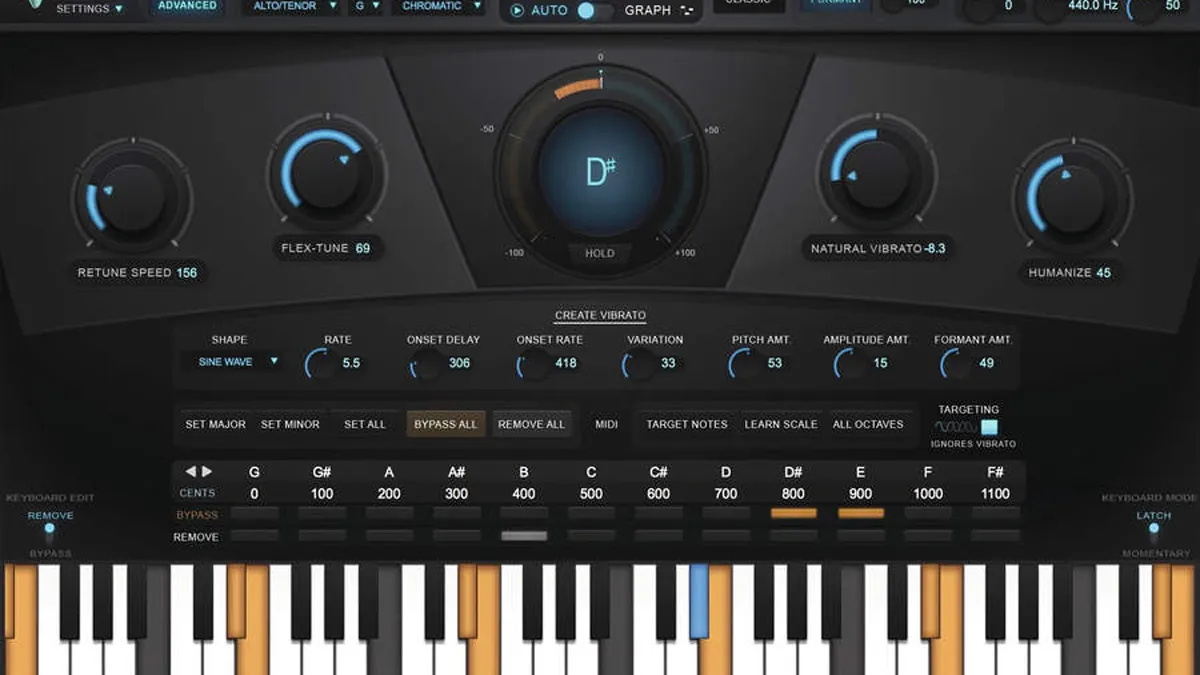
It’s operated in either of two modes: Auto and Graph, the first enabling real-time automatic re-pitching, the latter for detailed manual editing. You also get two views: Basic and Advanced. With Basic, choose a voice type, select the target key and scale, set specific pitches for removal (or leave unchanged). You can also use the Auto-Key plugin to detect the key and scale of the audio in your track, and transmit the results to all running instances of Auto-Tune.
Advanced view has a few extras like Create Vibrato, ideal for adding a bit of wobble via an LFO, plus options to set minor and major modes, edit across multiple octaves, and MIDI input editing features.
Auto-Tune Pro is the most powerful, usable incarnation of this standard yet, and easily maintains the software’s position as one of the best retuning solutions available, and may well prove to be the ultimate pitch-manipulating toolbox.
Read the full Antares Auto-Tune review
bx_crispytuner works best with bx_crispyscale (included free of charge), the latter allowing you to determine and apply a scale to the former, although crispyscale is by no means essential. Using the two in tandem, however, will allow you to apply a scale to multiple instances of crispytuner, which is great for large vocal sessions.
bx_crispytuner is very similar to Auto-Tune in that it has similar timing controls to make your tuning more natural or more synthetic. They even retail for the same price, although crispytuner is perhaps the slicker looking plugin of the two. And in terms of creating that synthetic vocal effect, it almost outdoes Auto-Tune. Subtle it isn’t, but that might be just what you are aiming for.
In order to perform this live tuning, the plugin operates with ultra low latency, so that even though the audio needs to go through your DAW and computer’s routing, it can still be monitored in real time. This means you as the singer, or your monitoring engineer, can hear what is happening as it happens and can make adjustments accordingly.
While some of the UI features are shared with Waves Tune, which is its non real-time sister plugin, the interface is somewhat more modern and slicker. It features a live tuning meter which shows the pitch as the vocal passes through, and as with Waves Tune, there are controls for Speed, Transition Tolerance and vocal Range. The central keyboard also indicates the notes of the audio passing into the plugin and here you can set the range of ‘allowed’ notes.
The Speed dial can, as with so many plugins of this ilk, be set to fast (zero) for the robotic Cher effect should you wish. Used in conjunction with the Transition dial, both can easily be used to create that effect, only this time you are doing it on live vocals. Waves Tune Real Time is therefore probably the first choice of the Waves Tune plugin range for that more unnatural effect, whereas the standard Tune will get you more natural results with ease.
You get three main modes from left to right: the main controls for Pitch and Formant, three Mode options (Transpose, Quantize and Robot) and then a Drive and Mix area. The Pitch control alters the incoming audio by semitones but the beauty of AlterBoy is that you don’t get the kind of high-pitch chipmunk effects you get with some pitch shifters – it’s a far more natural shift (unless you want to make it more extreme).
The Formant option can, again very naturally, sweep a male vocal into a female, or vice versa. It’s pretty incredible to hear it in operation because one of AlterBoy’s main attractions is the fact that it does it with no nonsense, one dial with all the science bits hidden away. It just gets on with it, with brilliant results.
The central Modes are where things get even more interesting. After a simple Transpose option, you get Quantize, where notes are forced to the nearest semi-tone for that Auto-Tune like effect. It works well and incredibly simply, although you’ll probably get more finesse and tweakability out of the real-deal Auto-Tune.
However, for no nonsense results, this is great. Finally here you also get Robot Mode, where the pitch is frozen to one note, no matter what the original input is singing. This pitch, and indeed the formant, can still be changed with the left hand dials.
Add in saturation via a Drive option and AlterBoy is a wonderful, diverse vocal tuning plugin that does the job and does it very well. Great for beginners and superb value.
Recent additions include a Melodic algorithm that allows editing of noise-based sibilants to be carried out separately from pitch-based parts. Vocal pitch editing is also now incredibly natural due to features like a Levelling Macro that balances quiet and loud elements, and even the tiniest of pitch deviations can be tweaked.
Melodyne 5 Studio offers the full panoply of multitrack polyphonic editing options, but, if you mainly work with monophonic material, the more affordable Melodyne 5 Assistant still delivers many of the essential features. Whatever version, Melodyne is powerful and remains an exceptional tool for manipulating vocals and other audio in functional and creative ways.
Read the full Melodyne 5.1 review
One of Nectar 3’s many highlights is a machine-learning driven system for automatically setting the plugin up based on analysis of the input signal. Called Vocal Assistant, it creates a custom preset to make your vocal sound objectively ‘better’ and more mix-ready.
Select Assist mode, point the algorithm in the right direction by choosing Vintage, Modern or Dialogue as the source ‘Vibes’, and Light, Moderate or Aggressive as the processing ‘Intensity’. The input signal is analysed for a few seconds, during which the modules are set up in the background to correct for dynamic fluctuations, resonant peaks, sibilance, and even adjust pitch correction and reverb mix.
In Unmask mode, Vocal Assistant clears space for the vocal by applying equalisation to any other track that’s fighting with it for space. The results are invariably well- judged and thoroughly effective, giving the vocals a perceived lift that’s almost always beneficial. This feature has also been enhanced for Nectar 3 Plus, the latest incarnation of Nectar.
With many other great features and modules plus a souped up EQ, Nectar 3 sounds incredible and flows beautifully, and we can’t recommend it highly enough to any vocal-wrangling producer. However, if you are just after simple tuning or that robotic vocal tuning effect, it may deliver much more than you need and there are cheaper alternatives out there.
Read the full iZotope Nectar 3 review
You can go from simple noise removal through harmonisers and alien effects to some of the most famous vocal tuning styles. Here you get everything from Daft Punk to T-Pain, although artists are not named directly (Bon Hiver, Duft Pank and P-Tain anyone?). Once done you can then apply some decent effects – compression, reverb and EQ – to the results for extra polish.
On top of this you get a free beat library, rudimentary multi-track recorder and the ability to import your own beats and export any creations you produce as WAV or AAC files, or share your efforts with other users.
Voloco is a huge amount of fun and also yields impressive results. It’s free but various subscriptions – up to $50 (£35 approx) a year – unlock extra import, multitrack and effect features, although what you get for free is still impressive.
APT (Automatic Performance Transfer) lies at the heart of what makes Revoice Pro so special. Having done your tuning work on the selected tracks, you simply call up the APT dialogue and select one of the presets (you can also make your own), tell it which is the guide and apply it to any track you wish to edit. This is great for backing vocals, for example, where you can add tracks and align not just the pitch and timing but also the dynamic.
Compared to the simpler plugins here, both VocAlign and Revoice Pro are perhaps aimed at the more professional user; pro producers and mixers will save countless hours in the studio with both tools. They do cost that bit more than other plugins here, so if you are just after simple tuning and the Auto-Tune effect, you will find simpler and less expensive alternatives in this guide.
The software has three core processors – Match Timing, Match Pitch and Formant Shift – each accompanied by a parameter control to determine how loose or tight the matching processing is. It has great visual feedback with the three zoomable views – waveform, pitch and signal energy – allowing you to see timing and pitch both before and after processing. The display can be used to add manual Guide/Dub sync points or establish protected areas that won’t be processed – handy for more creative applications.
You can use VocAlign Ultra without delving too deeply into the advanced features. In that respect, we managed to tighten all manner of doubled and layered vocals. The results are very impressive and in many cases pleasantly transparent. It’s also very easy to adjust the amount of timing and pitch correction, and loosening things a bit is often the key to getting the most natural results.
VocAlign Ultra is a great vocal and audio processor. It’s a bit pricey but if you do a lot of editing and aligning it will improve your productivity considerably.
Read the full Synchro Arts VocAlign Ultra review
You insert the plugin on an audio channel just like any other effect, play your audio and it will map it across a piano keyboard after scanning it. (This is as opposed to the real-time processing of Waves Tune Real Time – see above.) An orange line shows the original recording and you can then drag and drop the constituent parts onto the correct notes. Once done, a green line shows the corrected notes.
Controls allow you to select vocal type, root of the scale and scale type. There are also a couple of speed controls that determine how quickly the plugin takes effect so you can go natural or robotic, your choice.
There’s also an LT version of Waves Tune that greys out some of the features of the main plugin. It retails for less (often around £30/$37), but since the full version is usually on sale (at the time of writing just $36/£29), we’d recommend shelling out the extra on it. It does the job of tuning without any fuss and very accurately, and focusses well on natural vocal tuning – although you can get more extreme effects should you wish.
There are two knobs, Pitch and Formant, controlling the central tone of the human vocal and the resonant frequencies that shape the timbre of the vocal. A Flatten button allows you to force the input to snap to a predetermined note, a speedy tool for building up augmented choruses and harmonies.
Experiment with the modulation and automation options, and vast creative scope presents itself. Automation can be a superb way of introducing vocal effects (such as sudden pitch drops) that activate based on the volume of the input signal, so the intensity of your performance can be the triggering factor.
The aim of the game with Vocal Bender is really getting that professional-sounding vocal manipulation at speed and with no processing lag. It is certainly one of the slickest vocal plugins we’ve experimented with – best in class for quick-fire, modern pitch manipulation.
Read the full Waves Vocal Bender review
One of its big draws is that you can play the instrument with your voice, or if that is shaky, play within set pitch parameters with tuning set up for you with its Auto Pitch Tracking.
There are an incredible number of presets to get you going – over 250 covering harmonies, tuning effects, formant shifting, alien vocoder voices and more rhythmic effects. These all utilise Voice Synth’s more pro-end effects like a 24-band EQ, auto-gain compressor, 8-octave pitch shifter, arpeggiator and analogue modelling vocoders.
You certainly get a huge variation in sound and, even though it’s a decade old, Voice Synth still has a lot to say – or you can say it too with its integrated sampler. That all said, the iOS version scores much better than the full desktop Mac version on their respective App Stores, so this is a good mobile but less attractive desktop proposition.
You get 500 beats included with the app which will play in time with your vocals – yes it sorts both your timing and pitch out – and in this respect it delivers the goods fast. It’s a bit geared towards that one-trick synthetic style, with hip-hop and R&B being its focus, but it is free so well worth a download.
There is a Pro version, but at just $3.99/£3.59 it’s not much of an outlay for extra multitrack recording features, more effects and, of course, less ads.
When it comes to buying a plugin specifically for vocals (check out our guide to the best vocal plugins for more insight), you need to decide what your needs are from the many issues vocalists have. It might well be that a simple EQ is all you require, just to bolster certain frequencies to give your vocal more body, or remove mid and high frequencies to reduce overall harshness.
Some of our buying choices, particularly the mobile entries, also focus on other more out-there effects. Some of the other vocal processes you will come across in these include formant shifting, where you might turn a male voice into a female (or vice versa); harmonising or doubling, where a single voice is doubled or more to produce a group of voices singing together; and vocoding, where a standard voice becomes a more robotic voice not dissimilar to the extreme pitch and time settings in automatic tuning software.
However, aside from these more extreme vocal effects, it’s more likely that you will have tuning issues with your singing and that’s where this buyer’s guide really comes into its own. Vocal tuning is, of course, an essential application. Even if you are – or are recording – the world’s best vocalist, you or they will always have an off day, and it might not be possible to do a vocal retake. Vocal tuning applications to help tweak the vocal into tune post-recording are therefore incredibly popular, and this process can be very straightforward and transparent. You, your vocalist and audience need never know such processing has taken place.
Or you might want the opposite! You might want everyone to know just how much processing you’ve done by utilising the famous and much more obvious automatic tuning effect. The effect, made famous by Cher in the late ’90s and the producer T-Pain the 2000s, is essentially derived from the mother of all tuning plugins, Antares’ aptly named Auto-Tune. This software was originally intended simply to help vocalists or producers get voice recordings in tune.
The almost robotic-like vocal effect is produced when that (or a similar) plugin is used in a more extreme setting. Here its tuning effect – produced in Auto-Tune’s case by way of the Return Speed parameter – is at its quickest setting. It therefore retunes any incoming vocal signal at the fastest speed resulting in an inhuman effects where you can hear the jolt as it knocks the vocals in tune. You suspect that Auto-Tune was never really intended to be used at this setting on purpose but, as with many music production principles, if used at an extreme setting, happy accidents occur!
So when buying your pitch correction plugin, you simply need to decide whether you want to go natural or robotic, or would prefer a plugin that is capable of both. In our best pitch correction plugins buyer’s guide we have plugins capable of both, and some like iZotope’s Nectar that are capable of much more.
Finally, of course, decide on your desktop or mobile needs. Most of our recommendations run as third party plugins within standard Mac and PC DAWs, although we have also included app options for the mobile Android and iOS platforms. Only one, Voloco, sits in both mobile and desktop camps so could be used to transfer your mobile vocal experiments to desktop with ease.
Don’t miss the latest deals, news, reviews, features and tutorials
Andy has been writing about music production and technology for 30 years having started out on Music Technology magazine back in 1992. He has edited Future Music, Keyboard Review, MusicTech magazines and currently runs Computer Music which he helped launch back in 1998. He owns way too many synthesizers.
MusicRadar is part of Future plc, an international media group and leading digital publisher. Visit our corporate site (opens in new tab).
© Future Publishing Limited Quay House, The Ambury, Bath BA1 1UA. All rights reserved. England and Wales company registration number 2008885.

Novation's Bass Station and V-Station synth plugins are now free to … – MusicRadar

When you purchase through links on our site, we may earn an affiliate commission. Here’s how it works.
Get your ‘90s and noughties kicks for nothing… assuming your system is compatible
Built to emulate two of the company’s ‘90s/noughties hardware synths, Novation’s Bass Station and V-Station plugins are now pretty long in the tooth themselves. In fact, the company has now discontinued them as commercial products and made them available for free as ‘legacy’ software.
Bass Station is designed to create the monophonic 1993 hardware of the same name in your DAW. Like the original, which was used on countless dance records in the ‘90s, it offers two digital oscillators and an analogue filter. The plugin ships with all the presets from the original plus quite a few more, giving you a total of 100.
V-Station, meanwhile, is an emulation of the K-Station synth that was released in 2002. It has a 3-oscillator sound engine with noise and FM capabilities, an arpeggiator, effects, 200 user programs and 200 factory presets. Polyphony is eight notes.
Both plugins can be downloaded now from the Novation (opens in new tab) website, though it’s worth bearing in mind that there’s no guarantee that they’ll be compatible with your OS and DAW. They’re available in VST/AU formats for PC and Mac, but there’s no M1 support.
As such, it’s very much a case of sucking and seeing, but you’ve got nothing to lose by trying, right?
Don’t miss the latest deals, news, reviews, features and tutorials
I’m the Deputy Editor of MusicRadar, having worked on the site since its launch in 2007. I previously spent eight years working on our sister magazine, Computer Music. I’ve been playing the piano, gigging in bands and failing to finish tracks at home for more than 30 years, 24 of which I’ve also spent writing about music and the ever-changing technology used to make it.
MusicRadar is part of Future plc, an international media group and leading digital publisher. Visit our corporate site (opens in new tab).
© Future Publishing Limited Quay House, The Ambury, Bath BA1 1UA. All rights reserved. England and Wales company registration number 2008885.
SCN Review: DJI Mic Offers Versatile Wireless Audio Recording … – AV Network
When you purchase through links on our site, we may earn an affiliate commission. Here’s how it works.
The DJI Mic worked effectively for an outdoor interview on a windy day using a smartphone as the camera.
The new DJI Mic audio system is small but is packed with features. It contains two wireless transmitters with built-in recorders, two windscreens, 3.5mm TRS-to-USB adapters, lighting and USB–C connections, cabling, wireless receiver, charging case, and carrying pouch. It’s designed to work with smartphones and digital cameras, but can also be used for meetings, lectures, or anywhere a wireless microphone with an internal recorder might be useful.
One of the biggest issues with wireless technology is the potential for interference between the transmitter and receiver. While you have the benefit of not dealing with wires, potential audio break-up has created a stigma with using this technology for some. DJI has solved part of this problem by having a reliable backup recorder built in each transmitter. This “safety” relieves much of the stress associated with hoping interference between the microphone and receiver doesn’t occur.
Looking at one of the miniscule (less than 2 inches on its longest side), 100mW RF output transmitters, the 24-bit, 48kHz device records an adjustable level mono WAV file. It operates in the 2.4GHz frequency band and boasts an 820-foot line-of-sight operating range. Each transmitter includes 8GB of storage and is powered by a 320mAh lithium battery, which delivers more than five hours of use on a 70-minute charge.
[SCN Hybrid World Review: 4 Selling Points for the Shokz OpenComm UC Headset] (opens in new tab)
The top of the transmitter houses the electret condenser omnidirectional microphone, which accepts an included twist-on windscreen and includes a 3.5mm mini-input for attaching an external microphone. A USB-C port allows for charging or retrieving recorded data from the internal drive.
When you hold the power button, it activates a single vibration and lights a green power LED. The other side of the unit houses the linking button to pair the transmitter and receiver. Directly below is the record button, which activates another vibration and lights a red LED. Pressing it again stops the recording. The bottom features a charging pad, while the back includes a clip with an incredibly strong magnet.
The 50Hz-20kHz receiver (also less than 2 inches on its longest side) contains a five-hour lithium battery with a 160-minute charge time. The 9-ounce device features an organic LED (OLED) touchscreen that displays pertinent information, including recording mode, audio level, left and right transmitter signal strength, receiver battery charge, and receiver gain and battery level on each transmitter. Swiping down on the screen reveals the battery charge, volume, record mode (stereo, mono, and mono safety track), receiver gain, headphone/monitor volume, and other general settings.
[Review: How to Produce an Affordable Podcast with Multiple Mics] (opens in new tab)
Facing the receiver, the left side has both the 1/8 inch mini-3.5mm output and headphone/monitor jacks. The right side features the power button and USB-C port that is used for charging, receiving firmware updates, and as a computer microphone. As on the transmitter, the bottom contains the charging pad.
Weighing slightly over a pound is the carrying case. The front of the case has LEDs that indicate the level and status of the charge. The receiver is housed in the center of the case, with a transmitter to either side. The case also holds a hot shoe mount and USB-C and Lightning audio adapters. On the back is a female USB-C port for charging with the included cable. 
I have to attend many meetings, and I don’t like to rely on my own scribbled notes from a speaker who talks rapidly. What a perfect use for the DJI Mic, I thought. With two people discussing the intricacies of a new system they were installing, I wanted to preserve the discussion so I could better digest smaller chunks of information later. Others in the meeting had their phones on the table recording the presentation, but every time someone coughed or hit the table accidently, that “noise” would drown out what was said (the magic of automatic gain control). But I had both speakers wear a DJI omnidirectional microphone, so I could hear each of them as well as comments from others at the meeting, and the files from each microphone easily transferred to my computer.
[SCN Product Review: 3 Things to Know about the Jabra Engage 55 Headset] (opens in new tab)
One of the guest lecturers in my class was losing her voice and requested a PA system in our TV studio. We don’t have a system like that in place; instead, I clipped one of the DJI mics to her collar and connected the receiver to our XLR breakout box, which fed our audio mixer in the control room. She could now move freely through the studio and her voice was heard through the speakers. Luckily, we had the right connectors to accept the 3.5mm output and convert it to an XLR male.
Using his Android smartphone as a camera, one of my students, Tom, needed to record an outdoor interview, but the audio from the phone alone was unusable because of the wind. Instead, we connected the DJI receiver via the USB-C connector to the bottom of his phone. We attached the windscreen to the mic and were able to monitor the recording by attaching headphones to the side of the receiver. A great feature of the DJI Mic is that the transmitter records a backup audio track, so if something had gone wrong on the phone, we still had the audio.
My last use of the DJI Mic was to make audio notes of a freelance installation I was doing for a client. With the transmitter clipped to my shirt pocket, I walked through the client’s office asking what he specifically wanted, took many measurements, selected the equipment he desired, and answered all his questions. In the past I had taken notes, especially when taking measurements. The reliability of recording the measurements and selection of equipment helped to ensure the accuracy of the process. I asked the client if he minded if I recorded our discussion and he said, “I would prefer that you record everything.”
With its small size, portability, redundancy of transmitting and recording, omnidirectional pickup pattern, on-board recording, long line-of-sight range between transmitter and receiver, and extended battery life, the DJI Mic is a winner. Of course, it’s not the most discreet wearable mic on the market, and there is always room for improvement.
[AV Network’s top stories, product news, and expert insights] (opens in new tab)(opens in new tab)
For example, the record button is too easily activated. I’m not sure what a better solution would be, but the vibration alert does help. Also, the magnet on the transmitter’s clip is far too strong. I appreciate the feature, but when you need to use a tool to separate it, that’s too much.
The swiping action of the receiver’s touchscreen takes several attempts to accurately advance the settings. Finally, and this one is also minor, is the removal the Lightning or USB-C connectors from the carrying case. You need needle-nose fingers to remove them when the hot shoe mount falls out (which is every time I remove the receiver). Despite the nitpicks, DJI has a hit with this wireless microphone/recorder package.
Sign up below to get the latest from AV Network, plus exclusive special offers, direct to your inbox!
Chuck Gloman, Associate Professor, has more than 40 years of experience as a producer and director of photography with more than 900 TV commercials, 250 corporate videos, and 100 documentaries to his credit. His films have aired on HBO, Cinemax, and network television. He is the author of Placing Shadows: The Art of Video Lighting, 2nd Edition (Focal Press: 2000); No Budget Digital Filmmaking (McGraw-Hill: 2002); 303 Digital Filmmaking Solutions (McGraw-Hill: 2002); 202 Digital Photography Solutions (McGraw-Hill: 2003); Placing Shadows: The Art of Video Lighting, 3rd Edition (Focal Press: 2005); Scenic Design and Lighting Techniques (Focal Press: 2006); Working with HDV (Focal Press: 2006); Placing Shadows: The Art of Video Lighting, 3rd Edition (translated in Japanese Language Focal Press: 2007); and Placing Shadows: The Art of Video Lighting, 3rd Edition (translated in Chinese Language Focal Press: 2017). He has published more than 500 articles.
AVNetwork is part of Future plc, an international media group and leading digital publisher. Visit our corporate site (opens in new tab).
© Future Publishing Limited Quay House, The Ambury, Bath BA1 1UA. All rights reserved. England and Wales company registration number 2008885.
Sep 17 | Studio 131 Open House & Block Party | Tampa, FL Patch – Tampa, FL Patch
This post was contributed by a community member. The views expressed here are the author's own.
STUDIO 131 OPEN HOUSE
SATURDAY, SEPTEMBER 17th 1-7PM & 7-9PM After Party
Come by the studio for an all-day open house and after party to showcase our new event venue and featured vendors.
Live music by Saltwater Rockers on the outdoor courtyard
Indoor DJ by Local Music Lives
Raffles will be held throughout the day and after party!
Hook Line and Drinker for Bartending Services
Pay-by-plate by Belly Up with Bellyrubbers
Videography by Davey Rockwell Postproductions
Décor and Design by Karen Aucoin
Events will run throughout the day and evening including:
Kid’s crafts, bounce house, sidewalk chalk, face painting, outdoor games, make your own bubbles station, hula hoop contest, all day raffle, movies, car wash and more!
✔️Group Class Dance Demonstrations:
✔️Lady Firecracker Fitness with Tisha Robertson
✔️Baby Ballet
✔️Kids Hip Hop
✔️Miami Style Salsa and Bachata with Karen Aucoin and Mike Robinson
Group Yoga Sessions with Autumn Lee and Kirana Peters
Breathing and Meditation Session @ The Red Tent with Karen Ledesma
$5 Professional style headshots by Jasmine Melander
$10 Paint The Night Away class with Melissa Simpson: includes canvas and painting materials
$1 per minute Chair Massage with Kai Eckley
$5 Launching a Social Media Video Campaign
Valet parking and $20 Car Wash: hand wash, wheels, & rims
Outdoor vendor market will run 1-7 PM
Set Up @ 11 AM
Additional Fee for Afterparty 7-9 PM
$20 table fee for 10×10 ft space
Extra $10 to upgrade for double space
Limited indoor spaces available $55 & UP
Tampa, FL
Tampa, FL
Tampa, FL
Tampa, FL
Tampa, FL
Tampa, FL
Tampa, FL
Britney Spears tweets audio recording detailing life under her … – hotpress.com

In a lengthy voice recording – now since deleted – the pop singer opens up about the struggles of her controlled life, harsh comments made about her appearance and more.
Britney Spears tweeted out the link to a 22-minute audio broadside detailing the painful reality of her controlled life under her former, thirteen-year conservatorship. The link to the audio file was originally shared by the singer without context before being deleted, yet remains available online.
“I woke up this morning and I realised there’s a lot going on in my head that I haven’t shared with anyone,” says a worn-down, authentic Spears at the start of the recording.
She then goes on to detail the constraints placed on her by her father, who oversaw a majority of the conservatorship, which included being forced to work unwillingly on tour, cutting off contact with friends and not being allowed to drive her own car, and knowing that her phone was tapped. The singer explained this same lifestyle to a California courtroom last year during her trial.
In the audio clip, Spears further reveals that those in control of her life would shame her over her appearance or weight, admitting, “They made me feel like nothing, and I went along with it. It was demoralising.”
The conservatorship, largely controlled by her father Jamie Spears, was finally terminated by the Los Angeles Superior Court in November of last year, following online scrutiny by the #FreeBritney movement and the Framing Britney Spears documentary by The New York Times spotlighting some hidden truths about her life.
The southern-born pop star shot into the public eye in her early teen years with novice hits like ‘…Hit Me Baby One More Time’ and more, of which famously chronicled the teen years of young girls around the globe.
“You also have to understand, it was, like, 15 years of touring and doing shows,” she added in the audio file. “And I’m 30-years-old, living under my dad’s rules.”
In 2007, the singer’s life took a downhill turn when she went through a paparazzi-fueled public breakdown, crumbling under the weight of the spotlight and unable to receive privacy. Shortly thereafter, in 2008, the conservatorship went into place.
Guardianship enforced that Spears remained under her father’s primary control for over thirteen years. It wasn’t until last year, in September of 2021 that a Los Angeles judge dissolved the conservatorship, granting Spears her long-awaited independence.
Following the court’s decision and the public judgement against her family, Spears wrote on Instagram, “I was so scared and nothing is worse than your own family doing what they did to me. I’m lucky to have a small circle of adorable friends who I can count on.”
Coming up on one year since tasting freedom again, Spears is now married to Sam Asghari and just last week released new music for the first time in six years. Her duet with Elton John, ‘Hold Me Closer,’ entered the world last Friday, August 26, and it’s a celebratory pop moment for pop’s princess.
Okie dokie … my first song in 6 years 🎶 !!!! It’s pretty damn cool that I’m singing with one of
the most classic men of our time … @eltonofficial 🚀!!!! I’m kinda overwhelmed… it’s a big deal to me !!! I’m meditating more 🧘🏼♀️ and learning my space is valuable and precious !!!
— Britney Spears 🌹🚀 (@britneyspears) August 25, 2022
John himself announced the duet with his longtime friend a week before its release, sharing a photo on Instagram of the pair when they were young, which is also the cover art for the track.
Listen to ‘Hold Me Closer’ by Britney Spears and Elton John below.